The customer messages to ask whether the order was received. Then they call to ask whether it has entered production. When the team looks for an answer, the status is in a spreadsheet, the promised date belongs to a supplier, and the last update is buried in someone else's conversation.
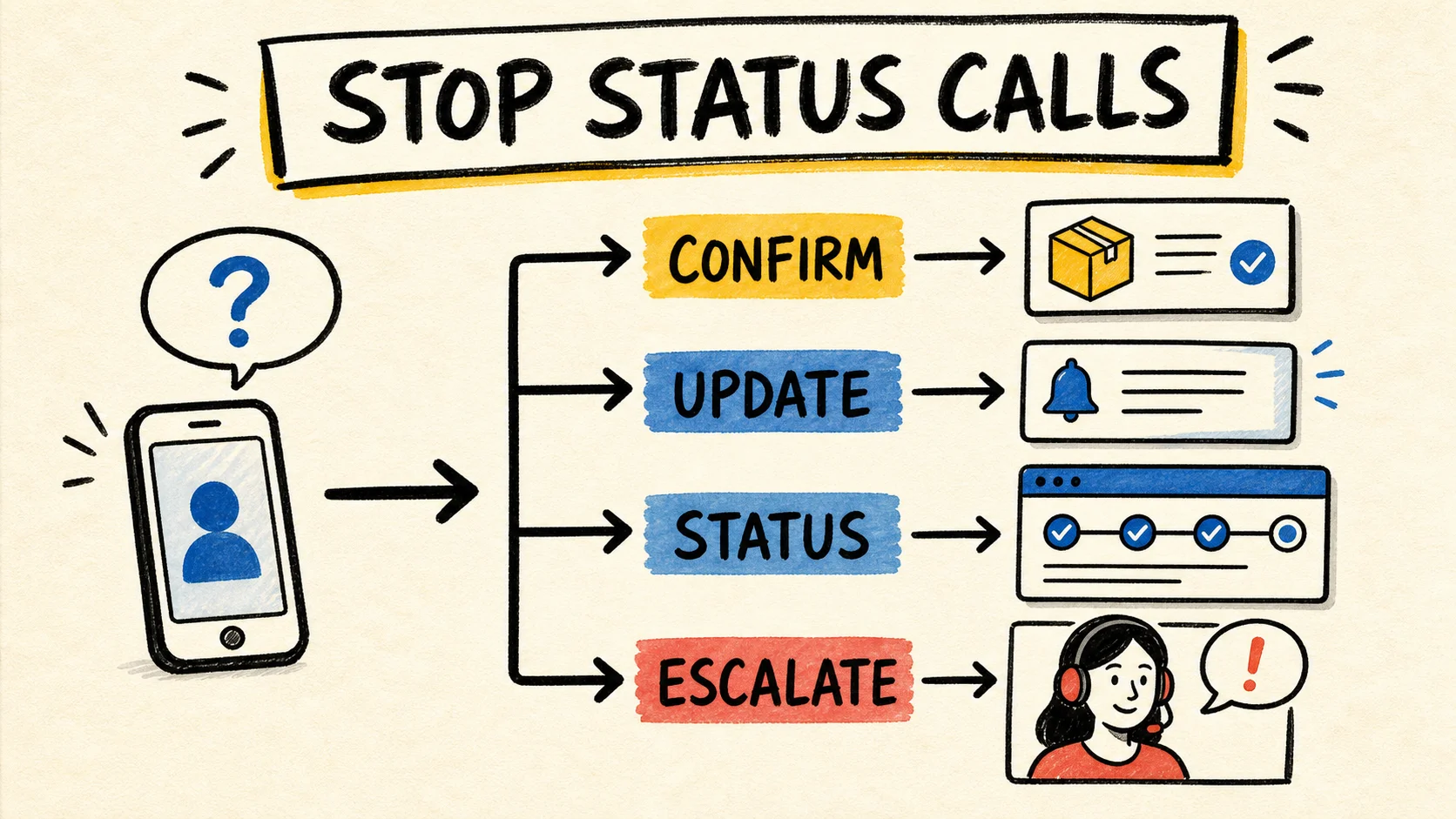
To reduce these calls, do not start with a portal. First find out which information is missing and whether the internal status can be trusted. Then choose the smallest path that closes the gap: confirmation, proactive update, status page, customer portal, or human help. If the business needs ongoing responsibility for the software running the business, that person must own the flow and the information, as well as the screen customers see.
The short answer
- Find out whether customers do not know if the order exists, which stage it is in, or what changed.
- Define a status source, the events that update an order, and who responds when the date changes.
- Use messages for a focused question, a page or portal for recurring lookups, and a person for exceptions.
- Measure status contacts, repeats, and escalations before and after the change. Silence is not proof of satisfaction.
Why do customers call about an order?
The contact is usually a response to missing information, not an automatic preference for the phone. The customer may not have received confirmation, may be looking at a missed promise date, or may not know whether "in progress" means waiting for materials, being made, or ready to ship.
In 2025, Shopify's "WISMO Ecommerce: Meaning + 5 Strategies" recommends combining clear delivery expectations, communication channels, order tracking, automation, and an order process that can retrieve status. That list does not turn every business into an online store. It helps separate two questions: does the customer need a notice, or do they need to investigate their order?
Follow five recent contacts from start to finish and write down what the person was trying to learn. Classify each contact as one of these:
- Confirmation: the customer does not know whether the order was recorded.
- Progress: the customer knows the order exists but not its current stage.
- Timing: the promised date is unclear, has passed, or changed.
- Action: the customer wants to approve, correct, provide a document, or change something.
- Exception: there is a delay, missing material, wrong address, or another issue that needs judgment.
This classification keeps you from buying a solution for the wrong problem. A portal cannot fix a confirmation that is never sent. An automatic message cannot fix a date the team cannot calculate.
What is the smallest fix for each kind of contact?
Choose the intervention by the repeated question and by the change the business can actually maintain. The table is a starting point, not a promise that a tool will reduce contacts on its own.
| Customer problem | Start with | Look for another solution when |
|---|---|---|
| "Did you receive my order?" | Send confirmation with an identifier, next step, and help channel. | Orders arrive through several channels and staff retype the details. |
| "What stage is it in?" | Define a few understandable statuses and notify customers when the stage changes. | Status starts in different systems or goes stale. |
| "Did the date change?" | Show the promised date and notify the customer when it is no longer valid. | Nobody has authority to confirm a new date. |
| "Can I approve or change it?" | Offer one clear action with a deadline and a record of the response. | Approval depends on documents, rules, or systems that are not connected. |
| "Did something go wrong?" | Send the exception to someone who can decide and explain the next step. | Staff must ask several teams before they can answer. |
The common mistake is jumping to the last row and trying to hide every question inside self-service. Customers still need a true answer. If the business does not know the status, the interface only makes the uncertainty look nicer.
Can the order status be trusted?
Before publishing an update, choose where the status begins and define what each stage means. The team can consult several systems, but the customer should not receive competing versions of the same order.
For each status, record:
- what event starts the stage;
- who can change the status;
- what information the customer may see;
- which date or next step belongs to the stage;
- what happens when the stage is late;
- when a person must take over the conversation.
In 2022, APQC's research, "Optimizing Customer Service", surveyed 289 respondents and found that 65% of organizations said the time spent responding to order-status requests had increased over the previous two years. That describes the sample and period. It is not a current measure of every business, but it shows why repetitive status work deserves an operational fix, rather than a support-only instruction.
The same research found that only 17% of respondents anticipated customers would use a self-service web portal for updates. That result is from 2022 and does not prove that portals are less useful today. It is a warning against assuming that every customer wants to open a page and search for an answer. In many cases, a confirmation or a timely alert is simpler.
If sales, operations, and finance keep different versions, read the diagnosis of business systems that do not talk to each other. The status problem may be the visible consequence of data and ownership already drifting apart.
When is a message enough?
Messages work when the question has a few predictable events. The customer does not need to sign in to learn that an order was received, production started, or the shipment left. The message should contain the information needed for the next decision, not just "your order was updated."
Before automating, check:
- Did the event really happen, or did someone change a field just to clear a queue?
- Does the message include a date, next step, and channel for an exception?
- Can the customer reply without starting a new conversation somewhere else?
- Can the team correct a message sent with the wrong status?
Include the date the team can support. Avoid promising "real time" when someone checks the data once a day. A late or false message can create more contacts than silence because the customer starts questioning both the update and the order.
Messages also do not replace fulfillment work. Shopify points to confirmation, tracking, and more than one communication channel as ways to answer status questions, but delays and service failures still need an operational response. The notice closes an information gap. It does not close an execution gap.
When is a status page or portal worth it?
A status page helps when customers need to check the same order more than once and the information changes through stages that can be explained. A portal makes more sense when customers also need to see documents, approve something, follow several orders, or respond inside their own space.
Use this distinction:
- Message: the business knows when something changed and wants to notify the customer.
- Status page: the customer needs to look up a simple stage.
- Portal: the customer needs to look up information, take action, and find history or documents.
- Human help: the case involves an exception, negotiation, or information that cannot yet be confirmed.
First check whether software the business already pays for includes a portal, notifications, or tracking that has not been enabled. When the need is standard and the product fits the current workflow, configuring it is often less risky than creating another system. When the portal must combine sales, production, inventory, finance, and logistics data with no shared source, the problem is larger than a lookup screen.
The guide to deciding whether a small business should buy another system helps make that decision without starting with a product catalog. Describe the workflow, copies, and owner first. Then choose the tool.
If order status is only one of several recurring requests and customers also need to send documents or approve steps, read how to decide whether your business needs a customer portal.
How do you protect the customer and the business?
A portal should expose data to the right person. That takes more than a nice URL and a field for entering an order number. List what data may appear, what proves the customer's identity, which actions are allowed, and how access is revoked when the relationship ends.
The Federal Trade Commission's guidance on cybersecurity for small businesses recommends inventorying the software, data, and services a business uses, limiting access to what is needed, using multifactor authentication when appropriate, protecting data in transit and at rest, and defining security expectations in vendor contracts. For an order-status page, turn that into concrete questions:
- Can a customer see only their own orders?
- Can access or a shared link be revoked?
- Does the business know where the data is stored?
- Does the business control an account, or only the vendor?
- What happens to the data when the contract ends?
- Who investigates an incorrect status or unauthorized access?
Do not turn this checklist into a reason to delay a simple confirmation. It is meant to increase the care required as the solution moves from a message with no sensitive data to a portal containing documents, amounts, addresses, or approval actions.
How can you tell whether calls actually fell?
Record the problem before changing the process. For a period the team can compare later, count contacts whose main reason was confirmation, progress, timing, change, or exception. Separate calls, messages, and email. Also record whether the answer was already available and whether someone had to rebuild the order's story.
After the change, compare the same kind of operating window. Watch:
- status contacts per order;
- orders without confirmation;
- repeat contacts from the same customer about the same event;
- time to the first answer;
- exceptions sent to a person;
- status corrections sent after an error.
A fall in calls can mean customers gave up, changed channels, or started waiting longer. Pair the measure with complaints, cancellations, replies to messages, and whether orders arrived within the promised date. Without those signals, record the change as a hypothesis, not a proven result.
Who owns the status when it changes?
The system should not own the process. Name a person or role that knows who updates the status, who corrects a date, who answers an exception, and who approves changes to customer communication. That responsibility can stay inside the business or sit with a partner, as long as it does not depend on one person's memory.
The guide to who maintains software after launch covers accounts, data, maintenance, and transition. For an order flow, the owner also needs the decision history, status criteria, sent messages, and the path to turn off or replace the solution.
If the business needs someone to fix the whole flow, do not ask only for "a portal." Describe what customers ask, where the answer begins, which actions are allowed, and who takes over when the rule does not fit. That makes the decision to buy, configure, or build start with the real work.
Frequently asked questions
Does a customer portal eliminate calls about orders?
No. A portal helps when customers need to look up or act on information that changes, but it cannot fix a missing, late, or wrong status. Start by defining the data source and events. Keep a person available for delays, negotiations, corrections, and cases the rule cannot explain.
Is it better to send messages or create a status page?
It depends on the question. Send messages when predictable events call for a notice. Use a page when customers check the same order repeatedly. If they also need to approve, edit, download documents, or see history, consider a portal. In every case, the information needs to be true and owned.
When is a custom portal worth building?
Consider custom software when customers must see or perform a specific workflow that depends on several systems and no existing tool can represent it safely. Before that, look for portal and notification features in what the business already uses. The cost of maintaining the solution belongs in the decision.
How do you reduce contacts without pushing away customers who want a person?
Do not hide the phone or force a customer to search when there is an exception. Put simple information in the right channel and make help easy to find. Automation should remove repetitive lookups from the queue, not prevent a person from seeing a delay, error, change, or negotiation.
Conclusion
Customers call about order status when information is missing, late, fragmented, or hard to understand. The fix starts with the workflow, not the portal. Define the status source, the events that change the stage, the date the team can promise, and the person who owns an exception.
Then choose the smallest path: confirmation, proactive update, status page, portal, or human help. Measure contacts and consequences alongside the change. A business may keep using the phone, a spreadsheet, or several systems for a while. What cannot continue is making customers and staff rebuild the same answer every time someone asks.
Production note
Samuel Fajreldines is the editorial owner of this article. The research used public documentation from Shopify, APQC, and the Federal Trade Commission, along with public discussions from operators. AI assistance helped with discovery, source comparison, first drafting, translation, image prompting, and consistency review. There was no client test, private benchmark, or invented case study.
Sources consulted
- Shopify, "WISMO Ecommerce: Meaning + 5 Strategies", published 2025-02-18, retrieved 2026-08-29.
- APQC, "Optimizing Customer Service", research conducted in 2022, retrieved 2026-08-29.
- Federal Trade Commission, "Cybersecurity for Small Business", retrieved 2026-08-29.