The same customer appears under two names in your records. A sale lives in one system, the updated address lives in another, and support does not know which history to trust. Someone merges the records before the next call, but the duplicate returns the following week.
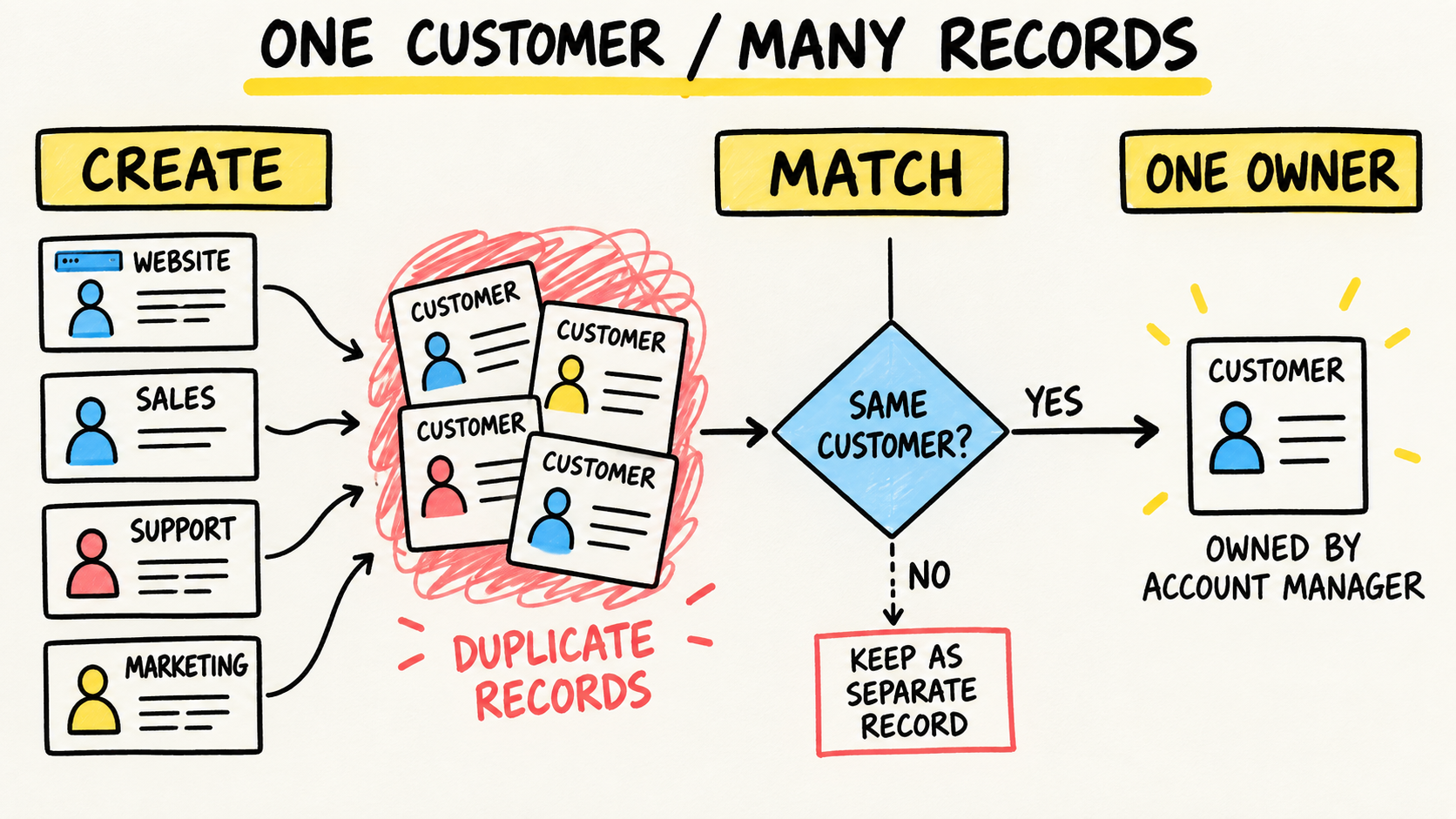
When the same customer appears twice across business systems, the problem rarely ends with a merge button. The business needs to find where the customer record is created, which fields identify the person or company, and which system owns each piece of information. If nobody can maintain that rule, an accountable software owner can organize the workflow and its continuity.
This is a narrower question than why business systems fail to talk to each other. That page covers the broader diagnosis. This one focuses on preventing one person or company from becoming several records as it moves through different channels and tools.
The short answer
- Confirm that records represent the same entity before merging anything.
- Decide where a customer is created and which fields each system may change.
- Check for a match before creation rather than waiting for a monthly cleanup.
- Preserve identifiers and history. The business remains responsible for its data even when someone else builds the integration.
Why does the same customer become two records?
The common cause is more than one entry point without a shared rule. A form creates a contact, a staff member creates another, and the accounting system receives a third version while an invoice is issued. Differences in names, phones, email addresses, addresses, or company types make the same customer hard to recognize.
There may also be a broken handoff. An integration receives a new customer but cannot find the original record's identifier. Instead of updating the existing record, it creates another one. A spreadsheet import can repeat the same mistake in bulk. Later cleanup does not change the rule that allowed the record.
If the symptom also appears as different totals, compare this diagnosis with why CRM and inventory numbers do not match.
Salesforce Trailhead's "Identify and Manage Duplicate and Disconnected Records" separates unintentional duplicates, records that should remain distinct, and transaction records that are no longer connected to a customer. That distinction helps even if you do not use Salesforce: identify the kind of problem before deleting or merging anything.
If the team notices the duplicate only when a customer needs an answer, the defect is earlier than the support screen. The diagnostic question is: which action created the second record, and what information was missing to relate it to the first? Creation history is often more useful than comparing names by eye.
How can you tell duplicates from legitimate relationships?
Two similar records are not automatically the same customer. A company may have a parent and a branch, a customer and a supplier relationship, or different contacts who share a phone number and address. Merging them can erase a distinction needed for billing, support, or authorization.
Start with context, not a rule based on one field. Compare the identifiers you actually have, order history, email domain, address, company relationship, and the purpose of the record. Mark a case as a possible duplicate when the evidence is not enough. A person should review ambiguous cases.
The same Salesforce material warns about false positives: a matching rule can find a correspondence even when the data is shared, incomplete, or misleading. Merging two different entities is often harder to notice than leaving one duplicate in a review queue.
Ask three questions before merging:
- Do the records represent the same person, company, or commercial relationship?
- Can their history be combined without changing the meaning of the events?
- Is there a way to undo the merge or recover the data if the decision is wrong?
Which record should be the reference?
Do not choose a surviving record only because it is older. Choose the system that owns each kind of information. The sales system may own contact details and relationship history. Accounting may own tax details, invoices, and payments. Support may own service history. A combined view can read all three without letting every screen edit every field.
A small ownership matrix moves the decision out of informal conversations:
| Information | Where it starts | Who may correct it | Who reads it |
|---|---|---|---|
| Identity and contact | defined sales intake | assigned sales team | support and accounting |
| Tax details | finance workflow | finance team | sales and operations |
| Support history | support workflow | support team | sales and management |
| Orders and payments | operational system | operations owner | support and finance |
The names vary by business. The rule does not: each fact needs a clear authority. A copy sent to another system should carry its source identifier and update time. Without that, a local edit can look like a correction and later be overwritten by an older record.
"Single source of truth" does not mean every piece of data must live in one program. It means the team knows which system decides each field and how other screens receive the change. Related records can coexist. What cannot coexist without a rule is several authorities competing over the same fact.
How do you stop new duplicates from being created?
Prevention starts when someone tries to create the customer. Before accepting a new record, the workflow should look for matches using the information the business actually has. If there is a possible match, show the existing record or send the case for review instead of silently creating another copy.
The workflow does not need to be fully automatic. A small business can begin with a checklist and a required source-system ID. Later, it can automate only the part where the rule and benefit are clear.
Microsoft's "Explore integration patterns", retrieved October 7, 2026, describes event-triggered, synchronization, and data consolidation patterns. It also warns that integrations need to report failures, avoid loops, and monitor execution. For an owner, that becomes a short set of questions: who sees the failure, who fixes it, and how do you know a second record was not created?
A first workflow can stay small:
- Receive the customer through a defined channel.
- Search for matches and show possible existing records.
- Create or relate the record with a stable identifier.
- Send only the fields the destination system should receive.
- Log failures and ambiguous cases for human review.
Do not automate a rule the team cannot explain. If the business treats a person, company, branch, and contact as the same thing, clarify the model first. A quick connection only makes the mistake travel faster.
How do you clean duplicates without hurting the operation?
Create an export or copy before changing records. Then classify the cases: confirmed duplicate, legitimate relationship, incomplete record, disconnected record, or ambiguous case. Keep the original IDs, the fields supporting the decision, and the person who approved the change.
Merge in the system that owns the customer record when the tool supports it. Do not fix only the screen where the issue appeared. Check that orders, cases, invoices, and permissions still point to the surviving record. If another system keeps a copy, confirm that it updated or record the exception for manual handling.
The AWS guidance on identifying and resolving duplicate customer records, retrieved October 7, 2026, shows a flow that loads data from different sources, matches records, and keeps transformation steps visible. You do not need the same platform to use the lesson. Cleanup needs a repeatable sequence, traceable input, and a way to observe failures.
After the correction, repeat the action that created the duplicate. If the same channel can still create another copy, cleanup was only an interval. Watch new records for an agreed period and include the cases sent for review.
What responsibility should you require before hiring an integration?
Ask for a proposal that describes the workflow and ownership, rather than just the apps being connected. It should say where the customer is created, which fields move, who may change them, how failures appear, how data can be exported, and who keeps the connection working when a vendor changes.
Also require:
- primary accounts under the business's control;
- least-privilege access for implementation and maintenance;
- copies of data maps, rules, and merge decisions;
- tests for a new record, a duplicate, a false positive, and a failure;
- a plan to pause, correct, and replay a transfer;
- a person who decides exceptions after launch.
The FTC's "Cybersecurity for Small Business", retrieved October 7, 2026, recommends limiting vendor access and documenting how data may be used, shared, and deleted. NIST guidance on outsourcing, retrieved the same day, also says that hiring outside help does not transfer the business's final responsibility for its systems and data.
If nobody inside the business can approve definitions, review duplicates, and follow failures, the project has an ownership gap. Fixing that gap is part of the purchase. It is not a task to discover only after the integration breaks.
Frequently Asked Questions
Should I delete the older duplicate record?
Do not use age as the only criterion. Confirm that the records represent the same entity, preserve their IDs, and choose the system that owns the customer record. Merge or relate the histories as the tool allows, then check orders, invoices, and support cases. An ambiguous case belongs in review, not in the trash simply to make the list look cleaner.
Does an integration fix duplicate records by itself?
No. It can reduce typing and carry an identifier, but it does not decide which system may create or edit a customer. Without an identity rule, a connection may create duplicates faster. Define the source, destination, fields, and failure handling before automating the workflow.
How do I know whether two companies with the same name are the same?
Compare context, rather than just the name. Use the identifiers available to you, address, domain, commercial history, and the legal or operational relationship. A shared name, phone, or address can create a false match. When the evidence is not enough, send the case to a person and record the decision so the next intake follows the same rule.
Who should maintain the customer-record rule?
Someone inside the business must own the meaning of the record and its exceptions, even when an outside person builds the integration. That responsibility includes prioritizing fixes, controlling access, reviewing failures, and documenting changes. If it does not exist internally, buy explicit continuity instead of leaving the knowledge with the vendor.
Conclusion
Duplicate customer records are a symptom of competing identity rules, workflows, and owners. Merging records may improve the screen today, but it will not stop the next form, import, or integration from creating another copy.
Map where the customer is created, assign authority for each field, and check for a match before creation. Preserve IDs and history, handle false positives with care, and require one person to own the exceptions. The business does not need everything in one system. It needs to explain which record represents the customer and who keeps that explanation true.
Production note
Samuel Fajreldines is accountable for this article. The research compared public guidance from Salesforce, AWS, Microsoft, the FTC, and NIST with current search results and open operator discussions. AI assistance supported source discovery, drafting, localization, review, and image generation. No customer process was tested, and no private metric or first-hand experience was invented.
Sources consulted
- Salesforce Trailhead, "Identify and Manage Duplicate and Disconnected Records", retrieved 2026-10-07
- AWS, "Guidance for Identifying and Resolving Duplicate Customer Records on AWS", retrieved 2026-10-07
- Microsoft Learn, "Explore integration patterns", retrieved 2026-10-07
- Federal Trade Commission, "Cybersecurity for Small Business", retrieved 2026-10-07
- National Institute of Standards and Technology, "Building Your Small Business’s Cybersecurity Team: From In-House to Outsourcing", retrieved 2026-10-07