The spreadsheet opens normally, but nobody knows whether today's number represents what is on the shelf, what was sold, or what someone corrected yesterday. When a business adopts inventory software, the fear is not only learning a new screen. It is carrying old errors into a new system.
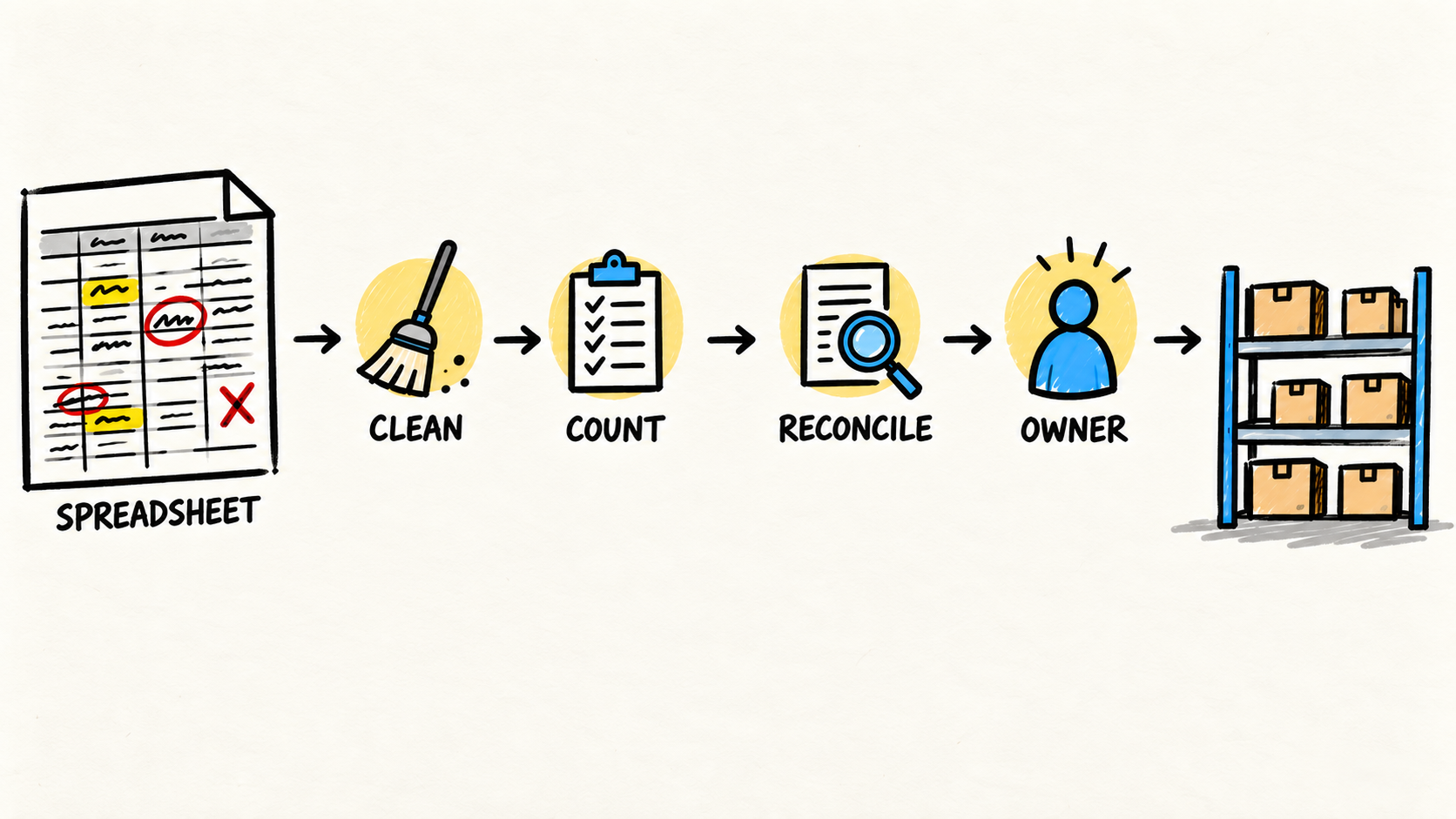
To move inventory from a spreadsheet to software without losing data, make five decisions separately: clean the records, count the physical stock, test the import, control the cutover, and reconcile the balance that arrived. The old file should not be treated as truth just because it is the latest version.
This article complements the guide to deciding when to replace a spreadsheet for inventory. That guide helps decide whether a change makes sense. This is a different question: how do you reach a trustworthy opening balance without interrupting operations? If the business does not yet have ongoing ownership for the inventory system, define that responsibility before the cutover.
If the symptom is copying the same order between tools, see how to stop entering the same order in multiple systems. When the discrepancy involves sales and inventory, the diagnosis for different CRM and inventory numbers helps separate records, events, and ownership.
The short answer
- Do not import the whole spreadsheet before reviewing items, units, locations, and duplicates.
- Use a physical count to establish the opening balance instead of copying the last column.
- Run a test import with representative data and keep the result.
- Freeze changes at the agreed time, reconcile what arrived, and assign someone to handle exceptions.
What needs to be decided before the migration?
Before choosing a file format, define what the new system must represent. One spreadsheet row may be a product, a package, a purchasing unit, an estimated balance, or a mixture of those ideas. If the team does not agree on what the row means, importing it only makes the uncertainty harder to see.
Write a short record for each item type:
- an identifier that does not change when the commercial name changes;
- the description used by the team;
- the purchasing, storage, and selling units;
- where the stock is kept;
- the physical quantity and count date;
- supplier, cost, or lot when needed;
- item status, such as active, discontinued, or awaiting review.
The Microsoft Learn documentation on importing business data, retrieved October 3, 2026, shows a common practice: use specific templates for customers, vendors, and inventory items. The important detail is not adopting the same product. It is learning which fields the destination considers necessary before preparing the source.
Do not resolve every exception in the first version. Separate items that can enter the opening balance from items that need a decision. A duplicate product, ambiguous unit, or item without a location belongs in a review queue, not in a silent edit.
How do you clean the spreadsheet without deleting important information?
Start by gathering the files that actually participate in the operation. Look for local copies, purchasing tabs, lists maintained by the warehouse, files used by ecommerce, and tables sent to finance. Choose a working version and mark the others as references. Do not delete the sources before reconciliation is complete.
Clean a copy of the file:
- remove blank rows and columns with no defined use;
- standardize names and units without losing the original value;
- find repeated codes and decide whether they are duplicates or different items;
- mark products without a location, cost, or unit;
- separate balance, movement, order, and forecast into different fields;
- record who approved each important correction.
This separation prevents a common mistake: changing an old number so it looks right and then forgetting that the change happened. The spreadsheet can remain evidence, but it should stop being the authority after cutover.
Odoo documents CSV and XLSX imports, downloadable templates, and column mapping, retrieved October 3, 2026. The same documentation warns that imports are permanent and cannot be undone automatically. Even when the chosen system behaves differently, treat the first load as an operation that needs a copy, a test, and a record.
Where should the opening balance come from?
The opening balance should come from a planned physical count, not only from the last quantity recorded in the spreadsheet. The spreadsheet can help build the list and locate discrepancies, but the number that opens the new system needs a date, a unit, and a person responsible for checking it.
Agree in advance:
- which location will be counted;
- which unit will be used for each item;
- how to separate available, reserved, damaged, and incoming stock;
- how to record items found that are not in the file;
- what happens to sales, transfers, and receipts during the count;
- who approves a difference that cannot be resolved immediately.
The whole operation does not need to be counted in exactly the same way if that is not practical. What cannot vary without a record is what the number means. Two people who count the same box as different units will not produce a balance that can be reconciled.
Count on an agreed date and keep the file or form used. If operations cannot stop, record movements between the count and cutover. The balance loaded into the system must be adjusted for those movements, or the check must be repeated at activation.
The useful question is not “which number is in the spreadsheet?” It is “which number can the business explain later?” A smaller balance with a date, unit, location, and owner is a better foundation than a larger total nobody can reconstruct.
How do you test the import before cutover?
Do not make the first import on the day the business plans to abandon the spreadsheet. Choose a sample containing simple items, duplicates, different units, multiple locations, and at least one case that needs review. The test should reveal what the system does when the data is not clean.
Check four outcomes:
- the item was created once, with the expected identifier;
- the unit and location reached the correct fields;
- the imported quantity appears in the report or screen the operation will use;
- errors and rejected rows can be found and corrected.
The AWS Prescriptive Guidance on running a pilot, retrieved October 3, 2026, recommends a small area, participants who represent real use, and success criteria defined before the test. That is a decision discipline, not a promise that an inventory migration will be quick.
Ask someone who did not prepare the file to check the result. The person who knows every spreadsheet exception can compensate for a mistake without noticing. An operator receiving the imported list shows whether the new process is understandable on a busy day.
Do not accept “import completed” as sufficient proof. Compare quantities, items, locations, and rejected records. Use a preview if the system offers one. If there is a test environment, load the data there before touching production data.
How do you plan cutover without creating two inventories?
Cutover needs a start, a rule, and an owner. Define when the spreadsheet stops accepting changes, which system receives each movement, and how to handle a sale or receipt that happens in the interval.
A simple plan can follow this order:
- save a read-only copy of the cleaned spreadsheet and physical count;
- record the cutover time and movements still pending;
- load the approved data into the new system;
- compare the balance by item and location;
- perform one low-risk real operation and confirm the result;
- tell the team where the next movement must be recorded;
- keep the old spreadsheet available for reference without allowing two authorities.
If the new system cannot be used by the whole operation at once, choose a location, category, or flow with controlled risk. Do not call the change complete while part of the team keeps updating the old file without a reconciliation rule.
Migration does not end when the file is accepted. Finish with a list of differences: missing items, different quantities, units needing conversion, and operations performed during cutover. Each difference needs a destination, even if that destination is “investigate before selling.”
How do you know the migration worked?
The migration worked when the team can answer the same case from the new system and the cutover evidence. A file loading without errors is not enough. The balance must support receiving goods, recording an issue, checking availability, and explaining a discrepancy.
In the first review, check:
- whether the most-used items are in the correct location;
- whether the total by location matches the approved count;
- whether a receipt, issue, or transfer appears in the expected history;
- whether the report used to buy or promise availability uses the right source;
- whether users know how to record an adjustment and explain why;
- whether someone is alerted when an operation cannot confirm a movement.
Keep the original spreadsheet, cleaned version, count, import file, errors, balance approval, and first corrections. Together they form the history of the change. Without them, the team may find a discrepancy in two weeks and not know whether it began in the count, mapping, or post-cutover operation.
The best completion test is a question another person can repeat: “Where did this number come from, and who can correct it?” If the answer still depends on opening the personal file of whoever performed the migration, the new system gained a screen but not ownership.
Who owns the process after migration?
The business needs to name someone to care for the process, even if a vendor configured the tool. That person does not need to perform every count. They need to know who can change records, how a difference is investigated, where copies are kept, which integration can affect the balance, and when a change needs approval.
Before closing the project, get answers to these questions:
- Who monitors import, receiving, sales, and transfer failures?
- Who decides when a new item can enter the catalog?
- Who corrects a wrong unit or location?
- Who controls accounts, data, and documentation?
- Who takes over if the vendor is unavailable?
- How can the business export its data and change systems later?
The FTC guidance for small-business cybersecurity, retrieved October 3, 2026, recommends limiting vendor access to what is necessary and agreeing how data is used, retained, and deleted. For inventory software, that also means keeping primary accounts and the recovery path under the business’s control.
If nobody inside the business has the time and authority, that gap belongs in the buying decision. A vendor can configure the tool. The business still needs someone accountable for the result when the workflow changes.
Frequently asked questions
Do I need to import all spreadsheet history?
Not necessarily. Decide what must be operational in the new system and what can remain available for reference. Active products, locations, units, and opening balances usually come first. Old analysis tabs and unused rows can follow a separate retention policy. Record the decision and preserve the original source.
Can I trust the last spreadsheet balance?
Use it as a clue, not proof. The last update may not include sales, losses, receipts, or transfers. Perform a physical count or define another verifiable method for establishing the balance. If the business cannot explain where the number came from, the problem is still in the process even if the total looks right.
What if the import creates duplicate items?
Stop the next load and preserve the list of created records. Identify which field should be unique, separate a duplicate from a legitimate variation, and correct the source before repeating. Do not solve it only by deleting rows in the new system. First record the rule that will keep the same duplicate from returning.
Who should perform the migration?
Preparation needs someone who knows the operation and someone who can check the chosen system. One person can coordinate the work, but should not be the only person who understands the records, count, cutover, and recovery. The business remains accountable even when execution is contracted out.
Conclusion
Moving inventory from a spreadsheet to software is not a column copy. It is a decision about which records, units, locations, and balance the operation will treat as trustworthy.
Clean the source, count what exists, test a difficult sample, control cutover, and reconcile what arrived. Then keep the evidence and name the person who will handle exceptions, access, and changes. If the team cannot explain where the opening balance came from, the migration is not finished.
How this article was researched
This article synthesizes public documentation about data imports and pilots, current search results, recent operator discussions, and pages already published on this site. Samuel Fajreldines is the accountable author. It does not present a client migration, original count, benchmark, savings figure, or implementation timeline as a result. AI assisted research organization, first drafting, image generation, and localization; no inventory execution was invented.
Sources consulted
- Microsoft Learn, “Import business data from other finance systems,” retrieved October 3, 2026
- Odoo, “Export and import data,” retrieved October 3, 2026
- AWS Prescriptive Guidance, “Running a pilot,” retrieved October 3, 2026
- Federal Trade Commission, “Cybersecurity for Small Business,” retrieved October 3, 2026