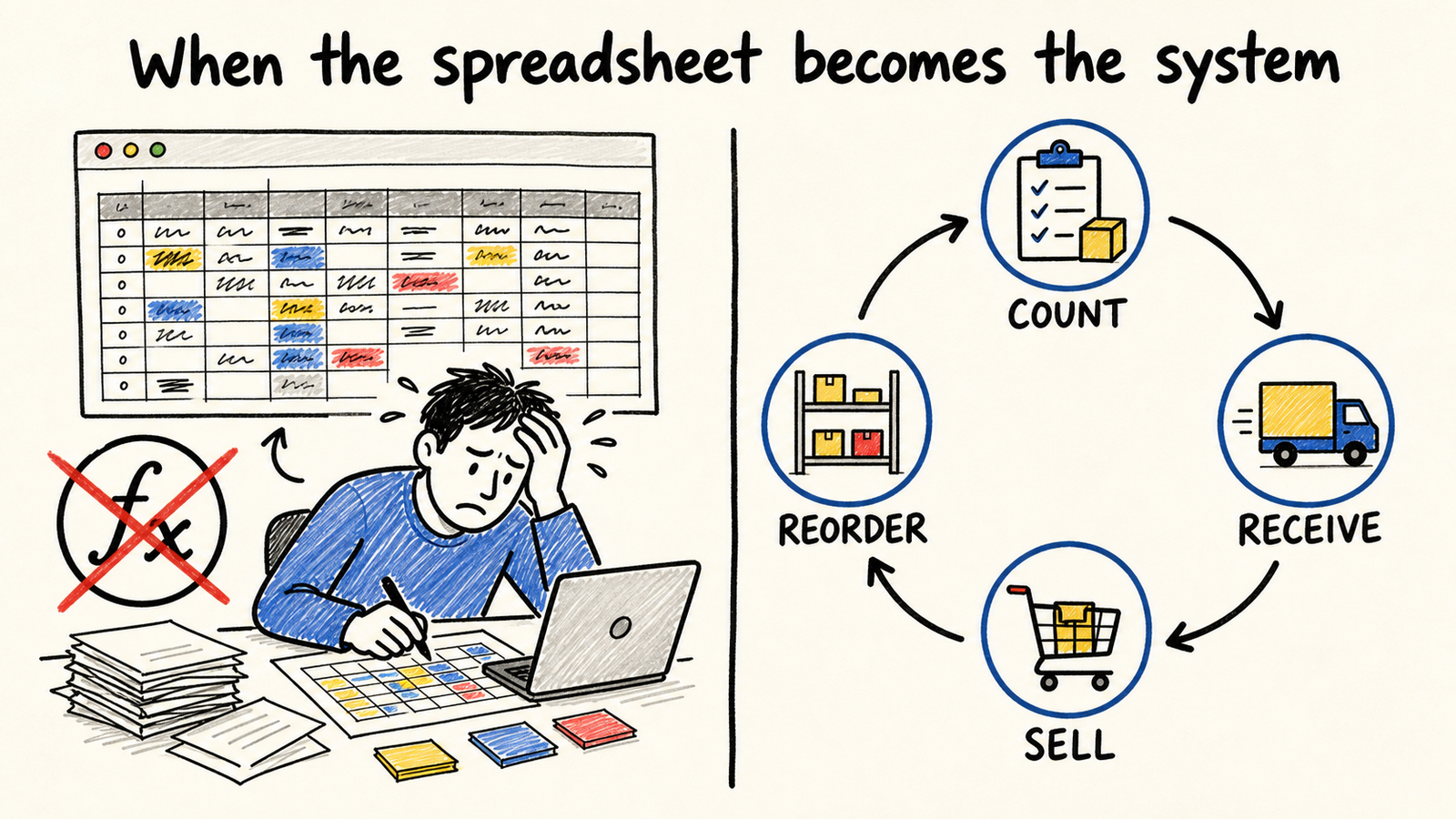
You confirm a sale, open the inventory spreadsheet, and find a balance that looks right, but nobody knows when it was updated. Someone checks the shelf, fixes a cell, and sends another version to the group. The problem is not using a spreadsheet. The problem is depending on it for decisions that now need a reliable process.
The rule is simple: keep the spreadsheet while a small routine can produce an explainable balance. Start looking for another solution when inventory depends on retyping, versions, memory, or a manual check for every sale and purchase. If your business needs ongoing ownership for the software running the operation, this decision needs a clear owner too.
The short answer
- A spreadsheet can remain useful for a small operation with one location, few movements, and a counting routine everyone understands.
- It has become a bottleneck when the balance cannot explain what happened, the team records changes later, or the operation depends on one person.
- The next step may be a tighter routine, ready-made software, or a custom system. Buying a tool without defining the process only moves the confusion.
When is an inventory spreadsheet still enough?
An inventory spreadsheet can still work when the workflow is short and visible. There is one location, a small number of people record receipts and sales, products have consistent identifiers, and the team can keep a physical count on a schedule. The balance can be manual as long as someone can explain where it came from.
Excel offers co-authoring and version history when a workbook is stored in compatible services, but that solves collaboration in the document. It does not create a receiving, selling, adjusting, reserving, or reordering routine by itself. Microsoft’s documentation on co-authoring and version history, retrieved August 15, 2026, shows the difference between sharing the file and controlling the work that happens outside it.
The useful test is not how many rows the spreadsheet has. Ask whether someone who did not create it can answer three questions without asking for help: what is the balance now, what movement changed it, and who should fix a mismatch. If the answer depends on memory, you have already found the limit, even if the file still opens quickly.
What signs show that the operation has outgrown the spreadsheet?
The strongest signal is a repeated difference between what the file says and what the operation finds. The other signs explain why the difference keeps coming back. Look for these patterns before blaming the team or buying a system:
-
The same product appears in more than one place. One tab records the purchase, another records the sale, and a third tries to calculate the balance. Every copy creates a chance for a late update.
-
People record changes later. A delivery happens in the warehouse, but the entry appears at the end of the day. A sale happens in one channel and inventory is adjusted in another. The balance does not represent the moment when the decision happens.
-
Nobody trusts the current version. The workbook has copies, similarly named tabs, or formulas replaced with values. Version history can help recover a file, but it does not turn every adjustment into an understandable inventory event.
-
One person has become the system interface. Only that person understands the codes, formulas, minimum levels, and exceptions. When they are away, the team counts, buys, or sells based on guesswork.
-
The operation gained a location, channel, or state. Stock in a store, warehouse, marketplace, and supplier is not just another column. You need to decide where an item is and whether it is available, reserved, committed, or in transit.
-
Counting happens only after a problem. If the team checks stock only when an item is missing, excess stock appears, or a customer complains, the spreadsheet has become a late record. It is not helping anyone decide.
A recent discussion among inventory operators repeats these symptoms in the language of people doing the work: broken formulas, avoided counts, memory-based ordering, missing ownership, and growth across locations. That is discourse evidence, not an independent measurement of the cost of these problems.
Is the problem the spreadsheet or the process?
Before changing tools, find out whether the problem is registration, business rules, or responsibility. A new system will not fix an unclear product definition, a unit of measure that changes between people, or a sale arriving through three channels without a unique identifier.
Run a short review of the real workflow. Choose one product and follow a receipt, a sale, a return, and an adjustment. Write down where each movement starts, who records it, when the balance changes, and who resolves a mismatch. If any step depends on copy and paste, a private conversation, or a file on one person’s computer, you have found part of the process that needs redesigning.
Separating the diagnosis prevents two expensive mistakes. The first is buying software with many features to hide a business rule nobody has decided. The second is rebuilding the spreadsheet forever when the business already needs permissions, an event history, and connections between sales and inventory.
What should a more reliable inventory system solve?
Do not start with a product name. Start with the controls the operation needs to see. An inventory system that fits should make these answers simple:
- What is the item? Each product and variant needs an identifier that the team recognizes and uses consistently.
- Where is it? A store, warehouse, third party, or shipment in transit may need different states when the distinction changes a decision.
- What is available? Physical quantity may not equal sellable quantity. A reserved, committed, or unavailable item needs to appear as such.
- What happened? Receipts, sales, returns, losses, and adjustments need a history that makes a mismatch traceable.
- Who can change it? Permissions and responsibility matter when an adjustment affects purchasing, sales, or cash tied up in stock.
- What happens next? A low level should trigger a replenishment decision, not just another colored cell.
These distinctions appear even in market tools. The Shopify documentation on inventory, retrieved August 15, 2026, separates tracking, physical products, locations, and starting quantities. For more than one location, its multi-location inventory guide explains that quantities are tracked by location. The point is not to adopt Shopify. It is to recognize that inventory control is a workflow with states, not just a table of numbers.
How do you choose the next step without buying blindly?
There are three legitimate paths. The choice depends on the process, not on the size of the spreadsheet.
1. Improve the routine and keep the spreadsheet
Do this when the problem is discipline and the workflow is still small. Define one file, one person who publishes changes, consistent codes, a counting time, and a rule for adjustments. Protect formulas, remove old copies, and test the flow with a real receipt and sale.
This path is honest when the team can follow the routine and the balance remains explainable. Do not choose it only because the tool has no monthly fee.
2. Adopt ready-made software
This path makes sense when the process is common and you need movement records, users, locations, alerts, or a connection to a sales channel. Before signing up, test it with real products, returns, adjustments, and a physical count. Ask how you can export data, recover history, and correct a mismatch.
Do not buy a demo. Buy a workflow the team can execute without returning to a parallel spreadsheet.
If the spreadsheet also carries staff schedules and shift changes, read the guide to deciding when to replace a scheduling spreadsheet.
3. Build a custom system and give someone responsibility
Consider this path when the rule that differentiates the operation does not fit ready-made software, when current systems do not talk to each other, or when the business already depends on integrations nobody maintains. The project should start with a process map, the data each step produces, and the person who will own changes to the rules.
A custom system without an owner becomes another spreadsheet with a nicer screen. The desired result is not “having an app.” It is reducing memory-based decisions and keeping the workflow understandable after the first delivery.
A decision checklist for the next 30 minutes
Answer these without opening a vendor presentation:
- Can a new person record a receipt, sale, and adjustment without the spreadsheet’s creator?
- Is there one definition for product, unit, location, and quantity?
- Does the balance show physical, reserved, available, and in-transit stock when those differences matter?
- Can you find who changed the balance and why?
- Does counting happen before a purchasing decision, or only after a surprise?
- Do sales and inventory receive the same movement without retyping?
- Is someone responsible for correcting data, maintaining connections, and explaining changes?
If most answers are “yes,” a better routine may be enough. If the “no” answers cluster around organization, standardize the process before choosing a tool. If the operation fails because of states, permissions, connections, and responsibility, you have a software decision, not just a spreadsheet decision.
Frequently asked questions
Does every small business need an inventory system?
No. A small operation can use a spreadsheet when it has few movements, one location, a counting routine, and someone who can explain the balance. Switching makes sense when the spreadsheet cannot follow the workflow or when the team needs to trust it without depending on one person’s memory.
Does having more people edit the spreadsheet mean we need to migrate?
Not necessarily. Co-authoring, permissions, and history can improve the file. But collaboration does not solve duplicate products, late records, unclear rules, or movements that start in other channels. Test the full workflow before deciding.
Is ready-made software better than building a custom system?
Ready-made software is often enough when the process is common and the team can accept its model. A custom system makes sense when rules and connections are an important part of the operation. In either case, define ownership, history, and data recovery before migrating.
Conclusion
Replace the inventory spreadsheet when it is no longer a simple record and has become the only thing between a commercial decision and a guess. Before then, improve the routine: one source, one definition, one cadence, and one owner. After that, compare ready-made software with a custom system by the workflow it can sustain, not by the number of screens.
The goal is not to abandon spreadsheets on principle. It is to keep the balance, the changes, and responsibility for the next step visible as the business grows.
After deciding to replace it, you still need to define who maintains the software after launch. A new tool without an owner only hides the same problem.
If the balance gets lost between sales, operations, and finance, read the diagnosis of business systems that do not talk to each other before choosing another tool.
If the disagreement is specifically between a sales promise and availability, read the diagnosis of different CRM and inventory numbers too.
Sources consulted
- Microsoft Support, “Collaborate on Excel workbooks at the same time with co-authoring”, retrieved August 15, 2026
- Shopify Help Center, “Setting up inventory for the first time”, retrieved August 15, 2026
- Shopify Help Center, “Understanding inventory management for multiple locations and apps”, retrieved August 15, 2026