An MCP server started over stdio works well when the client creates the
process. It stops being enough when several clients need the same tools over a
URL, when the server must sit behind a proxy, or when a team wants to publish an
integration without distributing a package.
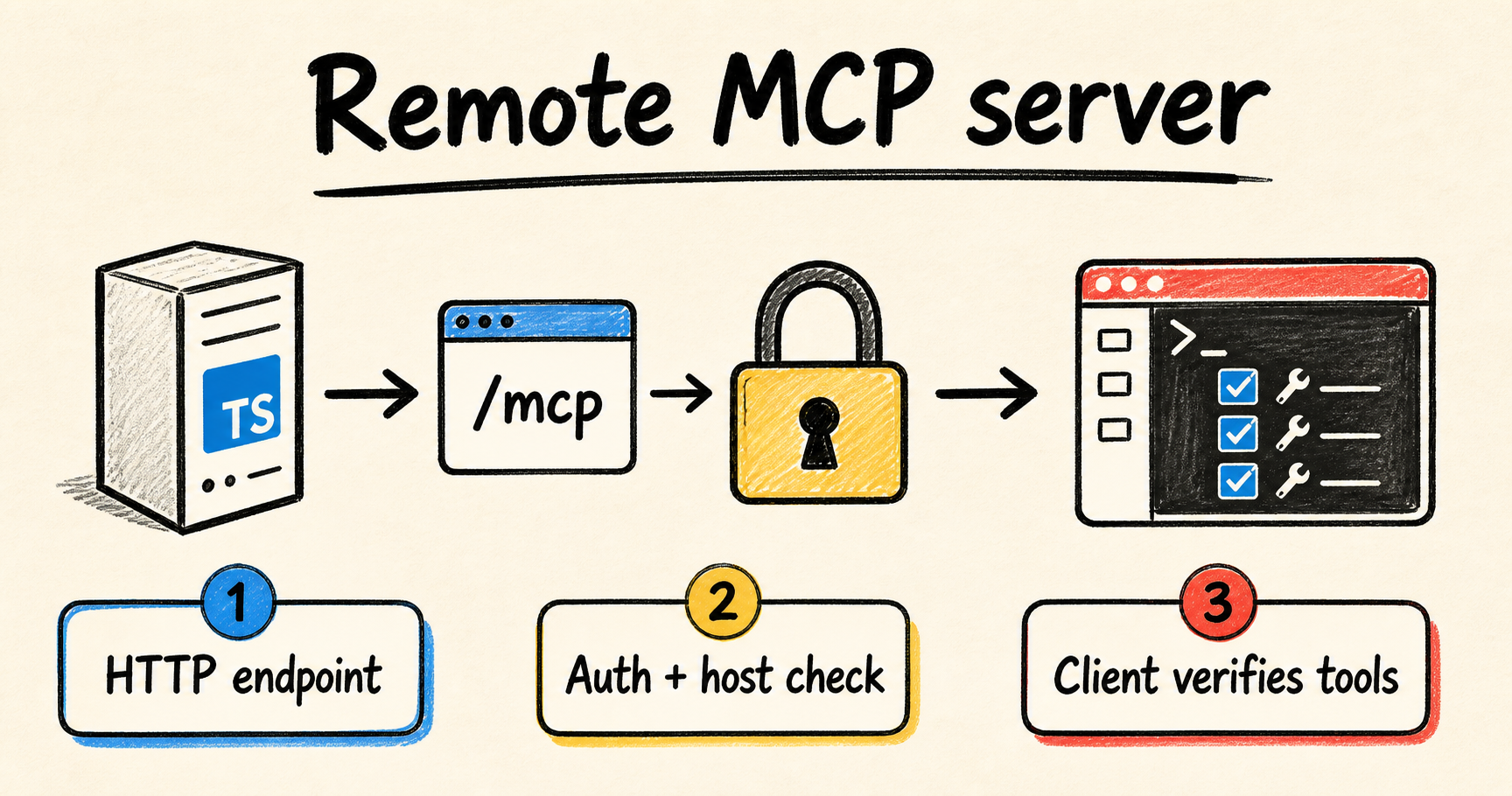
For that case, host the server over Streamable HTTP. The current MCP
TypeScript SDK separates the server from its transport: stdio serves local
integrations, while Streamable HTTP serves remote servers (MCP TypeScript SDK,
"Serve over HTTP",
retrieved 2026-08-10). The application still registers the same tools, but the
runtime now owns HTTP, authentication, and shutdown.
This tutorial covers the smallest useful design, its security boundaries, and a
repeatable verification path. The example uses the SDK v2 packages. If your
project still uses @modelcontextprotocol/sdk, compare its imports with the
SDK migration guide
before copying the code.
If you still need to create the local server, start with the TypeScript MCP server for coding agents. The problem here is different: putting the same surface behind a network without confusing transport with authorization.
Quick answer
- Use
stdiowhen the host starts a local process; use Streamable HTTP for a remote server.- Start stateless when each request can stand on its own.
- Validate Host, Origin, and authentication before a tool can run.
- Test
tools/listand a real call with a client separate from the server process.
When should an MCP server leave the local process?
A remote server makes sense when the client should not manage the process, when several consumers share the integration, or when the tool needs network access and credentials that should not be copied into every workspace. A local server remains better for private tools that are fast and tightly coupled to a developer's directory.
The protocol does not turn a local integration into a remote one just by
changing its URL. The Streamable HTTP transport
guide
defines one HTTP endpoint that receives JSON-RPC messages through POST. Each
request can receive a JSON object or an SSE response. That network boundary
needs authentication, limits, and observability.
Use this decision:
| Situation | Starting transport | Reason |
|---|---|---|
| IDE or CLI starts the server on the same computer | stdio |
The process and credentials stay on the local host. |
| Several clients access tools through a URL | Streamable HTTP | The server has a shared endpoint. |
| Tools are stateless and scale behind a proxy | Stateless Streamable HTTP | Any instance can handle a request. |
| The workflow needs sessions, resumption, or notifications | Stateful Streamable HTTP | The server must persist or route state. |
Do not choose HTTP just because it looks newer. If the only client is a local
process and the tool reads files in that workspace, stdio reduces the
operational surface. The remote endpoint must earn its extra TLS, identity,
network limits, and monitoring work.
What does Streamable HTTP change in the MCP contract?
Streamable HTTP makes the server an independent process and uses POST for each
JSON-RPC message. The current specification requires the client to advertise
support for application/json and text/event-stream, and the server chooses a
JSON response or an SSE stream per request (MCP, "Streamable
HTTP",
retrieved 2026-08-10). The client no longer talks to stdin and stdout.
That changes the tests. You must check the HTTP method, Content-Type, version
headers, JSON-RPC response, cancellation, and behavior when a proxy closes the
connection. A test that calls only the tool handler does not prove that the
remote endpoint follows the protocol.
Do not treat the protocol version as a permanent detail. Revision 2026-07-28
changed session and stream behavior compared with earlier revisions. The current
SDK provides createMcpHandler for a per-request modern path and documents
compatibility options for older clients (SDK, "Supporting protocol revision
2026-07-28",
retrieved 2026-08-10).
Record the package versions, accepted protocol revisions, and tested clients. Do not add a legacy SSE fallback without a client that needs it. Each extra transport adds states and failure paths that you must maintain.
How do you build a remote MCP server in TypeScript?
The current SDK reduces the HTTP path to three pieces: a factory that creates
McpServer, a handler that turns each request into an execution, and an adapter
for the Node runtime. The following example is illustrative, but it follows the
imports and composition shown in the SDK's official examples.
Install the packages and pin their versions in your lockfile:
npm install @modelcontextprotocol/server @modelcontextprotocol/node zod
npm install --save-dev typescript tsx @types/node
Create a small factory. It should register narrow tools and should not read credentials directly from the prompt. Authenticated context belongs in the HTTP layer, not in a string the model can change.
// src/mcp-server.ts
import { McpServer } from "@modelcontextprotocol/server";
import * as z from "zod/v4";

export function buildServer(): McpServer {
  const server = new McpServer({
    name: "remote-notes",
    version: "1.0.0",
  });

  server.registerTool(
    "find_note",
    {
      description: "Find a note by its public identifier",
      inputSchema: z.object({
        id: z.string().min(1).max(80),
      }),
    },
    async ({ id }) => ({
      content: [{ type: "text", text: `Requested note: ${id}` }],
    }),
  );

  return server;
}
A real tool should query an authorized source and validate its result as well. The return value above is deliberately small. It keeps the contract visible without pretending that a notes API, database, or ticket system exists in this example.
Now create a stateless HTTP entry point. createMcpHandler builds the server
from the factory per request, and toNodeHandler adapts it to node:http. The
code also applies the Host and Origin protections provided by the Node package.
// src/http.ts
import { createServer } from "node:http";
import {
  localhostHostValidation,
  localhostOriginValidation,
  toNodeHandler,
} from "@modelcontextprotocol/node";
import { createMcpHandler } from "@modelcontextprotocol/server";
import { buildServer } from "./mcp-server.js";

const handler = toNodeHandler(createMcpHandler(buildServer));
const validateHost = localhostHostValidation();
const validateOrigin = localhostOriginValidation();

const httpServer = createServer((req, res) => {
  if (!validateHost(req, res) || !validateOrigin(req, res)) return;
  void handler(req, res);
});

httpServer.listen(3000, "127.0.0.1", () => {
  console.error("MCP endpoint listening on http://127.0.0.1:3000/mcp");
});

process.on("SIGTERM", () => {
  httpServer.close(() => process.exit(0));
});
The loopback bind is appropriate for local development. In production, use an
HTTP framework or runtime adapter with an allowed-host list, listen on the
address supplied by the environment, and put authentication before the
handler. Do not copy 127.0.0.1 into a container that must receive external
traffic.
The SDK uses the same separation in its gateway example: createMcpHandler
owns the protocol, while toNodeHandler adapts it to Node (SDK, "Gateway
example",
retrieved 2026-08-10). That makes it possible to test the handler without a
listening port and the complete process over HTTP.
How do you protect the endpoint before the first tool call?
Protect the endpoint in layers. The MCP server should reject an invalid host or
origin, the proxy should terminate TLS, and the identity layer should validate a
token before the request reaches the handler. The MCP authorization tutorial
recommends OAuth for remotely hosted HTTP servers, while stdio servers can use
local environment credentials (MCP, "Understanding
Authorization",
retrieved 2026-08-10).
For a public Node service, the shape looks like this. verifier is an adapter
for your identity provider. Do not put a real token in the repository or treat
this excerpt as a complete OAuth implementation.
import { createMcpExpressApp } from "@modelcontextprotocol/express";
import { toNodeHandler } from "@modelcontextprotocol/node";
import {
  createMcpHandler,
  requireBearerAuth,
} from "@modelcontextprotocol/server";
import { buildServer } from "./mcp-server.js";

const app = createMcpExpressApp({
  host: "0.0.0.0",
  allowedHosts: ["mcp.example.com"],
});

const verifier = createVerifierFromYourIdentityProvider();
const auth = requireBearerAuth({
  verifier,
  requiredScopes: ["mcp:tools"],
});

const handler = toNodeHandler(createMcpHandler(buildServer));

app.all("/mcp", auth, (req, res) => {
  void handler(req, res, req.body);
});

app.listen(8080, () => {
  console.error("MCP endpoint listening on port 8080");
});
The SDK documentation describes requireBearerAuth, requiredScopes, and the
WWW-Authenticate challenge at this boundary (SDK,
"Authorization",
retrieved 2026-08-10). A tool should still apply domain authorization: a valid
token does not mean the caller can read every note, database, or repository.
Replace mcp.example.com with the real host and keep an explicit allowlist. The
specification also requires Origin validation to prevent DNS rebinding. If you
assemble the server with node:http without a framework factory, put the
corresponding guards before the handler.
Do not approve tools by name just because the server passed authentication. Separate reads from mutations, limit scope per user, and record which identity called which tool. The article on MCP allowlists for coding agents covers the tool policy above authentication.
Should the server be stateless or sessionful?
Start stateless when each request can rebuild the server and access storage on
its own. The SDK scaling guide explains that createMcpHandler creates an
instance per request, so stateless servers can scale behind a load balancer
without session affinity (SDK, "Sessions, state, and
scaling",
retrieved 2026-08-10).
This works well for tools that receive all arguments, query an external source,
and return a result. Application state belongs in a database, cache, or queue,
not in the McpServer object created for one request.
Use persistent state when the workflow must resume a stream, follow
notifications, keep a subscription, or run work across calls. Do not let an
in-memory Map be the only copy of a session if the service can have two
replicas or restart.
The practical choices are:
- Stateless: the handler creates the server per request and any instance can serve any call.
- External state: sessions, events, or results live in shared storage, so any node can serve the request.
- Session affinity: state stays in one node's memory and the proxy pins the client to it. This is simple, but makes failure and scaling harder.
The SDK scaling guide also describes a shared bus for notifications between nodes. Use it only when a feature truly needs cross-instance communication. A simple query tool does not need that cost on day one.
The useful cut is not "HTTP with a session" versus "HTTP without a session". Separate state required by the domain from state accidentally introduced by the transport. A long-running task needs persistence because the work exists. An in-memory map copied from a sample is operational debt.
How do you verify a remote MCP server without trusting its process?
Verify the server in layers: the process starts, the endpoint responds, the client discovers tools, a valid call produces a result, an invalid call is rejected, and an unauthorized request produces no side effect. The MCP Inspector is useful for interactive debugging, but the CI check should start or call the endpoint like a real client.
During development, run the process and point the Inspector at the endpoint:
npx @modelcontextprotocol/inspector http://127.0.0.1:3000/mcpConfirm this sequence in the panel and server logs:
- The client completes
initializeand negotiates a supported revision. tools/listshowsfind_notewith the published schema.- A valid identifier returns the expected content.
- An empty identifier fails validation before the real query.
- An invalid origin, host, or credential fails before the tool handler.
Do not treat a 200 response alone as proof. The HTTP layer can respond while
the tool contract is wrong. The MCP TypeScript contract-testing
tutorial shows how to automate
discovery, a valid call, invalid input, and transport errors for a local server.
For this remote spoke, replace stdio with the HTTP URL and add authentication
and proxy cases.
A smoke test can call the endpoint over a test network, never with a production
credential. Capture status, Content-Type, JSON-RPC body, response time, and
redacted logs. If the endpoint uses SSE, also check that the proxy does not
buffer the response.
This article does not claim a production benchmark or first-hand deployment result. The proposed proof is intentionally small: a separate client discovers the tool, calls a valid case, forces an invalid case, and confirms that the identity barrier stops execution. That is more honest and more useful than calling the handler directly and declaring the remote server ready.
Which failures appear first in production?
The first failures usually occur at the boundary, not in model reasoning. A
wrong path returns 404; a missing token returns 401; a missing scope returns
403; a rejected origin can return 403; an incompatible client fails during
negotiation; and a badly configured proxy holds or closes a stream. Record the
error without storing tokens, prompts, or tool data.
| Symptom | Likely cause | Check |
|---|---|---|
404 while connecting |
URL does not point to /mcp or the route is missing |
Confirm the final route and the POST method. |
401 before tools/list |
Missing, expired, or incorrectly issued token | Inspect WWW-Authenticate and use a test token. |
403 on localhost |
Host or Origin guard rejected the request | Test the explicit origin and do not bind openly without an allowlist. |
| No tools appear | Negotiation failed or the factory registered none | Read the initialize response and the construction log. |
| Works on one replica, fails on another | Session state exists only in memory | Use stateless mode, shared storage, or deliberate affinity. |
| Tool is slow and the connection drops | Proxy, server, or client timeout | Distinguish cancellation from tool failure and measure each layer. |
The most dangerous case is repeating a mutation after a disconnect. A dropped connection does not prove that the server did not apply the effect. For writes, use an idempotency key, a confirmation query, or a compensating operation. Reads are usually easier to repeat, but they still need a limit.
Another limit: Streamable HTTP does not authorize a tool by itself. The transport delivers messages, authentication identifies the caller, and the application policy decides whether that caller may act. Keep those decisions in separate layers so a transport change cannot accidentally expand agent agency.
Checklist before publishing the endpoint
Before giving the URL to a client, walk through this list:
- [ ] The server uses Streamable HTTP for remote access and does not expose
stdioon the network. - [ ] The
/mcppath is documented and tested by an external client. - [ ] TLS terminates at the proxy or process, according to the environment.
- [ ] Host and Origin have explicit validation, without
*as a permanent setting. - [ ] Authentication validates issuer, audience, expiry, and scope.
- [ ] Each tool applies domain authorization in addition to global authentication.
- [ ] Stateless or stateful mode was chosen from the actual workflow.
- [ ] Logs redact tokens, prompts, personal data, and sensitive results.
- [ ] CI tests discovery, schema, success, rejection, transport, and shutdown.
- [ ] Mutations have idempotency or effect confirmation before retry.
If you need to deploy on Cloud Run, treat the service as the HTTP process that receives the MCP endpoint. The article on service or worker pool for long-lived agents on Cloud Run helps with the execution model. It does not replace the protocol, auth, and scaling tests here.
Conclusion
A reliable remote MCP server only looks like an ordinary HTTP service. The transport defines how messages arrive, but Host, Origin, identity, permission, state, and verification decide whether the integration can operate safely. Start stateless when the domain allows it, and add persistence only for a concrete requirement.
For long Claude Code and Codex workflows, I use RemoteCode as the author's tool for continuing work between sessions. It helps preserve continuity, but it does not replace authentication, contract tests, or the decision about which tools a caller may execute.
Frequently asked questions
Can the same MCP server support both stdio and Streamable HTTP?
Yes. Register tools in a shared factory and choose a transport entry point per
environment. stdio serves a local process, while createMcpHandler or an HTTP
transport serves remote requests. Test both paths because their lifecycle,
authentication, and shutdown behavior differ.
Does Streamable HTTP need an in-memory session?
No. The current SDK supports a stateless per-request handler. Use a session or
external state when the workflow needs resumption, notifications, or work that
crosses calls. A local Map is acceptable in a sample, but not as the only
source of truth for a service that scales or restarts.
Can I protect MCP with only an API key?
An API key can work for a simple integration, but it must be validated before the handler and limited to the smallest possible tool set. For user data, consent, auditing, or distinct scopes, use a suitable identity system and validate issuer, audience, expiry, and service permissions.
Does the MCP Inspector replace contract tests?
No. The Inspector speeds up manual investigation of connections, schemas, and calls. CI should repeat those cases with an automated client and fail when the published surface changes. The test should use the same transport as production, instead of calling only an internal function.
Do I need to accept older MCP clients?
Only if a client you need still requires them. The current SDK documents compatibility across revisions, but every additional path expands the test matrix. Declare the accepted revision, record tested clients, and remove a legacy fallback when it no longer serves a real use case.
Sources consulted
- Model Context Protocol, "Streamable HTTP", retrieved 2026-08-10
- Model Context Protocol, "Understanding Authorization in MCP", retrieved 2026-08-10
- MCP TypeScript SDK, "Serve over HTTP", retrieved 2026-08-10
- MCP TypeScript SDK, "Authorization", retrieved 2026-08-10
- MCP TypeScript SDK, "Sessions, state, and scaling", retrieved 2026-08-10
- MCP TypeScript SDK, "Supporting protocol revision 2026-07-28", retrieved 2026-08-10
- MCP TypeScript SDK, "Upgrade to v2", retrieved 2026-08-10
- MCP Inspector, official documentation, retrieved 2026-08-10