The process starts, receives a request, and only then discovers that PORT is not a number, DATABASE_URL is empty, or a required key was never configured. TypeScript did not flag the problem because it checks the code, not the environment injected during deployment.
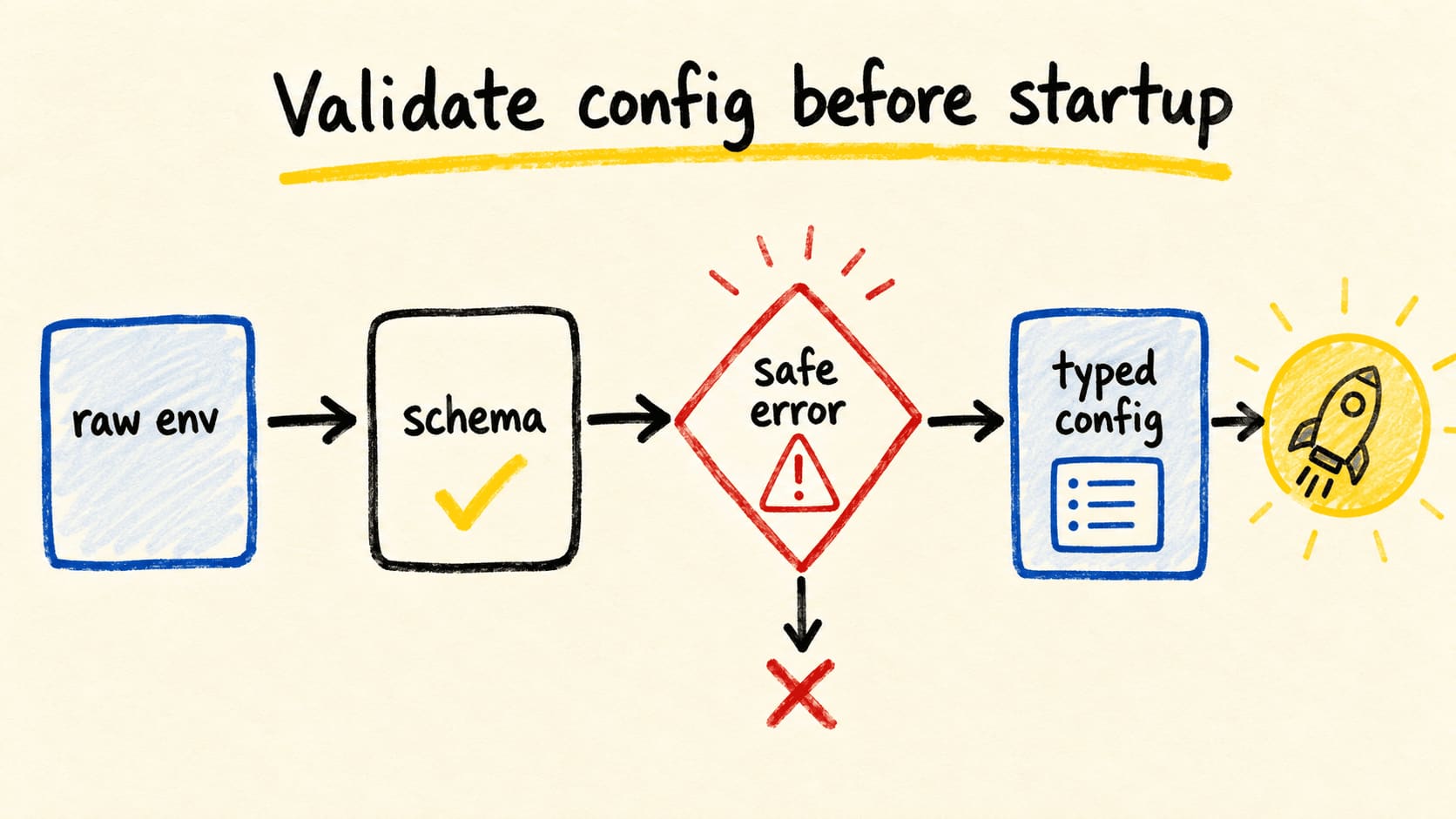
The fix is a small configuration boundary: read raw values, validate presence and shape at runtime, transform values that need another type, and export one object for the rest of the application. This article uses Zod, but the separation between typing and validation also works with a small custom function.
To separate this problem from other runtime boundaries, see how types and runtime checks work together in Express middleware. The input here is not req. It is the environment that exists before the server handles anyone.
In one sentence
- TypeScript types help after configuration has been validated.
- Apply the schema once at the input boundary.
- Application code should import
env, not repeatprocess.envreads.- Configuration errors can show the key and rule, never the received secret.
Can TypeScript validate the environment by itself?
No. TypeScript removes annotations during compilation, and an assertion does not check anything at runtime, as the handbook explains in "Everyday Types". Node.js exposes the environment through process.env, an object populated by the running process, as described in "Environment Variables". These are different moments.
If you write process.env.PORT as unknown as number, the compiler accepts the value, but the string is still a string when the program runs. The same applies if you declare every ProcessEnv field as required. That improves autocomplete, but it does not create a variable in the container or test the value injected by the provider.
The useful contract has two parts: an unknown input and an output the rest of the system can use. The schema performs the runtime proof. The inferred type describes the result of that proof for the code that follows.
Where should the configuration boundary live?
Put loading and validation in a configuration module near application startup. The module should export ready-to-use configuration, and other modules should depend on that object. The dotenv documentation describes loading a .env file into process.env; loading values and validating values are separate responsibilities (dotenv, "README").
For an application, the order can be simple:
- The chosen loader reads
.env, or the runtime injects the variables. createConfigvalidates the raw object.- The module exports
envwith numbers, URLs, and options already transformed. - The server, workers, and adapters import
envinstead of readingprocess.envagain.
For a reusable package, do not read process.env during import. Accept a configuration object in the factory and validate that argument. This lets the library run in more than one environment and makes tests easier. The decision is different for an application that controls its own process and a package that another application imports.
How do you create a schema that returns typed configuration?
Define the schema over the raw object and export a testable function. Zod documents schemas for describing data, coercion for converting inputs, and z.infer for obtaining the matching type (Zod, "Defining schemas"). Environment variables arrive as text, so the coercion must be explicit.
The code below is illustrative but complete. It does not depend on a global ProcessEnv interface, so it does not turn a compile-time promise into a false runtime guarantee:
// src/config/env.ts
import * as z from "zod";

const envSchema = z.object({
  NODE_ENV: z
    .enum(["development", "test", "production"])
    .default("development"),
  PORT: z.coerce.number().int().min(1).max(65_535).default(3000),
  DATABASE_URL: z.url(),
  API_KEY: z.string().min(1),
});

export type Env = z.infer<typeof envSchema>;

export function createConfig(
  input: Record<string, string | undefined>,
): Env {
  const result = envSchema.safeParse(input);

  if (!result.success) {
    const problems = result.error.issues.map((issue) => {
      const path = issue.path.join(".") || "root";
      return `${path}: ${issue.message}`;
    });

    throw new Error(
      `Invalid environment configuration:\n${problems.join("\n")}`,
    );
  }

  return result.data;
}

export const env = createConfig(process.env);
Then load .env before importing this module when the application uses dotenv:
// src/main.ts
import "dotenv/config";
import { env } from "./config/env.js";

startServer({
  port: env.PORT,
  databaseUrl: env.DATABASE_URL,
});
On Node.js versions that load environment files through a command-line option, you can choose the runtime's loader instead. The point stays the same: the schema decides whether a string is present, has the expected shape, and becomes the type the application receives.
How do you validate without leaking secrets into logs?
Show the key and the failed rule, not the received value. A library's default error can contain useful development details, but sending a complete error object to an aggregator may record a credential or a URL with a password. The example formatter selects only path and message for that reason.
Do not use a real key to prove the invalid path either. Use artificial values and check the shape of the error:
const valid = createConfig({
  NODE_ENV: "test",
  PORT: "3001",
  DATABASE_URL: "https://example.com/database",
  API_KEY: "test-only-key",
});

if (valid.PORT !== 3001 || valid.NODE_ENV !== "test") {
  throw new Error("valid configuration was not transformed");
}

try {
  createConfig({
    NODE_ENV: "staging",
    PORT: "not-a-port",
    DATABASE_URL: "not-a-url",
    API_KEY: "",
  });
  throw new Error("invalid configuration was accepted");
} catch (error) {
  const message = error instanceof Error ? error.message : String(error);

  if (
    !message.includes("NODE_ENV") ||
    !message.includes("PORT") ||
    !message.includes("DATABASE_URL") ||
    !message.includes("API_KEY") ||
    message.includes("test-only-key")
  ) {
    throw new Error("configuration error was not safe or specific");
  }
}
This is a behavior check, not a benchmark. It proves two local properties of the example: the port becomes a number after validation, and the invalid message lists keys without printing the API_KEY value. In a real project, run the test with the compiler and runtime that will perform the deployment.
What can initial validation not prove?
It can check presence, shape, ranges, enumerated values, and conversions that happen inside the process. It cannot prove that a credential is active, a database responds, or a bucket exists without making an external call. Putting those checks into startup makes another service's availability decide whether the process can begin.
A more predictable split is to validate shape and presence at startup, then check remote dependencies when the integration is used, with a timeout, observability, and an appropriate failure policy. For a simple application, the remote check may happen in a health check or on first use. For a package, the factory should receive the configuration selected by the consumer.
This boundary also avoids a common mistake: marking every key as required in the global type and treating that as production truth. An application may have environments with optional integrations. Model that difference in the schema instead of hiding absence with ! or as.
How do you verify the configuration in the project?
Start with a static check, then exercise real behavior. npx tsc --noEmit should accept env.PORT as a number and reject a property that does not exist on env. Running with valid configuration should start. Running with a missing, empty, or invalid variable should fail before opening a port or consuming a queue.
If configuration is used in CI, validate the contract without printing the whole environment. The pipeline can check names and shapes with test values while the protected environment injects secrets into the job that needs them. To fit that check into delivery, see GitLab continuous integration for Node.js.
In a monorepo, also decide who owns env.ts. If every package reads process.env on its own, the application gets several boundaries again. TypeScript Project References in a monorepo helps organize project dependencies, but it does not decide where configuration is validated.
Frequently asked questions
Should you extend NodeJS.ProcessEnv?
Only if autocomplete for direct access brings a real benefit and the team keeps runtime validation in place. A global interface does not read the environment or turn strings into numbers. Exporting env from a schema usually makes the boundary easier to see.
Can you use only as to type process.env?
It can make the compiler accept the code, but the assertion does not change the value or create a runtime check. Use it only after a proof the program actually performs. For configuration, that proof should happen at the input boundary.
Is Zod required?
No. A custom function using typeof, URL, and range checks may be enough. Zod reduces repeated code and infers the type from the schema. The library choice is secondary; the main contract is to validate once and export the result.
Conclusion
Environment variables are external input, even when the application team configures them. TypeScript can describe configuration after validation, but it cannot inspect the container, job, or provider dashboard.
Create one boundary, validate the raw object, transform the types, and export a small result. Make errors identify the key and rule without repeating secrets. Then prove the valid and invalid paths with the same runtime that will execute the application.
Sources consulted
- Node.js, "Environment Variables", retrieved 2026-09-07.
- TypeScript, "Everyday Types", retrieved 2026-09-07.
- Zod, "Defining schemas", retrieved 2026-09-07.
- motdotla/dotenv, "README", retrieved 2026-09-07.