An MCP server can appear connected in a host and still publish the wrong schema, fail over its transport, or return a result the client cannot interpret. Opening Inspector alone is not enough. The useful test starts the process the way the host would and checks the contract end to end.
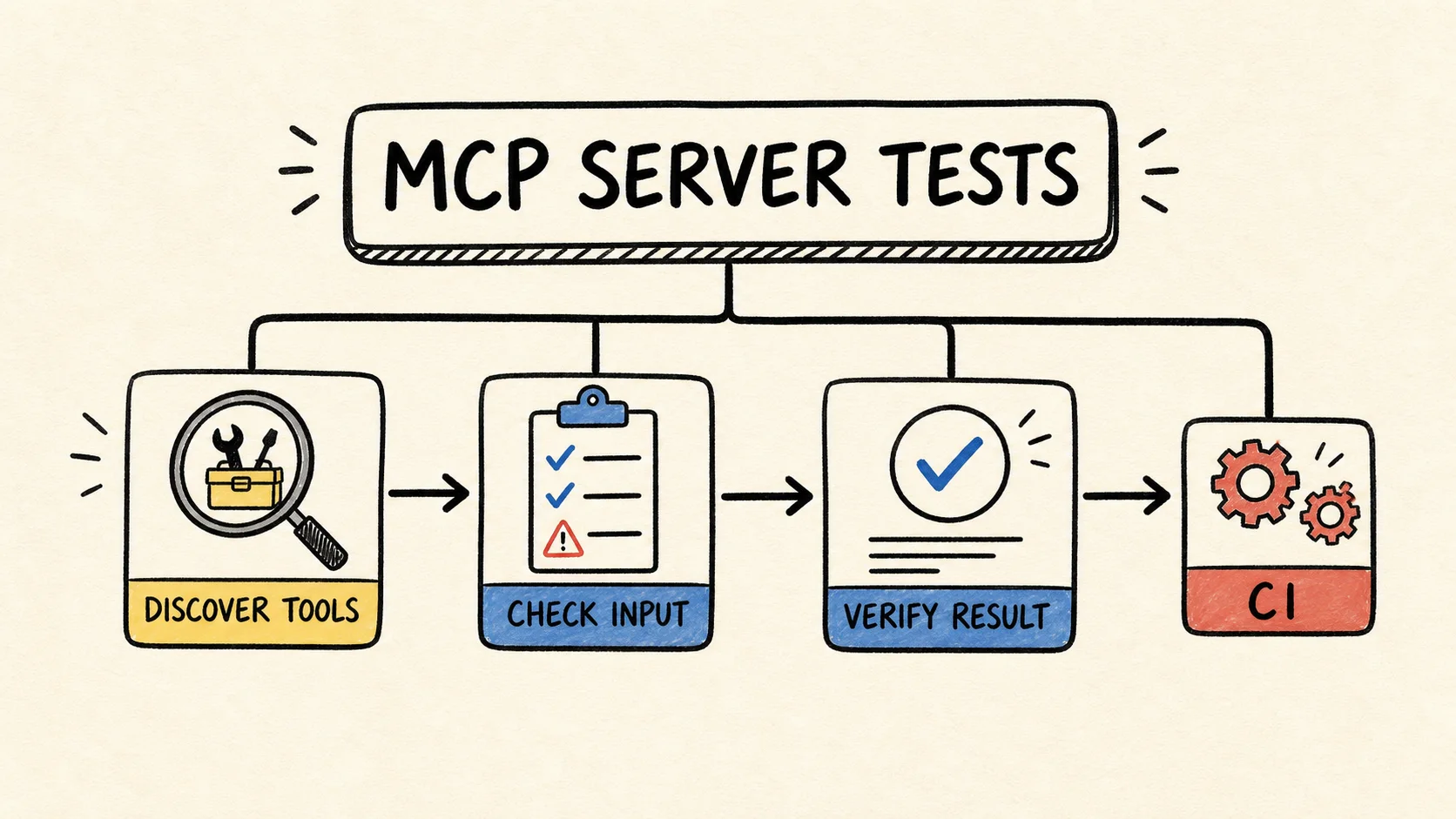
This tutorial builds a small test suite for a TypeScript MCP server. It discovers tools, checks the schema, runs a valid call, and covers an invalid input through the same stdio transport used by local integrations. At the end, you will have a command that fails in CI when the server surface changes without an updated test.
Tutorial result
- A minimal MCP server with one read-only tool.
- A TypeScript client that tests discovery, a valid call, and invalid input.
- Manual verification in MCP Inspector to debug what the automated test found.
- A CI routine that separates tool errors from protocol errors.
What do you need before starting?
You need Node.js 20 or later, TypeScript, npm, and familiarity with asynchronous functions. The MCP SDK first-server documentation uses this environment, the tsx package, and separate server and client SDK packages. The example follows that current organization.
The project also uses Zod for the tool schema and Vitest for tests. You can adapt the commands to pnpm or Bun, but keep the same contract: the test must start the compiled process and talk to it through the real transport. A test that only imports an internal function will not catch JSON-RPC, stdout, or capability-negotiation errors.
What should the test prove?
An MCP contract has three layers that belong in the suite. The first is discovery: the client finds the tool name and the schema the server published. The second is execution: a valid call returns a response the client can read. The third is failure: invalid input does not reach the tool effect and appears in a verifiable form.
The MCP TypeScript client documentation separates listTools() from callTool() and also distinguishes tool errors from protocol errors. That distinction is useful in tests. isError: true means the call reached the server and the tool reported a failure; a client exception usually points to transport, protocol, or a process that exited.
This example exposes find-ci-failures. It reads local data only to keep the test deterministic. Start with the TypeScript MCP server tutorial if you need the server first, then compare its runtime boundary with TypeScript tool-call validation. This article focuses on the complete MCP process. In a real project, replace the fixed list with a database or API adapter, but keep the contract cases and do not turn the test into a fragile copy of the implementation.
Step 1: prepare the project and dependencies
Create an empty project, install the packages, and make the test script compile before it runs Vitest. The official TypeScript MCP server quickstart also emphasizes that stdout belongs to the stdio protocol; diagnostic logs should go to stderr.
mkdir mcp-contract-tests
cd mcp-contract-tests
npm init -y
npm pkg set type=module
npm install @modelcontextprotocol/server @modelcontextprotocol/client zod
npm install --save-dev @types/node typescript tsx vitest
mkdir -p src tests
Create tsconfig.json:
{
  "compilerOptions": {
    "target": "ES2022",
    "module": "NodeNext",
    "moduleResolution": "NodeNext",
    "outDir": "build",
    "rootDir": ".",
    "strict": true,
    "esModuleInterop": true,
    "skipLibCheck": true
  },
  "include": ["src", "tests"]
}
Add these scripts to package.json:
{
  "scripts": {
    "build": "tsc",
    "test": "npm run build && vitest run"
  }
}
If your project still uses the legacy @modelcontextprotocol/sdk package, do not mix imports from both generations. The strategy remains the same, but package names and some helpers differ. Check the TypeScript SDK migration guide before copying the code.
Step 2: separate the factory from the stdio process
Put the implementation in src/factory.ts. Separating the factory from the entry point makes it clear what is server code and what is process code. The contract test does not import the factory to simulate a call; it starts build/server.js as a local host would.
import { McpServer } from "@modelcontextprotocol/server";
import * as z from "zod/v4";

const failures = [
  { id: "ci-1042", suite: "auth", summary: "token refresh returned 401" },
  { id: "ci-1043", suite: "billing", summary: "webhook retry exceeded the limit" },
];

const resultSchema = z.object({
  matches: z.array(
    z.object({
      id: z.string(),
      suite: z.string(),
      summary: z.string(),
    }),
  ),
});

export function createServer() {
  const server = new McpServer({
    name: "ci-evidence",
    version: "0.1.0",
  });

  server.registerTool(
    "find-ci-failures",
    {
      description: "Find a small set of CI failures by suite or message.",
      inputSchema: z.object({ query: z.string().min(1) }),
      outputSchema: resultSchema,
    },
    async ({ query }) => {
      const normalized = query.toLowerCase();
      const matches = failures.filter((failure) =>
        `${failure.suite} ${failure.summary}`
          .toLowerCase()
          .includes(normalized),
      );
      const structuredContent = resultSchema.parse({ matches });

      return {
        content: [
          { type: "text", text: JSON.stringify(structuredContent) },
        ],
        structuredContent,
      };
    },
  );

  return server;
}
Now create src/server.ts:
import { serveStdio } from "@modelcontextprotocol/server/stdio";
import { createServer } from "./factory.js";

void serveStdio(createServer);
console.error("CI evidence MCP server started");
The console.error() call is not cosmetic. With stdio, stdout carries protocol messages. A stray console.log() can turn a connection that looked correct into invalid JSON. The MCP debugging guide recommends checking logs and testing the process in isolation when a connection fails.
Step 3: write the contract client
Create tests/mcp.contract.test.ts and start the compiled process with StdioClientTransport. The test starts with discovery because a tool can keep responding in an old test after it has disappeared from the public list.
import { afterEach, beforeEach, describe, expect, it } from "vitest";
import { Client } from "@modelcontextprotocol/client";
import { StdioClientTransport } from "@modelcontextprotocol/client/stdio";

describe("MCP server contract", () => {
  let client: Client;

  beforeEach(async () => {
    client = new Client({ name: "contract-test", version: "0.1.0" });
    const transport = new StdioClientTransport({
      command: "node",
      args: ["build/server.js"],
    });
    await client.connect(transport);
  });

  afterEach(async () => {
    await client.close();
  });

  it("discovers the public tool and schema", async () => {
    const { tools } = await client.listTools();
    const tool = tools.find(({ name }) => name === "find-ci-failures");

    expect(tool).toBeDefined();
    expect(tool?.inputSchema).toMatchObject({ type: "object" });
    expect(tool?.inputSchema.properties).toHaveProperty("query");
  });

  it("runs a valid call through the real transport", async () => {
    const result = await client.callTool({
      name: "find-ci-failures",
      arguments: { query: "auth" },
    });

    expect(result.isError).not.toBe(true);
    expect(JSON.stringify(result)).toContain("ci-1042");
  });

  it("rejects invalid input before the tool effect", async () => {
    await expect(
      client.callTool({
        name: "find-ci-failures",
        arguments: { query: "" },
      }),
    ).rejects.toThrow();
  });
});
The last case needs one note. Some SDK versions expose schema rejection as a client exception; other surfaces may return an error result. Your project contract should choose one form and pin it in a test. If your version returns isError: true, replace the assertion with expect(result.isError).toBe(true) and confirm that the handler did not run.
Step 4: run and interpret the suite
Run the build and the complete test command:
npm testA healthy run should show three passing tests. The first proves that the server publishes the expected surface. The second confirms negotiation, stdio transport, the call, and the result. The third protects the input boundary. Together, they cover a renamed tool, a process that does not start, and an overly permissive schema.
If the test fails with spawn node ENOENT, the runner did not find the executable in the CI environment. Use the Node path configured by the job or the version manager used by the project. If it fails with invalid JSON, look for logs written to stdout and move diagnostics to stderr. If listTools() is empty, the server may have exited before completing initialize.
Step 5: use Inspector to debug the failed case
The automated client protects CI, but Inspector is faster for understanding a local failure. The official MCP Inspector documentation presents it as an interface for connecting, discovering schemas, and invoking tools with test inputs. When the same contract moves from stdio to a URL, follow the verification flow for a remote MCP server in TypeScript.
After the build, run:
npx @modelcontextprotocol/inspector node build/server.jsIn the panel, connect to the process, open Tools, check find-ci-failures, and send auth. Repeat with an empty string and observe whether the client shows an argument rejection. Inspector shows what happened in that run; it does not replace the test that should run without a browser in CI.
This flow also helps separate layers. If Inspector cannot connect, investigate the process, stdout, protocol version, and transport. If it connects but the call returns isError, investigate the tool rule. If the response arrives but the test cannot find the expected data, the output contract or assertion is too weak.
As the server gains tools, keep a case table by intent. Include a valid call for each critical tool, a missing required input, an unknown enum, a valid empty result, and a dependency failure. Do not turn every field combination into an integration test; cover detailed logic in unit tests and reserve the MCP process for the boundary.
How do you connect this to CI without noise?
The job should install dependencies, compile, run the suite, and save logs only when it fails. It does not need to call a model. Tool choice and arguments are already part of the contract, and deterministic verification prevents a generation variation from hiding server regressions.
In an agent pipeline, publish the tool name, server version, contract result, and tested revision together. That fits with code-agent observability in CI and regression evals for coding agents: the first shows what happened; the second checks whether the agent used the evidence correctly. When the schema changes while runs are active, also record compatible changes to a tool schema.
When many handoffs repeat the same errors and the history starts consuming the context window, I use RemoteCode to take Claude Code and Codex further in agentic flows with less repeated context. It is my own tool, mentioned here because contract tests produce short evidence that can pass through several stages without resending the entire run.
Common errors and test limits
A contract test can prove that the server publishes a tool and answers a call. It cannot prove that the tool is authorized to access a database, that the result satisfies a business rule, or that the agent will choose the right tool for an ambiguous request.
| Symptom | Likely cause | Fix |
|---|---|---|
| Inspector connects, but the test does not | The test starts from another directory or another build | Use the same command as CI and confirm build/server.js |
| The test passes even though a tool is missing | The suite only calls a known function | Check listTools() and the published schema |
| A validation error appears as success | The test ignores isError or catches every exception |
Separate tool errors from protocol errors |
| The server crashes without a clear message | A log was written to stdout | Send diagnostics to stderr and keep the exit code |
| The result changes on every run | An external dependency is inside the contract test | Use a deterministic fixture and test the adapter separately |
The MCP conformance test repository covers broader compliance with the specification. Use it when you maintain a client or server implementation that needs to prove protocol behavior. For a regular business tool, the local suite is still necessary because only it knows the names, schemas, permissions, and expected effects.
Frequently asked questions
Does MCP Inspector replace automated tests?
No. Inspector is excellent for exploring schemas, watching logs, and reproducing a manual call. An automated test runs in CI, repeats the same contract, and fails when the public surface changes. Use Inspector to diagnose; use the TypeScript client to protect the integration.
Do I need to call a model during the test?
Not to test the MCP contract. Discovery, schemas, transport, and responses can be checked with a deterministic client. Add a model-based eval only when the question is whether the agent chooses the right tool, interprets the response, or follows the system policy.
Should I test the server over stdio or HTTP?
Test the transport used in production. For a local server started by Claude Code, Codex, or another host, stdio reproduces the process lifecycle. For a remote server, use the matching HTTP client and include authentication, sessions, timeouts, and shutdown in the contract.
Does the test need every schema combination?
No. The contract should cover the boundaries and the cases that change the client decision. Detailed validation and domain combinations belong in unit tests for the handler. The MCP test should stay small enough to run on every change without becoming a second implementation of the server.
What changes when the MCP SDK is updated?
Recheck the imports, transport, and error format. Keep the behavior tests and update only the adapter that needs it. The intent remains the same: discover, call, validate, and distinguish failures. Pinning the version in the lockfile helps prevent CI from changing the contract without an explicit review.
The server is ready for an agent when the test can say more than "connected." It should prove which tools exist, which arguments enter, which response leaves, and how a failure stops the path. That evidence is small, reproducible, and more useful in CI than a screenshot of Inspector.