An agent sees two tools with similar names and chooses the wrong one. Another call uses an identifier that does not exist because the parameter description only said “ID”. The application rejects the request, but the model does not know whether to correct the argument, choose another tool, or ask the user for more information.
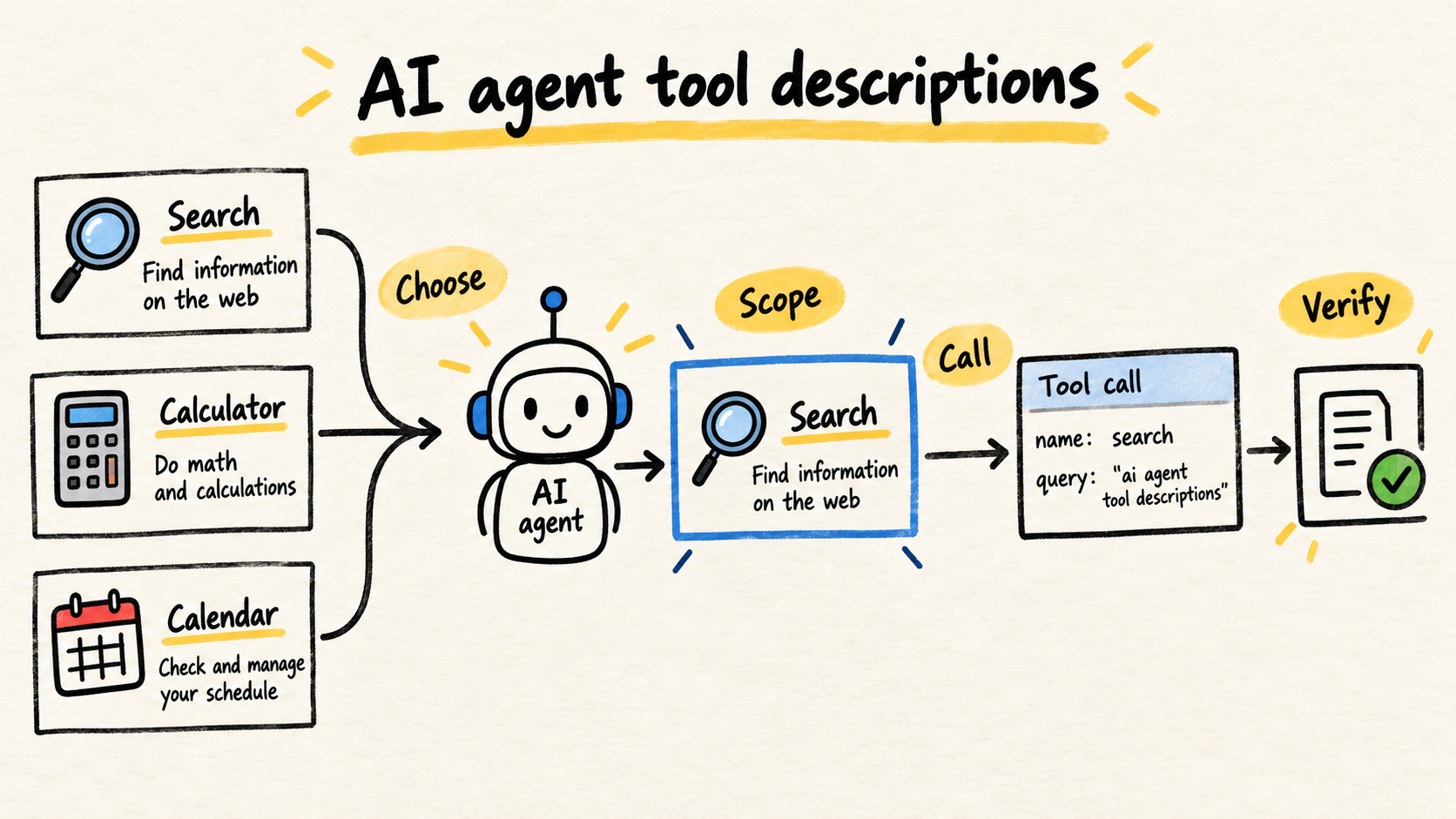
To write a useful tool description, explain four decisions: what the tool does, when the agent should choose it, what the parameters represent, and what result it returns. The schema constrains the call shape. The description guides the choice. One does not replace the other.
This work happens before runtime. The TypeScript MCP server for coding agents shows how to expose a narrow surface. This article focuses on writing the interface the model reads before it sends its first argument.
Practical summary
- Name the intent the agent needs to fulfill, not the internal class or endpoint.
- Say when to use the tool and when to choose another option.
- Describe ambiguous parameters with their unit, format, source, and short examples.
- Keep similar tools separated by scope and test selection with real cases.
What should a tool description answer?
A useful description answers “is this the right tool for this request?”. Google Cloud’s function calling guide separates the function declaration, parameters, and execution that returns a result to the model. These fields form the surface an agent uses to propose a call.
Start with the intent, not the implementation. The agent does not need to know that the function calls a REST endpoint or that the handler queries a table. It needs to know that the tool finds existing orders by number or customer, for example. The execution layer can change without forcing the model to relearn a business decision.
A description should make four things easy to see:
- Action: which question or task the tool solves.
- Timing: which signals mean it should be called.
- Boundary: which requests belong to another tool or require confirmation.
- Result: what evidence comes back and what remains unconfirmed.
That does not mean turning the description into a manual. Authentication details, internal retries, and table names belong in code and logs. The text sent to the model should contain the information needed for a decision, not the whole implementation history.
Citable capsule: A tool description is part of an agent’s interface. It should explain the action, when to use it, its boundaries, and the expected result. The schema validates argument shape, but it does not teach the model when one tool is more appropriate than its neighbor.
How should you name tools so they are distinguishable?
The name should represent a recognizable operation with stable, specific vocabulary. get_data does not distinguish customers, orders, or invoices. get_order_by_number reduces ambiguity because it names both the object and the main lookup criterion.
Avoid names based on details that exist only in code, such as executeQueryV2, customerLookupService, or runWorkflow. They may make sense to the repository author, but they do not describe the task appearing in the conversation.
This illustrative example shows two read tools. It does not depend on one provider:
const tools = [
  {
    name: "get_order_by_number",
    description:
      "Finds an existing order by its exact number and returns observed status, items, and dates.",
  },
  {
    name: "find_orders_for_customer",
    description:
      "Lists orders associated with a customer when the user does not have an order number.",
  },
];
Both tools still need input and output schemas. The difference is that each description answers a different intent. If one tool handles lookup by number and by name, the agent has to guess which rule applies and the surface becomes larger than it needs to be.
When a tool mutates data, its name should make the action visible too. prepare_refund and confirm_refund do not have the same risk or condition of use. The description should reinforce that difference, but authorization remains a runtime decision, not a promise in text.
How should you describe parameters without hiding ambiguity?
A parameter is not explained just because it has a name. id, date, status, and amount can represent many things. Google Cloud’s function calling guidance recommends clear names and detailed descriptions for functions and parameters. Turn that advice into concrete questions about each field.
For each parameter, say what it identifies, which format it accepts, where the user can obtain it, and which unit or time zone applies. If the value must come from an earlier result, say so. If the agent must not invent it, write that rule down.
const getOrder = {
  name: "get_order_by_number",
  description:
    "Finds an existing order by its exact number. Use it when the user provides the number; do not use it to discover a customer’s orders.",
  parameters: {
    type: "object",
    properties: {
      orderNumber: {
        type: "string",
        description:
          "Number shown on the order receipt, such as ORD-1042. Do not use the customer phone number or internal customer ID.",
      },
    },
    required: ["orderNumber"],
  },
};
The example also shows what should not happen: swapping one identifier for another because both are strings. A schema can require string, but it cannot explain the difference between ORD-1042, a phone number, and an internal UUID by itself.
Add examples only when they remove a real doubt. An example helps with dates, compound codes, and units. Decorative examples add context without improving the decision. If a rule needs a long paragraph of exceptions, the tool may be covering two operations.
Citable capsule: Well-described parameters carry semantics that JSON types do not express. State what the field identifies, which format and unit it uses, and where the value should come from. A schema can reject a wrong type, but it cannot distinguish an order number from another text identifier on its own.
How should you say when the agent should not call a tool?
A good description includes positive and negative boundaries. “Search orders” does not say whether the tool is for creating an order, finding a customer, or checking delivery. The agent needs to recognize the boundary with neighboring tools.
Write the rule in operational language:
- Use this tool when the request contains a complete order number.
- Use customer search when the user does not know that number.
- Do not use this tool to change, cancel, or refund an order.
- Do not infer the number. Ask for the missing value.
These sentences do not grant permission. They reduce the chance that the model treats a read tool as an action or chooses a mutation because the name looks similar. Argument and authorization checks still belong in code, as the post on validating tool calls in TypeScript explains.
AWS MCP tool design guidance warns that too few tools can leave the model without enough context, while too many can confuse tool selection and sequencing. It also recommends thinking about each tool’s granularity and scope.
Current Google Cloud function-calling guidance recommends providing only the tools relevant to the task and gives an active set of 10 to 20 as an operational reference. That is not a law for every agent. It is a sign that a perfect description cannot fix an indiscriminate catalog. Filter the surface before polishing the text.
How can you review a description without promising it works?
Do not treat a description as prose that only needs to sound clear. Review it with cases that represent competing decisions. The goal is not to prove that a model will always choose correctly. It is to discover whether the interface leaves an important choice unanswered.
A small matrix can contain:
| Case | Expected tool | What the description must make clear |
|---|---|---|
| User provides ORD-1042 | lookup by number | exact number and read-only scope |
| User provides only the customer | customer search | missing number and search criterion |
| User asks to cancel | no read tool | mutation belongs to another surface |
| User gives no identifier | clarification question | do not invent the missing value |
For each case, record the selected tool, generated arguments, and expected reason. If the output needs confirmation, record that condition too. The test can use a real model, a mock, or a call fixture, but the expected choice must be explicit before execution.
Then compare definition changes as code. A change to description, name, inputSchema, or outputSchema can change how the agent understands the surface. Contract tests for TypeScript MCP servers cover the protocol boundary; this matrix covers the decision that happens before the call.
A description fails when a reviewer can explain how the tool works but cannot explain why the agent should choose it instead of its neighbor. Remove the internal function name and ask which concrete task is still visible. That is a simple reading test for the interface.
What should stay out of the description?
Do not use the description to hide a policy that should be verifiable. Phrases such as “always safe”, “never fails”, or “can perform any operation” are vague promises. The runtime must enforce limits, validate arguments, control authorization, and verify external effects.
Do not put secrets, tokens, stack traces, sensitive table names, or infrastructure details in it either. The description is sent to the layer that helps the model choose. Execution logs and operator diagnostics have a different purpose and retention policy.
Avoid repeating the schema in prose. If status accepts three values, declare the enum and explain only the difference that affects the decision. If a field is required, mark it in the schema and use the prose to say why it matters or where it comes from.
In MCP, a tool definition includes its name, description, and input and output schemas. The MCP tools specification describes this surface and notes that tools are model-controlled, while the application should preserve trust and human interaction controls for sensitive actions.
Citable capsule: Tool descriptions should guide selection, not replace security controls. Do not put secrets in them or promise that an operation is always safe. Authorization, validation, limits, and confirmation belong in the runtime, while the text explains the intent and boundaries the agent should consider.
A checklist before publishing a tool
Before exposing a new tool to an agent, review:
- The name describes the intent and distinguishes neighboring tools.
- The description says when to use it and when not to use it.
- Each parameter explains meaning, format, unit, and source when those matter.
- The tool makes clear whether it reads, proposes, or changes state.
- The schema marks required fields, enumerates values, and rejects invalid shapes.
- The result explains what was observed rather than merely saying that the call finished.
- Authorization and limits exist in the runtime.
- There is at least one test case for each competing choice.
- The active surface contains only the tools needed for the task.
A description does not make behavior deterministic. It improves the contract the model receives and makes the decision reviewable. If the cases remain ambiguous after you write both the use rule and the non-use rule, the next adjustment is probably to split the tool or reduce the catalog, not to add more adjectives.
How this article was produced
Samuel Fajreldines wrote this article after auditing related posts in the repository, inspecting current search results, and reading Google Cloud, AWS, and Model Context Protocol documentation on October 9, 2026. The TypeScript and JSON examples are illustrative. No original benchmark or executed tool-selection test is presented as proof.