Text starts appearing in the browser, but the user still cannot tell what is happening. The agent may be calling a tool, waiting for approval, retrying a step, or stopping with an error. If the UI only receives tokens, it feels alive while lacking a trustworthy state.
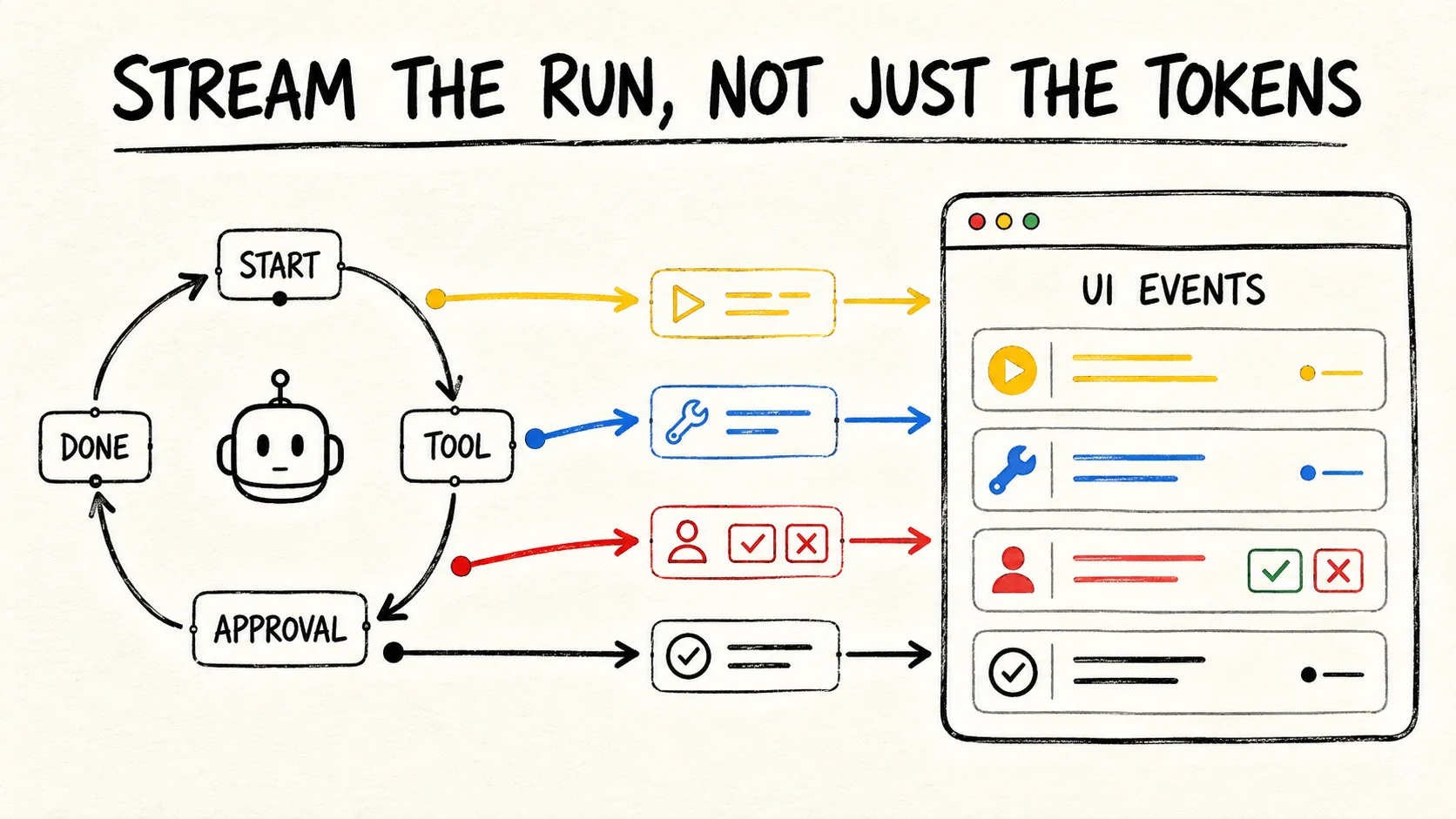
To stream AI agent progress, send run events rather than response fragments alone. Each event should identify the run, carry a sequence, declare its type, and contain only data the UI may show. The guide to durable execution for AI agents covers work recovery; this article covers delivering state to the browser.
This article uses SSE as the starting point for a server-to-browser flow and compares WebSockets with polling. The SDK integration code is illustrative and was not executed in this repository. Treat it as a contract to test against the runtime you choose.
The short answer
- Stream normalized run, step, tool, approval, failure, and completion events.
- Use SSE for one-way browser updates; use WebSockets when the client must control the run in real time.
- Include
runId,sequence,type, and terminal state in every event.- Persist state and a replay window. The connection is a delivery channel, not the source of truth.
Why do tokens fail to show real progress?
Tokens describe partial text. They do not say whether the agent started a tool, whether the tool finished, whether someone must approve an action, or whether the runtime still has internal work after the last token. The OpenAI Agents SDK, "Streaming" separates raw model events, run items, and agent updates. The UI should preserve that difference.
A progress bar should not be calculated from response length either. An agent can produce text while waiting for a tool. It can call another tool without producing text between them. It can finish without a useful answer. Events should represent what the runtime knows, not what looks convincing on screen.
A practical split is to keep two flows. One carries partial text for the conversation experience. The other carries execution facts for the activity panel. They can share a connection, but their types, permissions, and retention rules differ. Do not expose private reasoning or sensitive arguments just because the SDK puts them in a stream.
The most useful contract does not pretend every task has a percentage. It shows the last confirmed fact: "the search finished," "approval is pending," or "the run failed." An honest sequence of states helps more than an invented percentage for work whose size the system does not know.
Which transport should you choose for agent events?
SSE is a good default when the browser receives events and the server controls
the flow. The browser reconnects an EventSource after a lost connection, and
the format lets you name an event, send data, and attach an ID. MDN's "Using
server-sent events"
also documents keep-alive comments and the retry field.
Use WebSockets when the UI must send commands during the run, such as cancelling, answering an approval, or adding input without opening another request. The cost is higher: you now manage messages in both directions, connection authorization, shutdown, and reconnects. Google Cloud's "Host AI agents on Cloud Run resources" lists streaming HTTP and WebSockets as options for agent interactions.
Polling is still valid when the run is durable and the UI only needs to read its state. It simplifies proxies, reconnects, and scaling, but it can delay visible updates and create repeated reads. Choose the transport from the control you need, not from a desire to animate a progress bar.
| UI need | Starting choice | The contract still needs |
|---|---|---|
| Receive events from the server | SSE | IDs, replay, authorization, and terminal state |
| Receive and send live commands | WebSockets | Bidirectional messages, heartbeat, and explicit close |
| Read durable state | Polling | State version, interval, and idempotent response |
For a Cloud Run deployment, the comparison of Services, Jobs, and worker pools explains the execution boundary. The endpoint that streams events does not need to be the process doing all the work. A service can follow persisted events while a worker executes the task.
What should an agent event envelope contain?
An event envelope should be small, versioned, and sufficient to render a state
change without knowing the SDK's internal objects. The runtime should define the
runId and sequence; the browser can discard duplicate events and request
missing ones. The shape below is an application suggestion, not an official
OpenAI Agents SDK format.
type AgentEvent = {
  version: 1;
  runId: string;
  sequence: number;
  type:
    | "run.started"
    | "step.started"
    | "tool.called"
    | "tool.completed"
    | "approval.required"
    | "run.failed"
    | "run.completed";
  status: "running" | "waiting" | "failed" | "completed";
  occurredAt: string;
  payload: Record<string, unknown>;
};
The client needs a small state machine. run.started may lead to step.started,
tool.called, approval.required, run.failed, or run.completed. A pending
approval is not a failure or completion. A network timeout also does not prove
that a tool did not execute. The backend should check execution state before
emitting a final transition. If the flow has many transitions, the state machine
for AI agents helps decide
which states are legitimate.
Public events should contain tool names the user may see, short summaries, and non-sensitive identifiers. Remove tokens, full prompts, credentials, private arguments, and large results. The coding agent observability in CI guide explains how to separate a restricted audit trail from the summary sent to a consumer.
How do you adapt a runtime stream for the UI?
The adapter translates SDK events into the application's contract. In the
OpenAI Agents SDK for JavaScript, run_item_stream_event can represent a tool
call, tool output, approval, or agent update. The adapter does not need to copy
every field. It chooses a public summary and keeps complete details in run
storage.
import { Agent, run } from "@openai/agents";

async function* streamPublicEvents(input: string, runId: string) {
  const agent = new Agent({
    name: "Support agent",
    instructions: "Use the available tools and report a safe final answer.",
  });

  const stream = await run(agent, input, { stream: true });
  let sequence = 0;

  yield event(runId, ++sequence, "run.started", "running", {});

  for await (const item of stream) {
    const publicEvent = toPublicEvent(item, runId, ++sequence);
    if (publicEvent) yield publicEvent;
  }

  await stream.completed;
  yield event(runId, ++sequence, "run.completed", "completed", {});
}
This omits persistence, approval, error handling, and the implementation of
toPublicEvent on purpose. A real server should save an event before publishing
it, treat stream.completed as the completion boundary, and emit run.failed
from a controlled error path. The OpenAI Agents SDK, "Running
Agents"
describes the streamed result and the need to await the run lifecycle.
An SSE route can serialize the same envelope:
function toSse(event: AgentEvent): string {
  return [
    `id: ${event.runId}:${event.sequence}`,
    `event: ${event.type}`,
    `data: ${JSON.stringify(event)}`,
    "",
    "",
  ].join("\n");
}
The browser can use addEventListener for each type it needs. The panel can
render tool.called as "Looking up orders" and tool.completed as "Orders
looked up," while final text stays in another area. That separation stops a
language update from changing operational state.
How do you reconnect without losing events?
Reconnects need two things: a monotonic ID and a place from which the server can
repeat events. An SSE id helps the browser tell the server which event it last
received. The server must still decide whether to keep events in a log, an
execution table, or only a short in-memory window.
When the connection returns, compare the last ID with the runId history. Replay
later events in the same order. If an event has expired, return the current
snapshot and a marker that says there was a gap. The UI can redraw its timeline
from the snapshot without pretending it received every step.
Do not use reconnect replay as a way to replay external effects. Sending
tool.completed to the screen again is safe when the consumer deduplicates by
ID. Running the tool again is a different operation. The AWS guide to state and
checkpoint recovery
connects checkpoints with idempotency, conditional writes, and state lifecycle.
Durable state also needs a scope. A runId must not expose events from another
user, project, or environment. Microsoft's guide to managing state for
long-running agents
separates small metadata, such as watermarks and idempotency keys, from bulk
checkpoint state. That split also reduces what the endpoint must load for a
reconnect.
A rule I use when designing this contract is to make every event answer a panel question: "what changed?", "which run changed?", and "can I trust that it finished?" If it cannot answer all three, it is usually an internal log rather than a UI message.
What should you test before calling the stream ready?
Test the event sequence as public behavior. You do not need to assert every text delta, but you should prove that a tool is not shown as complete before it is called, that an approval pauses the run, and that the terminal event appears only after the runtime really finishes. The OpenAI Agents SDK testing guide provides a model for testing streamed and controlled events.
A minimal suite should cover:
- A normal run emits
run.startedand ends inrun.completed. - A tool emits a call and output without leaking a private argument.
- An approval emits
approval.requiredand continues only after a decision. - An error emits
run.failedwith a safe reason and queryable state. - A reconnect receives only events after the last
sequence. - A duplicate event does not duplicate the timeline in the UI.
- A cancellation is not rendered as success.
- An unknown event is ignored or routed through a compatible version.
To validate the data each tool returns, see validating tool calls in TypeScript. The adapter boundary and the stream boundary should reject invalid data before it is presented as progress.
Test the transport too. Close the connection during a tool, open two tabs for the same run, and remove a user's permission during execution. Check that the server closes the right subscription, each client receives only its scope, and the run continues or stops according to an explicit policy.
The UI test should check visible states, not only whether text exists. An assertion such as "the screen says complete" should depend on the terminal event and a saved result. If the UI turns green when it receives the last token, the test is validating the illusion the contract should prevent.
Common mistakes when streaming agent progress
The most common mistake is publishing the provider's raw stream. That couples the UI to the SDK, exposes details that should stay private, and turns a model change into a frontend change. Normalize on the backend and keep the public payload smaller than the internal event.
Another mistake is treating run.completed as proof that the browser received
the message. The runtime may finish while the client is disconnected. The server
needs persisted state and a query or replay path. The connection reduces visible
waiting; it does not confirm permanent delivery.
Approval is easy to forget too. The Agents SDK exposes interruptions and a state that can resume after a decision. The UI should show that the run is waiting, rather than displaying silence or an unexplained spinner. To decide when approval is needed, use the human approval gate analysis for AI agents, which handles risk policy separately from transport.
As volume grows, progress events can become a second source of pressure. Limit payload size, discard old text deltas when the product does not need them, and keep heartbeats separate from state changes. If a client is slow, prefer a fresh snapshot to an endless message queue that nobody can render.
Conclusion: stream execution facts
An agent UI becomes more trustworthy when the backend streams facts confirmed by
the runtime. Partial text can make a response feel fast, but tool.completed,
approval.required, run.failed, and run.completed explain what the execution
is doing.
Start with a small envelope: runId, sequence, type, status, time, and safe
payload. Use SSE for server-to-browser flows, WebSockets when control must travel
both ways, and polling when a durable query is enough. Then test reconnects,
approvals, cancellation, redaction, and terminal behavior with the same care you
apply to the agent itself.
For workflows that cross development sessions and need context continuity, I use RemoteCode as my own tool. This mention is about work continuity, not a performance measurement of the stream.
Frequently asked questions
Is SSE better than WebSockets for an AI agent?
There is no universal choice. SSE is often enough when the server sends events to the browser and the client uses separate requests to act. WebSockets make sense when cancellation, approval, or new input must travel through the same channel. In both cases, use IDs, authorization, durable state, and a reconnect rule.
Should I stream the agent's reasoning to show progress?
No. Show safe states and summaries, such as a started tool, a pending approval, or a completed step. Private reasoning, full prompts, credentials, and sensitive arguments do not belong in the public contract. Users need to know what happened and what they can do, not every internal detail produced by the model.
Does the last token mean the agent is finished?
Not necessarily. The runtime may still persist a session, record an approval, or run callbacks after the last visible delta. Wait for the completion boundary documented by the runtime and emit the terminal event from that state. If the connection dropped, query saved state before showing success.
Sources consulted
- OpenAI Agents SDK, "Streaming", retrieved 2026-09-03.
- OpenAI Agents SDK, "Running Agents", retrieved 2026-09-03.
- OpenAI Agents SDK, "Testing", retrieved 2026-09-03.
- Google Cloud, "Host AI agents on Cloud Run resources", retrieved 2026-09-03.
- MDN, "Using server-sent events", retrieved 2026-09-03.
- AWS, "Implement comprehensive state management and checkpoint-based recovery", retrieved 2026-09-03.
- Microsoft Learn, "Manage state for long-running agents", retrieved 2026-09-03.