

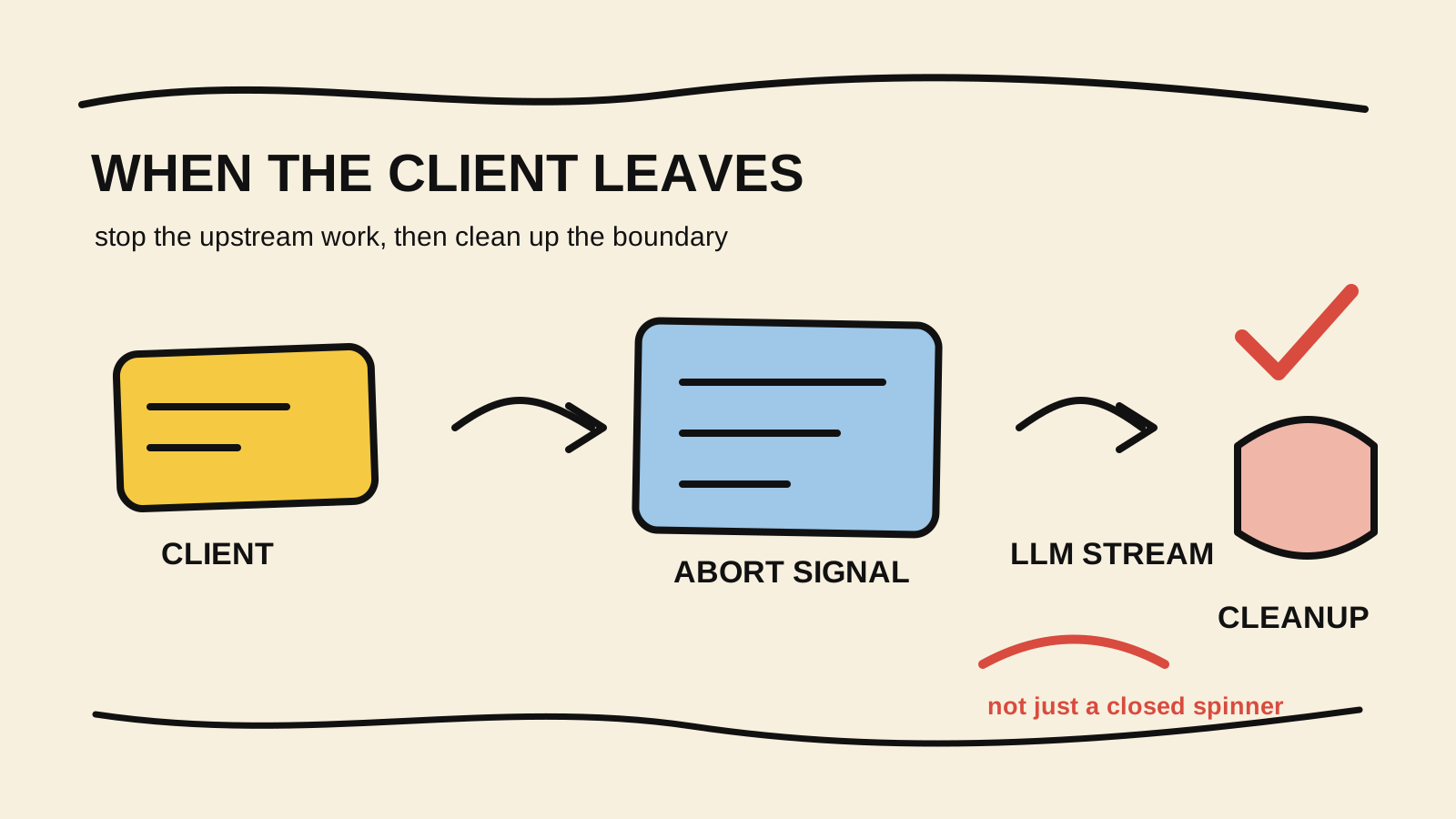
Closing a tab does not automatically cancel the request your server made to an LLM. The browser may abandon the stream while the backend keeps waiting for tokens, holding a connection open, or preparing another attempt.
The fix is to treat the HTTP lifecycle as part of the runtime. When the server response closes before it finishes, abort an AbortController, pass its signal to the SDK or fetch that talks to the LLM, and remove the listeners when the response completes normally. The guide to cancelling an agent when a tool hangs covers the broader cancellation policy; this article focuses on the boundary between client, server, and upstream.
This article uses Node.js and TypeScript to explain the mechanism. The adapter code is illustrative and was not run against a real provider in this repository. The OpenAI Node SDK documents that an AbortSignal can cancel a request, including while its response body is being read. The same pattern can be adapted to another SDK that accepts cooperative cancellation.
The short rule
- Stopping your wait on a Promise is not the same as aborting the I/O it is waiting for.
- The response close must reach the upstream
AbortSignal.- A normally completed response must not trigger cancellation or leave listeners attached.
- Cancelling the wait cannot undo an external side effect that was already accepted.
What needs to be cancelled?
There are three different layers in a streaming endpoint:
- the connection between the client and your server;
- the server's request to the model, usually a stream or HTTP request;
- any tool, query, or worker that the agent started before the client left.
An res.end() or a return in the handler solves only the first layer. If the model request stays alive, the process is still consuming resources. If a tool has already published a message or written a record, no AbortSignal can guarantee that the effect disappeared.
The runtime needs cooperative propagation: the disconnect event aborts the signal, and every operation that may wait on I/O observes it. The guide to streaming AI-agent progress to a UI covers the event contract sent to the browser. The decision to stop work belongs in the runtime, before the end event reaches the UI.
Turn the HTTP close into an AbortSignal
The server should create one controller per request. In Express, a useful combination is watching close on the response and checking writableEnded: close also participates in the normal completion path, so a response that already finished must not be aborted. The official OpenAI example also watches an aborted request and removes listeners at the end.
import type { Request, Response } from "express";

type Disconnect = {
  signal: AbortSignal;
  cleanup: () => void;
};

export function watchClientDisconnect(
  req: Request,
  res: Response,
): Disconnect {
  const controller = new AbortController();

  const abort = (reason: string) => {
    if (!controller.signal.aborted) {
      controller.abort(new Error(reason));
    }
  };

  const onRequestAborted = () => abort("request_aborted");
  const onResponseClose = () => {
    if (!res.writableEnded) abort("client_disconnected");
  };

  // The request event covers an aborted incoming body.
  req.once("aborted", onRequestAborted);
  // The response event covers a client leaving during the stream.
  res.once("close", onResponseClose);

  return {
    signal: controller.signal,
    cleanup() {
      req.off("aborted", onRequestAborted);
      res.off("close", onResponseClose);
    },
  };
}
The Node.js manual marks IncomingMessage's aborted event as deprecated in current versions and recommends the request close path. Frameworks and adapters may expose different names. Keep the detail in a small function and check the contract of the runtime that actually serves the endpoint.
cleanup is not cosmetic. Without it, every completed request can leave a function attached to a response object. The listener must also not abort the request after the server has successfully called res.end().
Pass the signal to the LLM stream
The controller matters only if the adapter receives the signal. In the official OpenAI SDK, the signal goes in the request options. In a client built on fetch, it goes in RequestInit. The option name changes by library, but the boundary is the same.
import OpenAI from "openai";

const openai = new OpenAI();

async function streamAnswer(
  prompt: string,
  signal: AbortSignal,
): Promise<AsyncIterable<{ delta: string }>> {
  const stream = await openai.chat.completions.create(
    {
      model: "gpt-5.5",
      stream: true,
      messages: [{ role: "user", content: prompt }],
    },
    { signal },
  );

  return (async function* () {
    for await (const chunk of stream) {
      const delta = chunk.choices[0]?.delta?.content;
      if (delta) yield { delta };
    }
  })();
}
The stream type varies by SDK and installed version, so the cast above is only an illustrative boundary. In production code, use the type exported by the library and treat an abort error as an expected path. Do not turn a client cancellation into an application error or start an automatic retry just because the Promise rejected.
A minimal handler should check the signal before starting the call, during iteration, and before writing to the response:
app.post("/api/chat", async (req, res, next) => {
  const disconnect = watchClientDisconnect(req, res);

  try {
    if (disconnect.signal.aborted || res.destroyed) return;

    const stream = await streamAnswer(req.body.prompt, disconnect.signal);
    res.setHeader("Content-Type", "text/plain; charset=utf-8");

    for await (const chunk of stream) {
      if (disconnect.signal.aborted || res.destroyed) break;
      res.write(chunk.delta);
    }

    if (!disconnect.signal.aborted && !res.destroyed) res.end();
  } catch (error) {
    if (disconnect.signal.aborted) return;
    next(error);
  } finally {
    disconnect.cleanup();
  }
});
The OpenAI Node streaming example follows the same idea: watch for disconnection, pass the signal to the stream, avoid new writes, and clean up listeners. A real handler also needs to account for headers already sent and the error format of its framework.
Combine disconnect with a deadline
The client is not the only reason to stop a run. A server deadline protects the endpoint when the client stays connected but the upstream makes no progress. Node.js provides AbortSignal.timeout() and AbortSignal.any() for combining reasons:
function withDeadline(clientSignal: AbortSignal, totalMs: number) {
  const deadline = AbortSignal.timeout(totalMs);
  return AbortSignal.any([clientSignal, deadline]);
}

const signal = withDeadline(disconnect.signal, 30_000);
const stream = await streamAnswer(prompt, signal);
The Node.js globals manual explains that AbortSignal.any() aborts when any signal in the list aborts and preserves the reason that caused the shutdown. Record that reason as client_disconnected, deadline, or server_shutdown. A generic request failed message loses the information needed to decide whether a run can resume.
For an agent that calls tools after each model response, pass the same signal to every step. The guide to pausing and resuming an agent helps when the intention is to continue the work later instead of cancelling the run attached to the UI.
Do not create a ghost retry
An abort may appear as a rejected SDK Promise, a stream error, or APIUserAbortError. Classify it before the retry policy runs:
| Situation | Endpoint state | Next action |
|---|---|---|
| Client left before the first token | cancelled_by_client |
End the stream and do not retry automatically |
| Client left during the stream | cancelled_by_client |
Abort upstream and record the interrupted step |
| Deadline expired while the client stayed connected | timed_out |
End or transfer to durable execution, according to the product |
Provider returned 5xx before an external effect |
upstream_failed |
Retry a limited number of times only if policy allows |
| A write tool was interrupted without confirmation | effect_uncertain |
Check external state before retrying |
The OpenAI Node SDK documents AbortSignal cancellation and retries for transient failures. The signal should cover the retry wait as well, and the retry layer must understand that the client no longer wants that answer. Cancelling a stream is not permission to execute the operation again in the background.
If the product must continue after a tab closes, do not tie the work to the HTTP connection. Persist a durable run, return an identifier, and let another connection read its state. Interactive response cancellation and asynchronous execution are different contracts.
Verify that upstream work really stopped
The weakest test calls controller.abort() before the model starts. That proves only that the signal arrives already aborted. A useful test starts a pending operation, simulates the response closing, and verifies that the upstream received the abort before another step begins.
function pendingRequest(signal: AbortSignal): Promise<never> {
  return new Promise((_, reject) => {
    const stop = () => reject(signal.reason ?? new Error("aborted"));

    if (signal.aborted) {
      stop();
      return;
    }

    signal.addEventListener("abort", stop, { once: true });
  });
}

const controller = new AbortController();
const upstream = pendingRequest(controller.signal);

controller.abort(new Error("client_disconnected"));

await expect(upstream).rejects.toThrow("client_disconnected");
In the endpoint suite, also cover these cases:
- a completed response calls
cleanupand does not abort the next piece of work; - a client leaving during the first chunk produces no later writes;
- a deadline produces
timed_out, notcancelled_by_client; - a provider error without a disconnect reaches the error middleware;
- a write tool interrupted without confirmation is marked uncertain, with no blind retry.
Add a runId, stop reason, step name, and effect state to the log. Do not record a prompt, token, or sensitive argument just to prove cancellation worked. The guide to validating tool calls in TypeScript shows a similar boundary: the value of the test is observing the decision and effect, not the exception alone.
When is not cancelling the right choice?
Not every connection close means the work has lost its value. A long report, migration, or approval-started task may continue in a worker. In that case, separate the connection that delivers progress from the persisted run. The guide to durable execution for AI agents covers the queue-versus-workflow decision.
Do not promise that cancellation erases the past. If the LLM already produced a tool call and the server forwarded it, the signal can interrupt the wait but cannot remove a message from a broker or undo a confirmed change. Use idempotency, state queries, and explicit compensation for those cases.
For long agent workflows, I use RemoteCode as the author's tool for continuity across sessions. It does not replace a cancellation signal, a deadline, or proof that an external operation finished.
Conclusion
The path is short, but every link matters: detect the disconnect, abort the signal, pass it to the LLM stream, stop new writes, clean up listeners, and record the reason. If one link ignores the signal, the server may keep working after the user has left.
Start with an isolated adapter and a fixture that stays pending until the signal aborts. Then test the endpoint behind the proxy it actually uses. The important result is that the runtime can prove the UI stopped showing tokens, no later step started, and any uncertain external effect was treated as uncertain.
Sources consulted
- Node.js, “HTTP”, retrieved November 12, 2026, https://nodejs.org/api/http.html
- Node.js, “Global objects: AbortController and AbortSignal”, retrieved November 12, 2026, https://nodejs.org/api/globals.html
- OpenAI, “openai-node”, retrieved November 12, 2026, https://github.com/openai/openai-node
- OpenAI, “Stream to client with Express”, retrieved November 12, 2026, https://github.com/openai/openai-node/blob/main/examples/chat-completions/stream-to-client-express.ts