

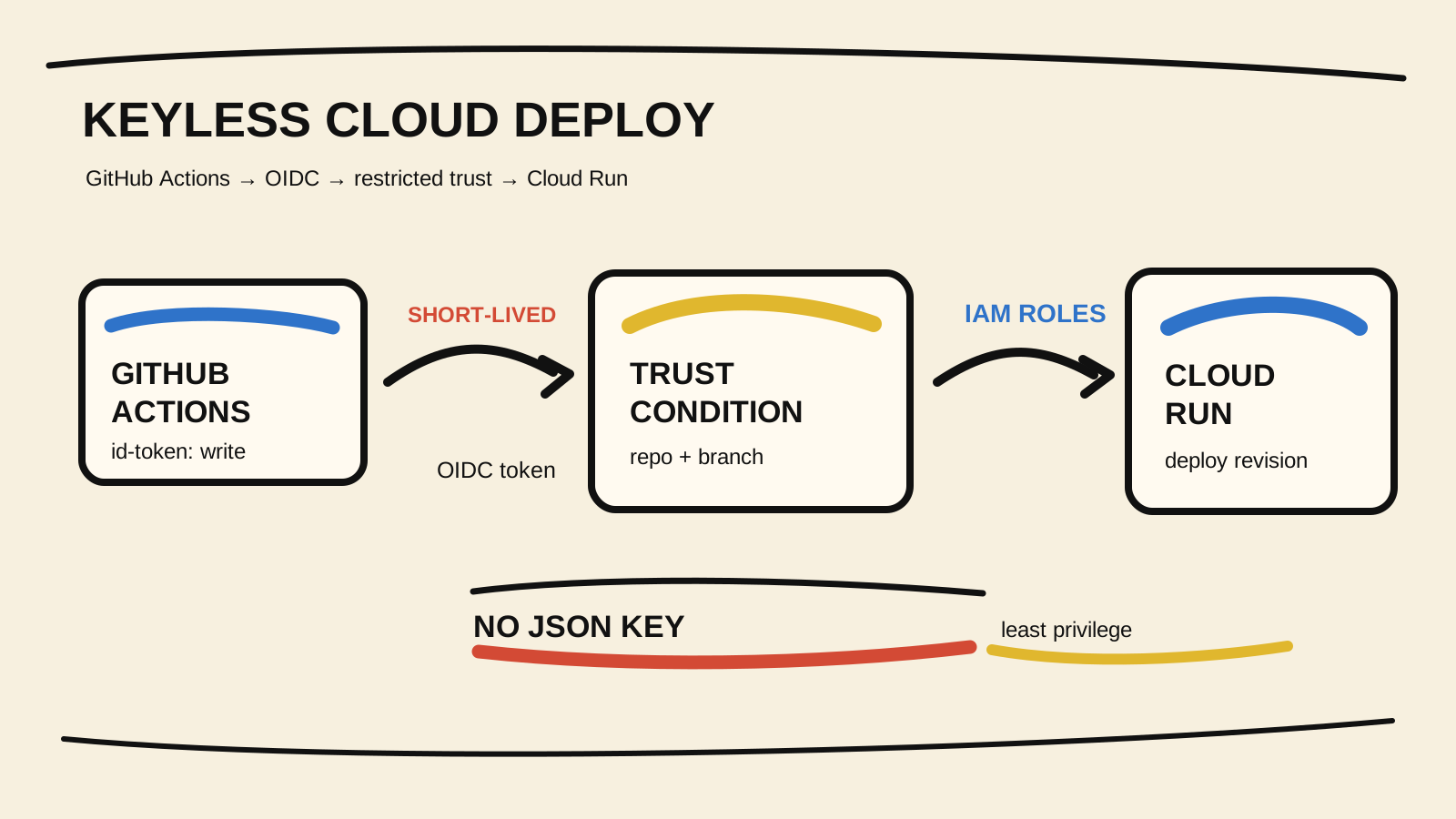
A GitHub Actions pipeline does not need to store a service-account JSON key to deploy to Cloud Run. The more controlled path is to use OpenID Connect (OIDC) so each run requests a short-lived credential while Google Cloud decides whether that repository may assume the deployment identity.
The detail people often miss is this: id-token: write lets the workflow request an OIDC token, but it does not grant Google Cloud access. Access comes from the combination of the Workload Identity Provider condition, the binding that connects the repository to the service account, and that service account's IAM roles. The general Cloud Run guide explains the platform model; this article focuses on the path from CI to deployment.
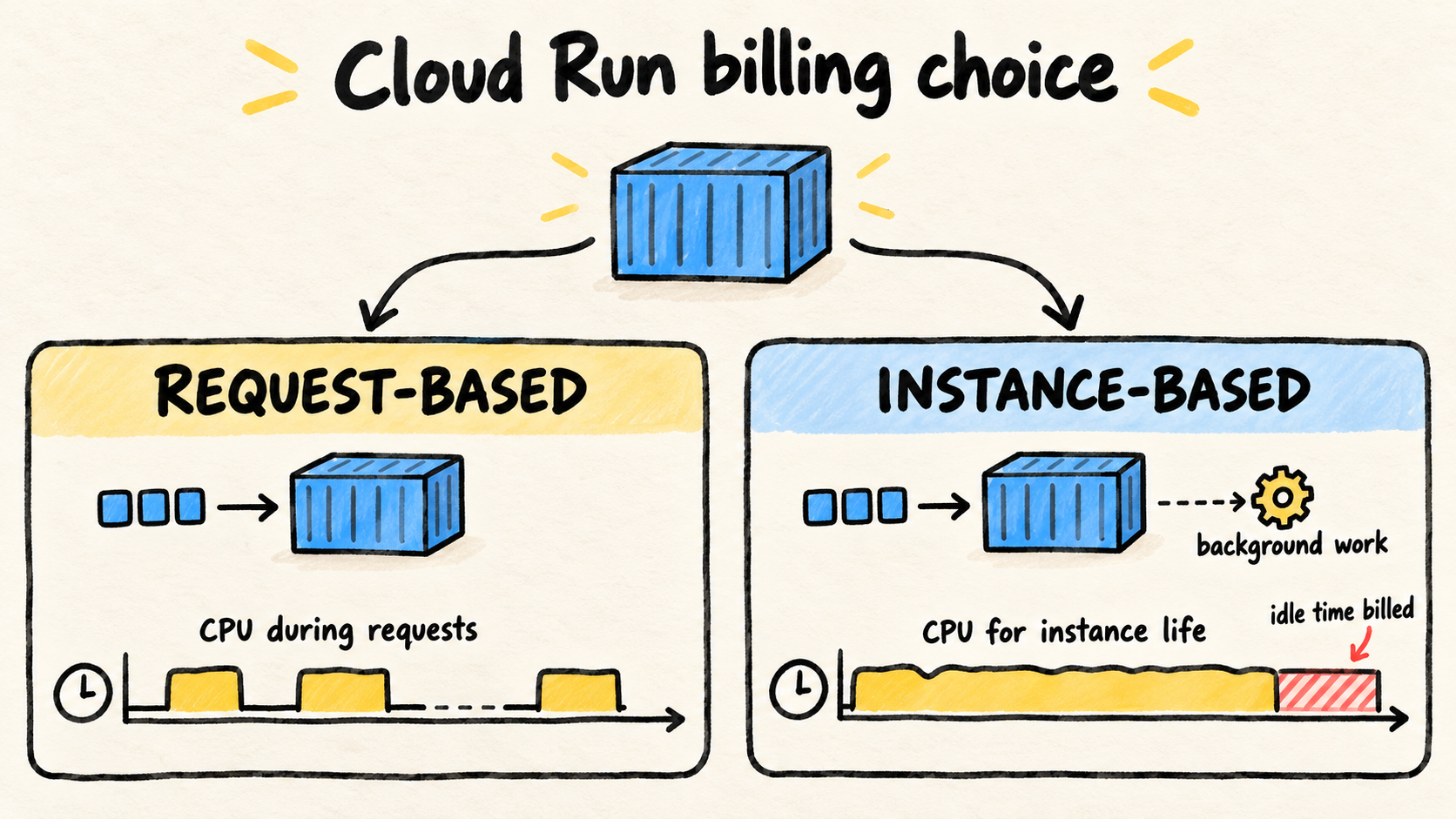
After authentication, the service's lifecycle choice still matters. The Cloud Run comparison of request-based and instance-based billing helps separate the deployment decision from the way the service runs.
The commands and YAML below are illustrative. I did not use a Google Cloud project, credentials, or a live pipeline to write this article. Apply the setup in a test project first, then check it against your organization's names and policies.

Key Takeaways
- Create a Workload Identity Pool and an OIDC provider that accepts only the expected repository.
- Give the deployment service account the
roles/iam.workloadIdentityUserbinding for that repository.- Grant Cloud Run, Artifact Registry, and
Service Account Userroles at the needed scope.- In the workflow, use
id-token: write, authenticate withgoogle-github-actions/auth, and only then rundeploy-cloudrun.- Verify the repository, revision, and published URL. The existence of a token does not prove that the deployment is authorized.
What changes when you replace the key with OIDC?
With a JSON key, GitHub Secrets stores a long-lived credential that the pipeline reads. With OIDC, GitHub Actions requests a JWT for that run and Google Cloud evaluates the token through a Workload Identity Provider. GitHub's OIDC guide for cloud providers describes the general sequence: the provider must trust the issuer, the workflow must have permission to request the token, and the policy must restrict who can receive access.
Google Cloud describes workload identity federation as an exchange between the IdP-signed token, the Security Token Service, and IAM. For this case, think in four boundaries:
- GitHub issues a token for the run.
- The provider checks that the token came from an accepted repository.
- The service account allows that federated identity to act on its behalf.
- The service account's roles limit what the deployment can do.
A condition that accepts only the organization is better than no condition, but it can still allow more repositories than intended. If one repository owns the deployment, restrict the provider to the complete ORG/REPO value and repeat that restriction in the IAM binding.
Create a provider restricted to the repository
You need a project, its project number, a pool, an OIDC provider, and a service account that will act as the deployer. The current google-github-actions/auth README recommends mapping the claims used in conditions and warns that the provider should always have an attribute condition.
Set the values in your terminal. They are placeholders, not names to copy literally:
export PROJECT_ID="your-project"
export PROJECT_NUMBER="123456789012"
export GITHUB_REPOSITORY="your-org/your-repo"
export POOL_ID="github"
export PROVIDER_ID="your-repo"
export DEPLOYER_SA="github-deployer@${PROJECT_ID}.iam.gserviceaccount.com"
Create the service account and pool:
gcloud iam service-accounts create github-deployer \
  --project="${PROJECT_ID}" \
  --display-name="GitHub Actions Cloud Run deployer"

gcloud iam workload-identity-pools create "${POOL_ID}" \
  --project="${PROJECT_ID}" \
  --location="global" \
  --display-name="GitHub Actions pool"
Now create the provider. The mapping makes attribute.repository available to the IAM binding. The condition uses the repository claim to keep another repository in the organization out of the pool:
gcloud iam workload-identity-pools providers create-oidc "${PROVIDER_ID}" \
  --project="${PROJECT_ID}" \
  --location="global" \
  --workload-identity-pool="${POOL_ID}" \
  --display-name="GitHub Actions provider" \
  --attribute-mapping="google.subject=assertion.sub,attribute.repository=assertion.repository,attribute.repository_owner=assertion.repository_owner,attribute.ref=assertion.ref" \
  --attribute-condition="assertion.repository == '${GITHUB_REPOSITORY}'" \
  --issuer-uri="https://token.actions.githubusercontent.com"
The expression is deliberately narrow. If you want to allow several repositories, record that decision in the policy and test every combination. Do not replace the condition with a wildcard just to make an authentication error disappear.
The complete provider identifier used by the workflow contains the project number, pool, and provider:
projects/123456789012/locations/global/workloadIdentityPools/github/providers/your-repoLet the repository use the deployer
The provider condition controls entry into the pool. You still need to authorize the federated identity to impersonate the service account. This binding uses the mapped repository, not the whole organization:
export WORKLOAD_IDENTITY_POOL="projects/${PROJECT_NUMBER}/locations/global/workloadIdentityPools/${POOL_ID}"

gcloud iam service-accounts add-iam-policy-binding "${DEPLOYER_SA}" \
  --project="${PROJECT_ID}" \
  --role="roles/iam.workloadIdentityUser" \
  --member="principalSet://iam.googleapis.com/${WORKLOAD_IDENTITY_POOL}/attribute.repository/${GITHUB_REPOSITORY}"
The authentication action README shows this service-account-based federation model. The action can use direct federation for compatible resources, but the dedicated deployer path makes the roles easier to review for a Cloud Run pipeline.
Grant deployment roles at the right scope
The deployer does not need to be a project owner. To publish an image that already exists in Artifact Registry to an existing service, the current Cloud Run IAM roles documentation separates these needs:
| Resource | Role used in the example | What it does |
|---|---|---|
| Cloud Run service | roles/run.developer |
Create or update the service and revision within the granted scope |
| Artifact Registry repository | roles/artifactregistry.reader |
Read the image that will be deployed |
| Runtime service account | roles/iam.serviceAccountUser |
Let the deployer use the identity selected by the service |
The Service Account User role deserves attention. It allows the deployer to act as the runtime identity. If that identity has broad permissions, the impact of a compromised workflow grows too. Use a separate runtime service account and give it only the roles the application needs.
The grant commands depend on the service name, region, and repository. A reference skeleton is:
export SERVICE="your-service"
export REGION="us-central1"
export GAR_LOCATION="us-central1"
export REPOSITORY="containers"
export RUNTIME_SA="cloud-run-runtime@${PROJECT_ID}.iam.gserviceaccount.com"

gcloud run services add-iam-policy-binding "${SERVICE}" \
  --project="${PROJECT_ID}" \
  --region="${REGION}" \
  --member="serviceAccount:${DEPLOYER_SA}" \
  --role="roles/run.developer"

gcloud artifacts repositories add-iam-policy-binding "${REPOSITORY}" \
  --project="${PROJECT_ID}" \
  --location="${GAR_LOCATION}" \
  --member="serviceAccount:${DEPLOYER_SA}" \
  --role="roles/artifactregistry.reader"

gcloud iam service-accounts add-iam-policy-binding "${RUNTIME_SA}" \
  --project="${PROJECT_ID}" \
  --member="serviceAccount:${DEPLOYER_SA}" \
  --role="roles/iam.serviceAccountUser"
If the pipeline also pushes the image, the deployer needs write permission on the repository. That is a scope change, not a detail of OIDC. Separate the publishing role from the runtime role, and do not grant artifactregistry.admin just because the first test failed.
Write the GitHub Actions workflow
The workflow must declare id-token: write, check out the repository before authentication, and pass the provider and service account to the action. The deploy-cloudrun action documents the combined use of auth@v3 and deploy-cloudrun@v3. The example uses checkout@v7, auth@v3, and deploy-cloudrun@v3, versions shown in the current documentation consulted on 2026-11-11.
name: Deploy Cloud Run

on:
  push:
    branches: [main]

env:
  PROJECT_ID: $
  REGION: $
  SERVICE: $
  IMAGE: $

jobs:
  deploy:
    runs-on: ubuntu-latest
    permissions:
      contents: read
      id-token: write

    steps:
      - name: Check out the repository
        uses: actions/checkout@v7

      - name: Authenticate to Google Cloud
        uses: google-github-actions/auth@v3
        with:
          project_id: $
          workload_identity_provider: $
          service_account: $

      - name: Deploy the existing image
        id: deploy
        uses: google-github-actions/deploy-cloudrun@v3
        with:
          project_id: $
          region: $
          service: $
          image: $

      - name: Check the deployed service
        run: curl --fail --silent --show-error "$/health"
GCP_WIF_PROVIDER must contain the complete identifier, not only the name github. GCP_DEPLOYER_SERVICE_ACCOUNT must point to the service account that received the binding. A swapped variable can produce a generic permission message, so record these values in the pipeline inventory without printing tokens or credentials.
The workflow assumes $ already points to an image in Artifact Registry. If the same job also builds and pushes the image, authenticate Docker with a short-lived access token and grant roles/artifactregistry.writer to the deployer. The docker/login-action documentation shows this pattern with oauth2accesstoken; do not use a registry JSON key as a shortcut.
The file created by the authentication action also deserves a repository rule:
gha-creds-*.jsonThe google-github-actions/auth README recommends ignoring this pattern when the action creates a credentials file for later tools. The file is temporary, but a .gitignore rule lowers the risk of packaging the artifact into an image or commit.
How do you verify the deployment instead of trusting the green check?
Verify in layers. A green job proves that the steps ended without an error. It does not prove that the service received the right image or that the main endpoint responds.
- Confirm identity and scope. Review the organization, repository, and branch accepted by the provider condition.
id-token: writealone grants no Google Cloud role. - Confirm the revision. After deployment, compare the image and digest shown by
gcloud run services describewith the image the pipeline calculated for that commit. - Test a safe endpoint. Use a health check that does not write to a database or enqueue work. If the service is private, configure the test authentication without making the service public.
- Inspect logs. A 200 response from
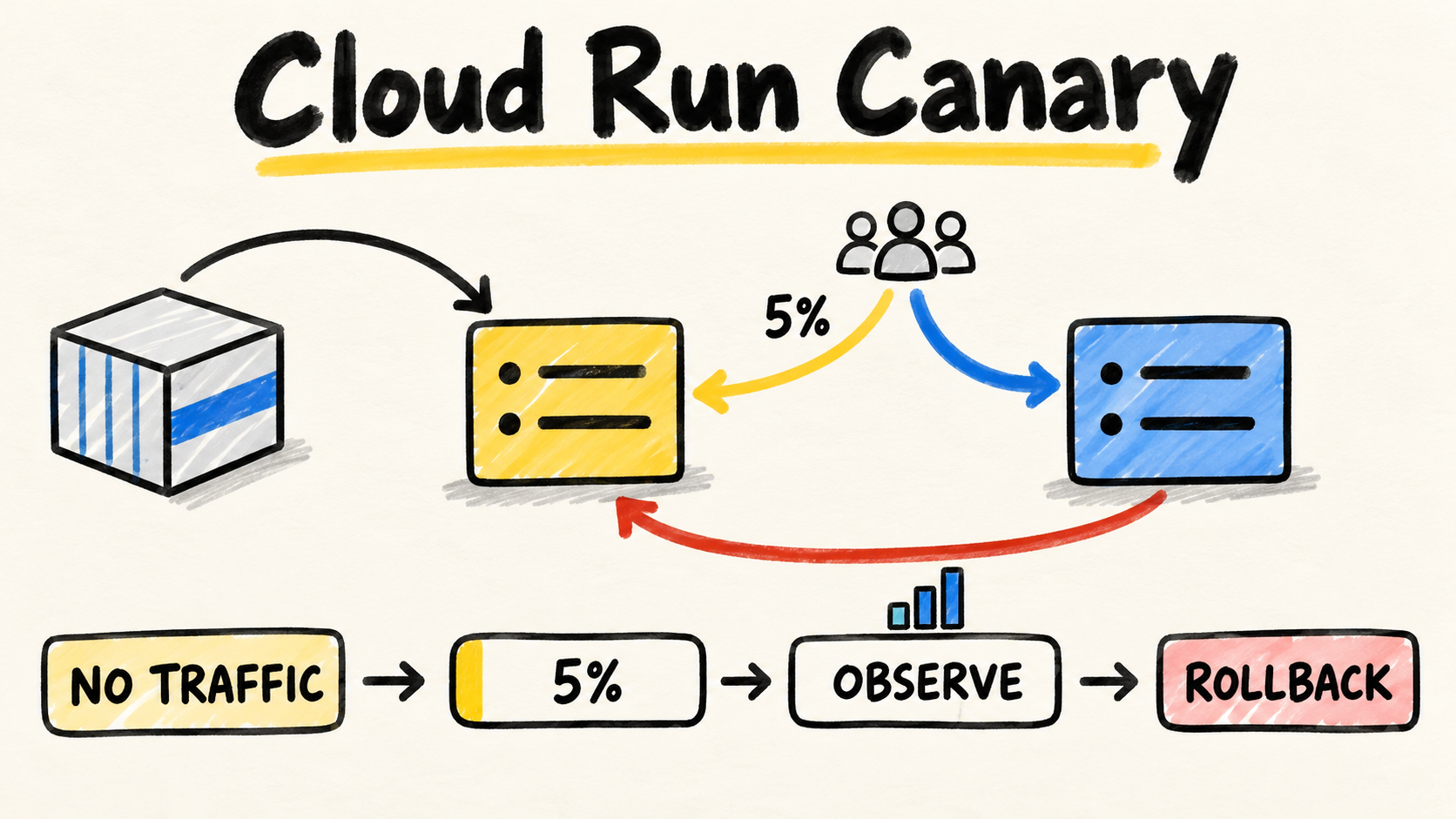
curldoes not prove that an important dependency is healthy. Watch startup, authorization, image reads, and the application's main path. - Prove rollback. The Cloud Run deploy action exposes the service URL as an output. Record the previous revision and know which command or workflow restores it before promoting a larger change. For traffic decisions, see the Cloud Run canary deployment guide.
This sequence separates authentication, authorization, artifact delivery, and application behavior. When everything is reduced to “the job passed,” the first failure is harder to locate.
Diagnose the common errors
The provider rejects the token
Check the issuer https://token.actions.githubusercontent.com, the assertion.repository mapping, and the provider condition. A renamed repository, a fork, or a workflow running in another context may not satisfy the expression. Do not remove the condition to test; fix the claim that should be accepted.
The token is issued, but the service account is denied
This usually means the pool principal lacks roles/iam.workloadIdentityUser on the service account, or the principalSet uses the wrong project number, pool, or attribute. Compare the complete pool identifier with the binding and confirm that the attribute path uses exactly attribute.repository/ORG/REPO.
The deployer cannot update the service
The authenticated service account can be valid and still lack the role on the right resource. Check roles/run.developer on the service or project, roles/artifactregistry.reader on the image repository, and roles/iam.serviceAccountUser on the runtime identity. The action does not replace these roles.
The image exists, but Cloud Run cannot use it
Separate the identity that publishes the image from the identity that runs the container. The deployer must read the repository during deployment. The runtime identity needs the application's access, but should not receive the deployer's key. If the error appears only in one region, also check the full repository name and the image project.
The example works manually but fails on GitHub
Your local terminal uses your session identity. The workflow uses the federated principal and the provider condition. Repeat the diagnosis with the repository, branch, environment, and service account used by the run. Do not put the local key in a secret just to confirm the roles; that masks the problem the migration was meant to remove.
When is this model not enough?
OIDC removes the stored JSON key, but it does not remove the need for a trust policy. A broad provider, an administrative service account, or a workflow that accepts unreviewed code is still a risk.
If the job builds, pushes, deploys, runs a migration, and changes traffic, consider splitting those operations into jobs with different permissions. If the organization requires approval before production, use a protected environment and connect the deployment condition to that flow. If the resource does not accept federated identities directly, use service-account federation with an explicit binding and document the exception.
Also keep the deployer identity separate from the container identity. The first publishes a revision. The second exists while the service runs and accesses Pub/Sub, Secret Manager, Cloud SQL, or another resource. Mixing the two makes rollback and incident investigation harder.
The value of a keyless deploy is not a YAML substitution. It is making Google Cloud answer a specific question before each publication: can this repository, in this context, assume this identity to perform exactly this deployment? If the answer is not expressed in the condition and roles, the pipeline still depends on implicit trust.