The pipeline stops before the tests because npm ci found a package.json that does not match package-lock.json. The common reaction is to replace the command with npm install until the job turns green. That hides the cause: CI has found that the repository does not describe one dependency tree.
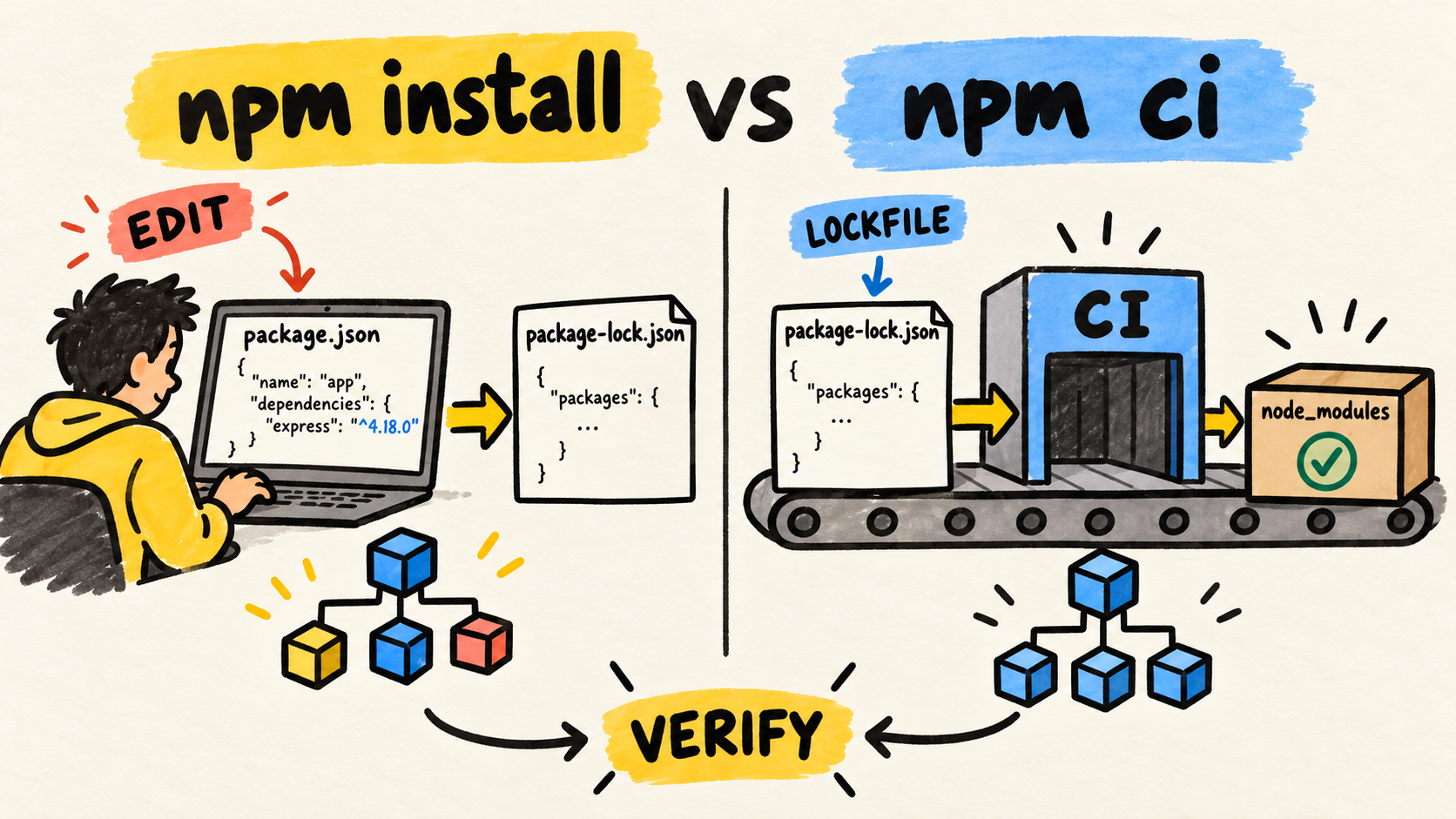
The practical rule is simple: use npm install to add or update dependencies during development. Use npm ci in CI when the lockfile has been reviewed and should be restored without changes. If the files drift, fix the manifest and lockfile in the branch instead of letting the pipeline choose a new version.
Dependency installation is part of the delivery contract. The GitLab CI guide for Node.js covers the shape of a pipeline. This article focuses on the decision that happens before typechecking, tests, and the build.
Short answer
- Run
npm installwhen changing dependencies or regenerating the lockfile.- Run
npm ciin automated jobs that should install the approved state.- Commit
package.jsonandpackage-lock.jsontogether when a dependency changes.- If
npm cifails, compare the two files before changing the command.- A lockfile improves repeatability, but it does not replace review of scripts, Node versions, or runner permissions.
When should you use npm install?
npm install is the change command. It installs project dependencies and can update package-lock.json when the range in package.json no longer matches the lockfile. The npm npm install documentation, checked on October 26, 2026, describes the manifest as the source of acceptable ranges and the lockfile as the record of resolved versions.
Use it to add a production or development dependency, update an allowed version, rebuild the lockfile after an intentional change, or test a configuration that affects dependency resolution. Review the diff afterward. The lockfile can change beyond the line you edited because resolution affects transitive dependencies. It is not disposable generated noise. It is the concrete proposal for the tree that the next environment should install.
During development, confirm the Node and npm versions used by the project too. A team that creates a lockfile with one configuration and installs with another may discover the difference only in CI. Record the version in .nvmrc, package.json, mise.toml, or the mechanism the project already uses.
The guide to a lean AGENTS.md treats the install command as part of a repository's verifiable instructions. The same idea applies to any team: say which command restores dependencies, which command changes the tree, and which proof should run afterward.
When should you use npm ci in CI?
npm ci is the normal choice for an automated job that should restore the state described by the lockfile. In 2026, the npm npm ci documentation, checked on October 26, says the project needs a package-lock.json or npm-shrinkwrap.json, the command fails when the lockfile does not match the manifest, and it does not write those files.
That behavior is useful because it is strict. If someone edits package.json and forgets to generate or commit the lockfile, the job stops before testing an unrecorded tree. If node_modules already exists, npm removes it before installing. The job starts with a clean install, within the limits imposed by the runner and the project's scripts.
Use npm ci when the lockfile is versioned, the two dependency files are in sync, the job knows which Node version it should use, resolution flags are recorded, and the result will be followed by typechecking, tests, or a build.
The setup-node lockfile guidance, checked on October 26, 2026, recommends committing the lockfile and using npm ci for npm projects in CI. That is workflow guidance, not permission to copy any configuration. The project still needs to define its Node version, scripts, and platform requirements.
npm ci is not a repair command. If it reports drift, the desired result is an error that someone fixes in the repository. Running npm install inside the job to make the error disappear turns verification into mutation. The next job may then test a tree that is not recorded by the commit.
What happens when the files drift?
Imagine a project with is-number@7.0.0 in its lockfile. If someone changes the manifest to ^6.0.0 without running npm install, CI has no safe answer that preserves both files. npm ci should reject the install and ask the branch to update the lockfile.
I checked this case in a temporary fixture on October 26, 2026, using Node v25.5.0 and npm 11.8.0. I installed is-number@7.0.0, changed only the dependency in package.json to ^6.0.0, and ran npm ci. The command exited with status 1 and reported that is-number@7.0.0 did not satisfy is-number@6.0.0.
The repair flow was:
# After intentionally editing package.json
npm install

# Review and commit both dependency files
git diff -- package.json package-lock.json

# CI restores the approved state
npm ci
In the same fixture, npm install updated the lockfile to 6.0.0. A later npm ci installed that version. This demonstrates the file contract in a small case. It is not a benchmark, does not measure speed, and does not prove behavior for workspaces, native modules, or every lockfile format.
When the error appears in a pull request, do not solve it by deleting the lockfile automatically. Find the change that left the files out of sync. The fix may be to regenerate the lockfile with the project's npm version, adjust the range in the manifest, or restore a change that should have been included in the same commit.
How should you write the install step in CI?
The step should show the boundary: configure the runtime, install what the commit declares, and run proofs. An illustrative GitHub Actions example is:
steps:
  - uses: actions/checkout@v4

  - uses: actions/setup-node@v4
    with:
      node-version-file: ".nvmrc"
      cache: "npm"

  - run: npm ci
  - run: npm run typecheck
  - run: npm test
  - run: npm run build
The YAML is illustrative. Use the action versions and scripts the repository actually maintains. The current setup-node cache and lockfile guidance explains the relationship between the cache, lockfile, and npm ci; it does not guarantee that a cache can hide an invalid install.
For GitLab CI, the equivalent remains explicit:
install:
  script:
    - npm ci

test:
  script:
    - npm run typecheck
    - npm test
Do not mix the step that changes dependencies with the step that verifies a commit. If an automated update needs to run npm install, put it in a separate job, produce the diff, and require review before accepting the lockfile.
Why can npm ci still fail?
An npm ci failure does not automatically mean the command is wrong. Start with the message, then inspect the boundary it identifies.
Manifest and lockfile drift
This is the main case. Compare dependencies, overrides, workspaces, and declared versions. The npm documentation also warns that flags such as --legacy-peer-deps and --install-links used to create the lockfile need to be repeated for npm ci, or resolution may fail. Put those options in project configuration when appropriate instead of relying on local memory.
Workspace or local dependency
Workspaces and file: dependencies increase the lockfile surface. An npm CLI issue about file-based dependencies, checked on October 26, 2026, records a version-specific failure in which npm ci rejected a tree after npm install. Treat the report as a clue to check npm versions, dependency shape, and a minimal reproduction. Do not turn it into a rule for every project.
Native or optional dependency
Packages that vary by operating system, architecture, or an available tool may need a different investigation. The npm CLI issue about architecture-related packages, checked on October 26, 2026, shows why an install that works on one machine does not prove that the lockfile and binaries will be accepted by another runner.
Record the runner system, Node version, npm version, project configuration, and full error. Then reduce the problem to a fixture. Changing to npm install without keeping that evidence only moves the error.
Install scripts
A clean install is not a sandbox. npm may run lifecycle scripts needed to build a native dependency or prepare the project. A public discussion about npm install scripts and non-registry sources, checked on October 26, 2026, shows the operational concern, but it does not replace the documentation for the npm version your team uses.
If the project can work without scripts, npm ci --ignore-scripts may be a hardening option. If it cannot, document which scripts are required and run the job without unrelated secrets. Do not present --ignore-scripts as a security promise the project has not tested.
How should development, CI, and deploy differ?
The three situations have different goals. The same command may appear in more than one, but the reason should remain clear:
| Situation | Starting command | What may change | Expected proof |
|---|---|---|---|
| Add or update a dependency | npm install |
Manifest and lockfile | Reviewed diff and local tests |
| Verify a commit in CI | npm ci |
Nothing in the manifest or lockfile | Typecheck, tests, and build |
| Install runtime dependencies at deploy | npm ci --omit=dev |
Nothing in the manifest or lockfile | Smoke test of the deployed artifact |
The third case depends on how the application is packaged. A project that compiles in CI needs devDependencies during the build. Another may publish compiled output and install only production dependencies in the final environment. Do not paste --omit=dev into a test job just because it looks smaller.
The guide to choosing unit or integration tests in Node.js helps with the proof after installation. npm ci only makes the package set more predictable. It does not prove that the code compiles, tests cover the change, or deployment can start.
Checklist before changing the command
Before replacing npm ci with npm install, answer these questions:
- Did
package.jsonchange without a matching lockfile update? - Does the branch include both files in the same diff?
- Does CI use the Node and npm versions the project expects?
- Are local install flags recorded and repeated in CI?
- Does the project use workspaces,
file:dependencies, or native packages? - Is the cache based on the lockfile, and can you discard it to reproduce the failure?
- Do install scripts need network access, credentials, or extra binaries?
- After installing, does the job run typecheck, tests, and a build?
If the answer points to a stale lockfile, make the change locally, review the diff, and commit the result. If it points to the runner, reproduce it with the same Node and npm versions. Change the command only when the job's purpose has changed too.
Frequently asked questions
Can I use npm install in CI?
You can, but that gives the job permission to resolve and update dependencies from the manifest and local state. For commit verification, that mutation weakens reproducibility. Use npm ci when the lockfile is part of the contract, and reserve npm install for a job that creates a deliberate, reviewable update.
Does npm ci install exactly what the lockfile says?
It installs the tree represented by the lockfile when the manifest and configuration are compatible. The command fails on drift, removes existing node_modules, and does not write dependency files. It does not remove differences in the operating system, scripts, runtime version, or native dependencies. Check the environment with the lockfile.
Should I delete package-lock.json when npm ci fails?
Not as a first step. Deleting the lockfile removes the evidence CI is protecting and allows a new resolution without review. Compare the files, confirm the npm version, and reproduce the case. Regenerate the lockfile only when that is an intentional change, then review and commit the result.
Conclusion
npm install is the tool for changing the dependency tree. npm ci is the check that restores a declared tree and fails when the commit does not describe it precisely.
Use the first during a conscious dependency change. Use the second before typecheck, tests, and the build. When CI fails, treat the message as evidence about the manifest, lockfile, flags, or runner. Making the pipeline green by installing something else fixes the symptom and weakens the proof the pipeline should provide.
How this article was produced
Samuel Fajreldines is the accountable author. The research compared current npm documentation for install and ci, setup-node lockfile guidance, live results in Portuguese, English, and Spanish, and public discussions used only for operational vocabulary and failure modes.
The local fixture used Node v25.5.0 and npm 11.8.0 on October 26, 2026. It demonstrated npm ci failing when the manifest and lockfile disagree, followed by repair with npm install. It is not a benchmark, does not cover every workspace shape, and is not a security audit.
AI assistance supported source discovery, comparison, organization, drafting, image generation, localization, and consistency review. It did not replace the fixture run or add project experience that was not performed.
Sources consulted
- npm, "npm-ci", retrieved 2026-10-26
- npm CLI, "npm-install", retrieved 2026-10-26
- actions/setup-node, "Working with lockfiles", retrieved 2026-10-26
- npm CLI, "npm ci after npm install fails for file-based dependencies", retrieved 2026-10-26
- npm CLI, "npm ci fails with architecture-related packages on lockfiles", retrieved 2026-10-26
- GitHub Community, "Preparing for npm v12: install scripts and non-registry sources become opt-in", retrieved 2026-10-26