
Graphiti transforma datos en constante cambio en un grafo de conocimiento bi-temporal que tus agentes de IA pueden consultar en milisegundos.
1 ¿Qué es Graphiti?
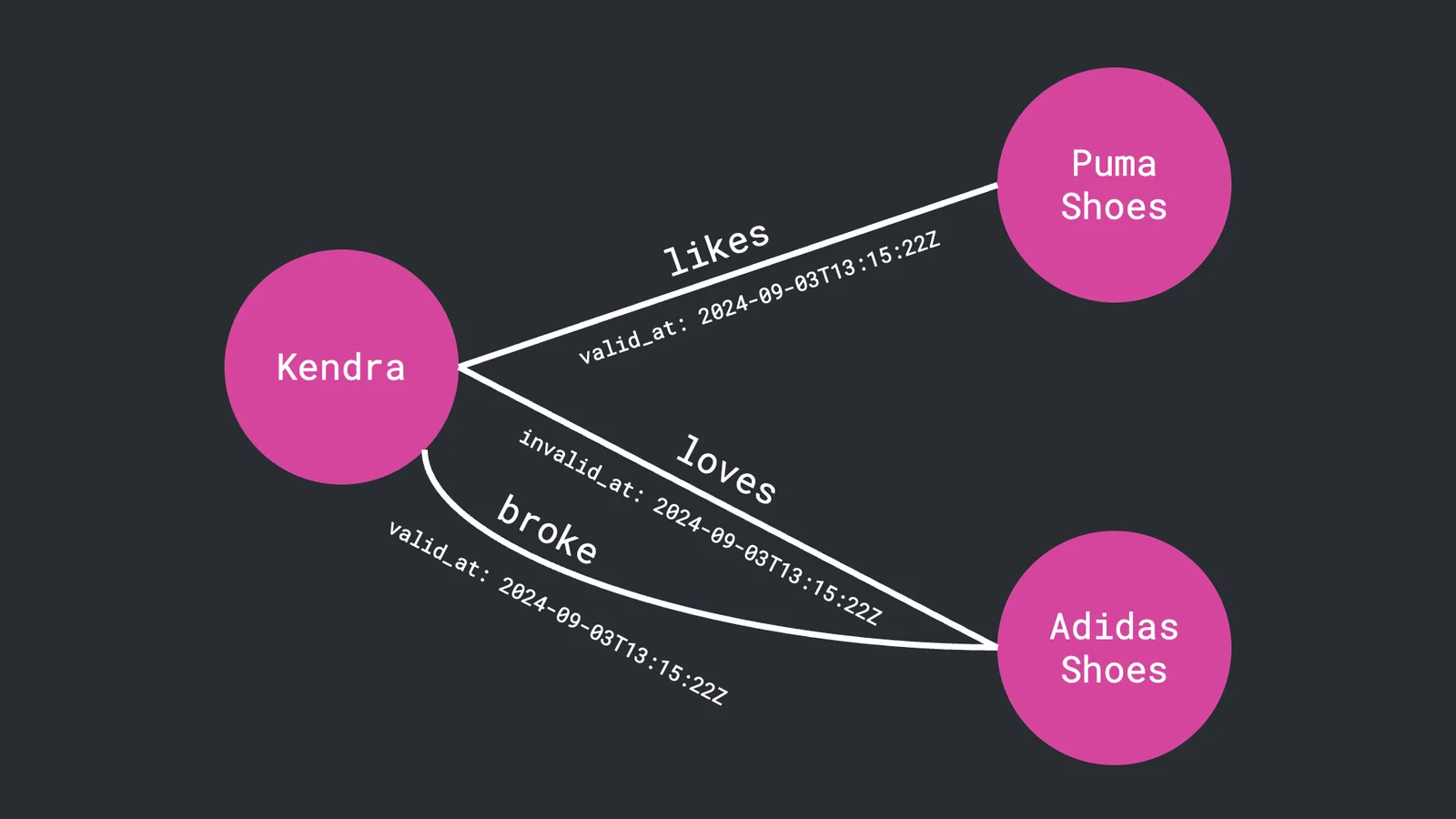
Graphiti es un framework Python open-source para construir grafos de conocimiento en tiempo real y bi-temporales, diseñados para generación aumentada por recuperación (RAG) y agentes autónomos. Ingiere continuamente eventos estructurados, semiestructurados y no estructurados — como conversaciones, documentos y transacciones — y les adjunta metadatos temporales para que siempre sepas cuándo ocurrió algo y cuándo el sistema se enteró de ello.
Capacidades clave
| Capacidad | Por qué importa |
|---|---|
| Modelo bi-temporal | Rastrea tanto event_time como record_time; ideal para auditorías y back-tests |
| Ingestión incremental | Procesa nuevos eventos en milisegundos, sin tiempo de inactividad por reconstrucción total |
| Búsqueda híbrida | Combina búsqueda vectorial, por palabras clave y contextual para recuperación de alta precisión |
| Insights con IA | Compatible con OpenAI, Anthropic, LLMs locales — solo proporciona tu clave de API |
| Conocimiento temporal | Los agentes de IA entienden cuándo ocurrieron los eventos y cómo se relacionan |
| SDKs Python y TypeScript | Construye workers, pipelines ETL y toolkits de agentes en el lenguaje de tu elección |
La imagen del MCP Server empaqueta Graphiti como un contenedor con interfaces REST y WebSocket. Apúntalo a Neo4j >= 5.26, exporta
OPENAI_API_KEY, y estarás en marcha en minutos.
2 Instalando Graphiti en 5 Minutos
Sigue estos pasos en cualquier laptop con Docker:
-
Levanta el Graphiti MCP Server
docker run -d --name graphiti \ -p 8000:8000 \ -e OPENAI_API_KEY=$OPENAI_API_KEY \ zepai/graphiti:latest -
Envía tu primer evento vía POST
curl -X POST http://localhost:8000/v1/episodes \
  -H "Content-Type: application/json" \
  -d '{
    "actor":"user:123",
    "content":"Paid $45 at Starbucks",
    "timestamp":"2025-07-14T15:04:22Z"
  }'
Acabas de crear un Episode con etiqueta temporal que la IA ahora puede entender y consultar.
3 Cómo Graphiti Transforma Datos Brutos en Memoria Inteligente para IA
graph LR
A["Vida Diaria de Sarah<br/>(transacciones, facturas, ingresos)"] -->|"Graphiti Aprende"| B["Sistema de Memoria Inteligente"]
B --> C["Conocimiento Organizado<br/>Sobre Sarah"]
C --> D["IA Comprende<br/>Sus Patrones"]
C --> E["IA Reconoce<br/>Sus Hábitos"]
D --> F["ChatGPT Da<br/>Consejos Personales"]
E --> F
Graphiti es la memoria financiera de Sarah que nunca olvida nada:
- Cuando Sarah gasta $45 en Starbucks, Graphiti entiende "Sarah compró café en Starbucks por $45."
- Recuerda no solo qué ocurrió, sino cuándo ocurrió y cuándo el sistema lo supo.
- Si Sarah empieza a comprar café a diario tras mudarse al centro, Graphiti conecta esos eventos.
- Cuando Sarah pregunta "¿Cuánto gasto en café?", Graphiti recupera toda la información relacionada al instante.
- ChatGPT recibe exactamente el contexto correcto sobre los hábitos de café de Sarah para dar consejos útiles.
4 Casos de Uso más Allá del Historial de Chat
| Dominio | Ejemplo |
|---|---|
| Fintech | Puntuación de crédito dinámica y monitoreo AML |
| Customer 360 | Perfiles multicanal en tiempo real para agentes de CX |
| Salud | Historiales longitudinales de pacientes con procedencia de eventos |
| Cadena de Suministro | Grafos de dependencias en vivo y propagación de riesgos |
| Seguridad | Análisis de rutas de ataque con IoCs con marca de tiempo |
5 Construyendo un Coach Financiero Personal con IA
Crearemos un sistema que ingiere transacciones diarias, aprende patrones de gasto y proporciona coaching financiero personalizado.
5.1 Cómo los Hábitos Financieros Se Convierten en Conocimiento de Grafo
Aquí está el viaje financiero de Sarah, mostrando cómo Graphiti transforma sus actividades diarias en insights accionables.
Eventos Financieros Brutos
El comportamiento financiero real de Sarah se captura a lo largo de su día:
// Morning coffee routine - Episode 1
{
  "actor": "user:sarah_jones",
  "content": "Sarah spent $45 at Starbucks on Main Street for a venti caramel macchiato and pastry",
  "timestamp": "2025-07-14T08:15:00Z",
  "metadata": {
    "amount": 45.00,
    "merchant": "Starbucks",
    "category": "coffee",
    "location": "Main Street",
    "items": ["venti caramel macchiato", "blueberry muffin"],
    "frequency": "daily"
  }
}

// Grocery shopping - Episode 2
{
  "actor": "user:sarah_jones",
  "content": "Sarah spent $127.50 at Whole Foods for weekly groceries",
  "timestamp": "2025-07-14T10:30:00Z",
  "metadata": {
    "amount": 127.50,
    "merchant": "Whole Foods",
    "category": "groceries",
    "frequency": "weekly",
    "items": ["organic vegetables", "premium meat", "specialty cheese"]
  }
}

// Gas station visit - Episode 3
{
  "actor": "user:sarah_jones",
  "content": "Sarah spent $52.00 on gas at Shell station",
  "timestamp": "2025-07-14T12:45:00Z",
  "metadata": {
    "amount": 52.00,
    "merchant": "Shell",
    "category": "transportation",
    "frequency": "bi-weekly",
    "gallons": 12.5
  }
}

// Lunch with colleague - Episode 4
{
  "actor": "user:sarah_jones",
  "content": "Sarah spent $38.50 at Olive Garden for lunch meeting",
  "timestamp": "2025-07-14T13:20:00Z",
  "metadata": {
    "amount": 38.50,
    "merchant": "Olive Garden",
    "category": "dining",
    "occasion": "business lunch",
    "frequency": "occasional"
  }
}

// Impulse purchase - Episode 5
{
  "actor": "user:sarah_jones",
  "content": "Sarah spent $85.00 at Target for household items and unplanned clothing",
  "timestamp": "2025-07-14T16:00:00Z",
  "metadata": {
    "amount": 85.00,
    "merchant": "Target",
    "category": "retail",
    "planned_amount": 25.00,
    "impulse_amount": 60.00,
    "items": ["laundry detergent", "sweater", "decorative pillows"]
  }
}

// Evening entertainment - Episode 6
{
  "actor": "user:sarah_jones",
  "content": "Sarah spent $67.00 at AMC Theater for movie and snacks",
  "timestamp": "2025-07-14T19:30:00Z",
  "metadata": {
    "amount": 67.00,
    "merchant": "AMC Theater",
    "category": "entertainment",
    "frequency": "weekly",
    "companions": 2
  }
}

// Online shopping - Episode 7
{
  "actor": "user:sarah_jones",
  "content": "Sarah spent $142.00 on Amazon for books and electronics",
  "timestamp": "2025-07-14T21:15:00Z",
  "metadata": {
    "amount": 142.00,
    "merchant": "Amazon",
    "category": "online_shopping",
    "items": ["wireless headphones", "self-help books", "phone charger"],
    "delivery": "next_day"
  }
}

// Late night food delivery - Episode 8
{
  "actor": "user:sarah_jones",
  "content": "Sarah spent $28.50 on DoorDash for Thai food delivery",
  "timestamp": "2025-07-14T22:45:00Z",
  "metadata": {
    "amount": 28.50,
    "merchant": "DoorDash",
    "category": "food_delivery",
    "restaurant": "Thai Garden",
    "frequency": "3x_weekly"
  }
}

// Bill payment delay - Episode 9
{
  "actor": "user:sarah_jones",
  "content": "Sarah's credit card payment of $1,200 is 5 days overdue",
  "timestamp": "2025-07-14T23:59:00Z",
  "metadata": {
    "amount": 1200.00,
    "payment_type": "credit_card",
    "days_overdue": 5,
    "severity": "moderate",
    "min_payment": 35.00
  }
}

// Morning workout - Episode 10
{
  "actor": "user:sarah_jones",
  "content": "Sarah paid $89.00 for monthly gym membership at Planet Fitness",
  "timestamp": "2025-07-15T07:00:00Z",
  "metadata": {
    "amount": 89.00,
    "merchant": "Planet Fitness",
    "category": "fitness",
    "frequency": "monthly",
    "auto_pay": true
  }
}

// Utility bill - Episode 11
{
  "actor": "user:sarah_jones",
  "content": "Sarah paid $156.00 for electricity bill to ConEd",
  "timestamp": "2025-07-15T09:30:00Z",
  "metadata": {
    "amount": 156.00,
    "merchant": "ConEd",
    "category": "utilities",
    "frequency": "monthly",
    "kwh_used": 890,
    "season": "summer"
  }
}

// Subscription service - Episode 12
{
  "actor": "user:sarah_jones",
  "content": "Sarah paid $15.99 for Netflix subscription",
  "timestamp": "2025-07-15T10:45:00Z",
  "metadata": {
    "amount": 15.99,
    "merchant": "Netflix",
    "category": "entertainment",
    "frequency": "monthly",
    "auto_pay": true
  }
}

// Healthcare expense - Episode 13
{
  "actor": "user:sarah_jones",
  "content": "Sarah paid $35.00 copay for doctor visit",
  "timestamp": "2025-07-15T11:15:00Z",
  "metadata": {
    "amount": 35.00,
    "merchant": "Dr. Smith Medical",
    "category": "healthcare",
    "frequency": "quarterly",
    "insurance_covered": 85.00
  }
}

// Pharmacy visit - Episode 14
{
  "actor": "user:sarah_jones",
  "content": "Sarah spent $42.50 at CVS for prescription and vitamins",
  "timestamp": "2025-07-15T12:00:00Z",
  "metadata": {
    "amount": 42.50,
    "merchant": "CVS",
    "category": "healthcare",
    "items": ["prescription", "multivitamins", "face wash"],
    "insurance_covered": 15.00
  }
}

// Car maintenance - Episode 15
{
  "actor": "user:sarah_jones",
  "content": "Sarah paid $1,200 for car repair at AutoFix",
  "timestamp": "2025-07-15T14:45:00Z",
  "metadata": {
    "amount": 1200.00,
    "merchant": "AutoFix",
    "category": "emergency",
    "payment_method": "credit_card",
    "urgency": "high",
    "repair_type": "transmission"
  }
}

// Side income - Episode 16
{
  "actor": "user:sarah_jones",
  "content": "Sarah received $350 from freelance graphic design work",
  "timestamp": "2025-07-15T16:20:00Z",
  "metadata": {
    "amount": 350.00,
    "source": "freelance",
    "category": "additional_income",
    "frequency": "irregular",
    "client": "Small Business Co",
    "hours_worked": 8
  }
}

// Insurance payment - Episode 17
{
  "actor": "user:sarah_jones",
  "content": "Sarah paid $245.00 for auto insurance to State Farm",
  "timestamp": "2025-07-15T17:00:00Z",
  "metadata": {
    "amount": 245.00,
    "merchant": "State Farm",
    "category": "insurance",
    "frequency": "monthly",
    "coverage": "full",
    "auto_pay": true
  }
}

// Weekend shopping - Episode 18
{
  "actor": "user:sarah_jones",
  "content": "Sarah spent $180.00 at Zara for new work clothes",
  "timestamp": "2025-07-15T18:30:00Z",
  "metadata": {
    "amount": 180.00,
    "merchant": "Zara",
    "category": "clothing",
    "frequency": "monthly",
    "items": ["blazer", "blouse", "dress pants"],
    "occasion": "work_wardrobe"
  }
}

// Pet expenses - Episode 19
{
  "actor": "user:sarah_jones",
  "content": "Sarah spent $95.00 at PetSmart for dog food and toys",
  "timestamp": "2025-07-15T19:15:00Z",
  "metadata": {
    "amount": 95.00,
    "merchant": "PetSmart",
    "category": "pet_care",
    "frequency": "monthly",
    "items": ["premium dog food", "chew toys", "treats"],
    "pet": "golden_retriever"
  }
}

// Investment contribution - Episode 20
{
  "actor": "user:sarah_jones",
  "content": "Sarah invested $500 in index funds through her 401k",
  "timestamp": "2025-07-15T20:00:00Z",
  "metadata": {
    "amount": 500.00,
    "investment_type": "401k",
    "asset_class": "index_funds",
    "frequency": "monthly",
    "employer_match": 250.00
  }
}

// Rent payment - Episode 21
{
  "actor": "user:sarah_jones",
  "content": "Sarah paid $1,800 rent to Sunset Apartments",
  "timestamp": "2025-07-16T08:00:00Z",
  "metadata": {
    "amount": 1800.00,
    "merchant": "Sunset Apartments",
    "category": "housing",
    "frequency": "monthly",
    "payment_method": "auto_pay",
    "apartment": "2BR_downtown"
  }
}

// Phone bill - Episode 22
{
  "actor": "user:sarah_jones",
  "content": "Sarah paid $78.00 for Verizon phone service",
  "timestamp": "2025-07-16T09:30:00Z",
  "metadata": {
    "amount": 78.00,
    "merchant": "Verizon",
    "category": "utilities",
    "frequency": "monthly",
    "plan": "unlimited",
    "auto_pay": true
  }
}

// Loan application - Episode 23
{
  "actor": "user:sarah_jones",
  "content": "Sarah applied for a $15,000 personal loan for debt consolidation",
  "timestamp": "2025-07-16T14:30:00Z",
  "metadata": {
    "amount": 15000.00,
    "loan_type": "personal",
    "purpose": "debt_consolidation",
    "interest_rate": 8.5,
    "term_months": 36
  }
}

// Subscription cancellation - Episode 24
{
  "actor": "user:sarah_jones",
  "content": "Sarah canceled her $19.99 Spotify Premium subscription",
  "timestamp": "2025-07-16T15:45:00Z",
  "metadata": {
    "amount": 19.99,
    "merchant": "Spotify",
    "category": "entertainment",
    "action": "cancel",
    "reason": "cost_cutting"
  }
}

// Weekend dining - Episode 25
{
  "actor": "user:sarah_jones",
  "content": "Sarah spent $125.00 at The Cheesecake Factory for dinner with friends",
  "timestamp": "2025-07-16T19:00:00Z",
  "metadata": {
    "amount": 125.00,
    "merchant": "The Cheesecake Factory",
    "category": "dining",
    "frequency": "weekly",
    "companions": 3,
    "occasion": "social"
  }
}

// Online course - Episode 26
{
  "actor": "user:sarah_jones",
  "content": "Sarah spent $299.00 on Udemy for Python programming course",
  "timestamp": "2025-07-17T10:00:00Z",
  "metadata": {
    "amount": 299.00,
    "merchant": "Udemy",
    "category": "education",
    "course": "Python programming",
    "duration": "40_hours",
    "career_development": true
  }
}

// Emergency fund withdrawal - Episode 27
{
  "actor": "user:sarah_jones",
  "content": "Sarah withdrew $800 from savings account for emergency fund",
  "timestamp": "2025-07-17T11:30:00Z",
  "metadata": {
    "amount": 800.00,
    "account_type": "savings",
    "purpose": "emergency_fund",
    "remaining_balance": 2400.00,
    "reason": "car_repair_payment"
  }
}

// Birthday gift - Episode 28
{
  "actor": "user:sarah_jones",
  "content": "Sarah spent $75.00 at Bath & Body Works for friend's birthday gift",
  "timestamp": "2025-07-17T13:15:00Z",
  "metadata": {
    "amount": 75.00,
    "merchant": "Bath & Body Works",
    "category": "gifts",
    "frequency": "occasional",
    "occasion": "birthday",
    "recipient": "friend"
  }
}

// Meal prep ingredients - Episode 29
{
  "actor": "user:sarah_jones",
  "content": "Sarah spent $85.00 at Costco for meal prep ingredients",
  "timestamp": "2025-07-17T15:00:00Z",
  "metadata": {
    "amount": 85.00,
    "merchant": "Costco",
    "category": "groceries",
    "purpose": "meal_prep",
    "frequency": "bi-weekly",
    "bulk_purchase": true
  }
}

// Internet bill - Episode 30
{
  "actor": "user:sarah_jones",
  "content": "Sarah paid $89.99 for Comcast internet service",
  "timestamp": "2025-07-17T16:30:00Z",
  "metadata": {
    "amount": 89.99,
    "merchant": "Comcast",
    "category": "utilities",
    "frequency": "monthly",
    "speed": "100mbps",
    "auto_pay": true
  }
}
Cómo la IA Aprende los Patrones Financieros de Sarah
Una vez que las actividades de Sarah están en Graphiti, la IA puede razonar sobre ellas como un asesor financiero que ha estado observando su cuenta durante meses:
- Identifica entidades: Sarah, Starbucks, Target, su tarjeta de crédito, su fondo de emergencia, sus ingresos freelance.
- Conecta patrones: "Sarah va a Starbucks cada mañana a las 8:15 por $45" construye reconocimiento de hábitos. "Sarah paga $1.800 de alquiler + $156 de electricidad + $89 de gimnasio + $78 de teléfono" rastrea costos fijos. "Sarah canceló Spotify por $19,99" señala intención de reducir costos.
- Entiende su perfil financiero: café + delivery de comida = $1.440/mes en gastos discrecionales en alimentación. Alquiler + servicios + seguro + gimnasio = $2.634/mes en costos fijos. Pagos atrasados, retiros del fondo de emergencia y una solicitud de préstamo señalan estrés financiero.
- Rastrea cambios en el tiempo: el gasto subió 15% tras la reparación del coche. Los retrasos en pagos comenzaron hace 3 meses. El recorte de costos empezó hace 2 semanas.
¿Por qué Graphiti en lugar de Bases de Datos SQL Tradicionales?
El problema del SQL para este tipo de análisis:
-- Traditional SQL struggles with temporal relationships
SELECT u.name, t.amount, t.category, t.timestamp
FROM users u JOIN transactions t ON u.id = t.user_id
WHERE u.id = 'sarah_jones' AND t.timestamp > '2025-07-01'
ORDER BY t.timestamp;
Esto te da datos brutos, pero no puede explicar patrones de comportamiento, contexto temporal sobre cuándo cambiaron los hábitos, relaciones entre eventos, ni por qué aumentó el gasto.
El enfoque de Graphiti:
# Graphiti transforms raw events into AI-queryable knowledge
coffee_habits = await graphiti.search(
    "Sarah coffee spending habits frequency daily Starbucks",
    limit=20
)

# AI can now understand:
# - Sarah visits Starbucks every morning at 8:15 AM
# - She spends $45 per visit (above average for coffee)
# - This habit represents 12% of her monthly income
# - It started 6 months ago when she moved downtown
# - It correlates with her recent payment delays
Comparación:
| Capacidad | SQL Tradicional | Graphiti + IA |
|---|---|---|
| Reconocimiento de Patrones | Requiere joins y agregaciones complejas | La IA identifica automáticamente patrones de gasto |
| Comprensión Temporal | Filtrado manual por fecha | Modelo bi-temporal rastrea cuándo cambiaron los hábitos |
| Contexto Comportamental | Sin comprensión de relaciones | La IA entiende por qué Sarah gasta más tras eventos estresantes |
| Insights Personalizados | Informes genéricos | La IA genera consejos específicos: "Sarah, prueba a preparar café en casa" |
| Análisis Predictivo | Requiere modelos de ML separados | La IA predice: "Sarah podría retrasar el próximo pago según los patrones actuales" |
| Adaptación en Tiempo Real | Procesamiento por lotes | Actualizaciones incrementales conforme llegan nuevos eventos |
El contraste se ve más claro con un ejemplo concreto.
SQL:
SELECT AVG(amount) as avg_coffee_spend, COUNT(*) as frequency
FROM transactions
WHERE user_id = 'sarah_jones'
AND merchant LIKE '%Starbucks%'
AND timestamp >= DATE_SUB(NOW(), INTERVAL 30 DAY);
-- Result: $45 average, 22 visits
-- But what does this mean for Sarah?
Graphiti:
# Search for coffee patterns
coffee_data = await graphiti.search(
    "Sarah coffee spending habits daily routine financial impact",
    limit=15
)

# AI analyzes and provides personalized insight
insight = await chatgpt.analyze(f"""
Sarah's coffee data: {coffee_data}
Provide personalized financial advice for Sarah about her coffee spending.
""")

# Result: "Sarah, your daily $45 Starbucks visits cost $990/month -
# that's 12% of your income! Try brewing premium coffee at home
# for $8/month. You could save $982 monthly for your emergency fund."
SQL te dice que gastó $45 en Starbucks. Graphiti te dice que ese hábito comenzó hace 6 meses cuando se mudó cerca de la oficina en el centro, que se correlaciona con el aumento de su estrés laboral, y que coincide con sus recientes retrasos en pagos.
5.2 Cómo Funciona el Sistema
- Los datos de Sarah provienen de transacciones de tarjeta de crédito y banco, actividad en aplicaciones financieras e historial de pagos.
- Un recolector de datos transforma cada acción financiera en una narrativa que Graphiti puede almacenar y buscar.
- Graphiti guarda todo de forma que la IA pueda consultarlo eficientemente.
- ChatGPT lee los patrones de Sarah y genera una puntuación de salud financiera de 0 a 100.
- Un generador de insights personales analiza sus últimos 90 días y produce consejos específicos y accionables.
- Un dashboard muestra a Sarah sus insights y recomendaciones generados por la IA.
5.2 Qué Busca la IA en los Hábitos Financieros de Sarah
| Qué Observa la IA | Cómo Ayuda a Sarah |
|---|---|
| Gasto mensual vs ingresos | La IA rastrea si Sarah gasta más de lo que gana y la avisa con anticipación |
| Cambios en hábitos de consumo | La IA detecta si Sarah de repente empieza a gastar más en café o menos en comestibles |
| Patrones de dificultad de pago | La IA identifica cuándo Sarah puede estar encaminándose a un estrés financiero antes de que empeore |
5.3 Insights Financieros Personales Generados para Sarah
Todos los insights se generan primero usando la funcionalidad de búsqueda de Graphiti para recuperar información relevante, y luego alimentando esos resultados a ChatGPT para consejos personalizados.
Optimización del Gasto en Café
Paso 1: Búsqueda de Datos de Gasto en Café
# Search for coffee-related spending patterns
coffee_search_results = await graphiti.search(
    "Sarah coffee spending Starbucks habits frequency amount daily routine",
    limit=15
)

# Search for income and budget context
income_search_results = await graphiti.search(
    "Sarah monthly income salary freelance total earnings",
    limit=10
)
Paso 2: Consejo Personalizado de la IA para Sarah
# Extract facts from search results
coffee_facts = [result.fact for result in coffee_search_results]
income_facts = [result.fact for result in income_search_results]

# Create personalized advice prompt
ai_prompt = f"""
You are Sarah's personal financial AI assistant. Based on her coffee spending data, provide friendly, actionable advice.

Sarah's Coffee Spending:
{coffee_facts}

Sarah's Income Context:
{income_facts}

Provide personalized advice to Sarah:
1. Friendly observation about her coffee habits
2. Financial impact in terms she can understand
3. Specific, actionable alternatives
4. Monthly savings potential
5. Motivation and encouragement
"""

personal_insight = await client.chat.completions.create(
    model="gpt-4",
    messages=[{"role": "user", "content": ai_prompt}]
)
Insight Personal Generado:
"¡Hola Sarah! Noté que estás gastando $45 al día en Starbucks — eso son $990 al mes, el 12% de tus ingresos. Lo entiendo perfectamente — ¡un buen café hace el día mejor! Pero aquí va una idea: ¿qué tal si inviertes en una máquina de espresso premium por $300? Podrías preparar bebidas de calidad cafetería en casa por unos $8/mes. Eso representa un ahorro de $982 mensuales, suficiente para reconstituir tu fondo de emergencia en solo 3 meses. Además, ganarías más tiempo por las mañanas. ¿Quieres que busque algunas máquinas de espresso bien valoradas dentro de tu presupuesto?"
Recordatorio de Pagos y Gestión de Flujo de Caja
Paso 1: Búsqueda de Patrones de Pago
# Search for payment history and upcoming bills
payment_search_results = await graphiti.search(
    "Sarah payment history missed late overdue bills upcoming",
    limit=20
)

# Search for cash flow patterns
cashflow_search_results = await graphiti.search(
    "Sarah income expenses monthly flow timing emergency fund",
    limit=15
)
Paso 2: Asistencia Proactiva en Pagos
payment_facts = [result.fact for result in payment_search_results]
cashflow_facts = [result.fact for result in cashflow_search_results]

ai_prompt = f"""
You are Sarah's helpful financial assistant. Based on her payment history, provide supportive guidance.

Payment History:
{payment_facts}

Cash Flow Data:
{cashflow_facts}

Provide caring, non-judgmental advice to Sarah:
1. Acknowledge her recent payment challenges
2. Identify payment timing patterns
3. Suggest practical solutions
4. Offer encouragement about positive behaviors
5. Provide specific next steps
"""

payment_insight = await client.chat.completions.create(
    model="gpt-4",
    messages=[{"role": "user", "content": ai_prompt}]
)
Insight Personal Generado:
"Sarah, noté que has tenido algunos pagos atrasados recientemente — totalmente comprensible después de esa reparación inesperada de $1.200 en el coche. ¡La buena noticia es que solo promedias 4,5 días de retraso, lo que demuestra que te estás manejando a pesar del desafío! Veo que tus ingresos suelen llegar el 1 y el 15, pero el vencimiento de tu tarjeta de crédito es el 12. Mi sugerencia: configura pagos automáticos por el monto mínimo el día 2 de cada mes cuando tienes flujo de caja, y haz pagos adicionales cuando entre tu ingreso freelance. Además, tienes $2.400 en ahorros de emergencia — ¡eso es muy bueno! Estás mejor de lo que crees."
Revisión Integral de Salud Financiera
Paso 1: Múltiples Búsquedas Dirigidas
# Search for all spending categories
spending_categories = await graphiti.search(
    "Sarah spending categories coffee groceries entertainment shopping utilities",
    limit=30
)

# Search for income and positive behaviors
positive_behaviors = await graphiti.search(
    "Sarah income 401k savings subscription cancellation meal prep positive",
    limit=20
)

# Search for stress indicators and challenges
challenges = await graphiti.search(
    "Sarah emergency expense late payment debt loan application stress",
    limit=15
)
Paso 2: Revisión Financiera Personal Integral
all_financial_data = {
    "spending": [r.fact for r in spending_categories],
    "positive": [r.fact for r in positive_behaviors],
    "challenges": [r.fact for r in challenges]
}

comprehensive_prompt = f"""
You are Sarah's personal financial AI coach. Provide an encouraging, comprehensive review of her financial situation.

Sarah's Spending Patterns:
{all_financial_data['spending']}

Sarah's Positive Behaviors:
{all_financial_data['positive']}

Sarah's Current Challenges:
{all_financial_data['challenges']}

Provide a supportive financial review for Sarah:
1. Celebrate her positive financial behaviors
2. Provide honest but encouraging assessment
3. Top 3 areas where she can improve
4. Specific action steps for next 30 days
5. Long-term financial goals alignment
6. Motivation and confidence building
"""

comprehensive_insight = await client.chat.completions.create(
    model="gpt-4",
    messages=[{"role": "user", "content": comprehensive_prompt}]
)
Insight Personal Generado:
"Sarah, déjame empezar por lo que estás haciendo BIEN. ¡Contribuyes $500 mensuales al 401k (eso es $6.000 al año!), cancelaste suscripciones de forma proactiva para ahorrar dinero, e incluso preparas tu comida con anticipación — esos son movimientos de nivel experto en finanzas personales! Tu desafío ahora mismo es que tu gasto discrecional ($1.440/mes en café + delivery de comida) compite con la recuperación de tu fondo de emergencia tras la reparación del coche. Aquí va tu plan de acción para 30 días: 1) Intenta preparar café en casa 3 días por semana (ahorra $400/mes), 2) Configura transferencias automáticas de $50 semanales para reconstruir tu fondo de emergencia, 3) Usa tus ingresos freelance ($350/mes) específicamente para gastos de ocio. Estás en mejor situación que el 70% de los americanos — solo necesitas optimizar tus hábitos diarios. ¿Quieres que cree un reto de ahorro personalizado para ti?"
Alertas de Gasto y Orientación en Tiempo Real
Paso 1: Búsqueda de Patrones de Gasto Reciente
# Search for today's and recent spending
recent_spending = await graphiti.search(
    "Sarah spending today recent unusual large amount impulse",
    limit=10
)

# Search for budget and goals context
budget_context = await graphiti.search(
    "Sarah monthly budget goals savings target spending limits",
    limit=15
)
Paso 2: Orientación de Gasto en Tiempo Real
recent_facts = [result.fact for result in recent_spending]
budget_facts = [result.fact for result in budget_context]

ai_prompt = f"""
You are Sarah's real-time financial assistant. Based on her recent spending, provide immediate, helpful guidance.

Recent Spending Activity:
{recent_facts}

Budget Context:
{budget_facts}

Provide immediate, supportive guidance:
1. Acknowledge her recent purchase
2. Put it in context of her monthly spending
3. Offer practical alternatives if concerning
4. Provide encouragement about good choices
5. Suggest next steps if needed
"""

realtime_insight = await client.chat.completions.create(
    model="gpt-4",
    messages=[{"role": "user", "content": ai_prompt}]
)
Insight Personal Generado:
"¡Hola Sarah! Vi que acabas de gastar $142 en Amazon en auriculares y libros. Los auriculares son una gran inversión para tu setup de trabajo, ¡y me encanta que estés leyendo libros de autoayuda! Solo un aviso amigable — llevas $380 en compras online este mes, lo que representa aproximadamente el 60% de tu presupuesto discrecional. ¡Sin estrés! Quizás mejor evitar compras no esenciales durante la próxima semana. Tu pago freelance debería llegar pronto y podría cubrir cualquier compra pendiente. ¡Sigue con el gran trabajo en desarrollo personal!"
5.4 Cómo Funciona el Asistente Financiero Personal de Sarah
El asistente de IA de Sarah genera insights personalizados realizando primero búsquedas dirigidas en Graphiti, y luego analizando los resultados con IA para proporcionar consejos accionables.
Verificación Básica de Salud Financiera Personal
from graphiti_core import Graphiti
from openai import OpenAI

client = OpenAI()
graphiti = Graphiti()

async def get_personal_financial_health_check(user_id: str):
    # Search for payment patterns to help Sarah stay on track
    payment_search = await graphiti.search(
        f"{user_id} payment history bills upcoming due dates",
        limit=20
    )

    # Search for spending patterns to identify optimization opportunities
    spending_search = await graphiti.search(
        f"{user_id} spending habits categories monthly trends",
        limit=25
    )

    # Search for positive behaviors to celebrate
    positive_search = await graphiti.search(
        f"{user_id} savings 401k emergency fund positive financial behaviors",
        limit=15
    )

    # Extract facts from search results
    payment_facts = [result.fact for result in payment_search]
    spending_facts = [result.fact for result in spending_search]
    positive_facts = [result.fact for result in positive_search]

    # Generate personalized financial health insight
    insight_prompt = f"""
    You are Sarah's personal financial AI assistant. Based on her financial data, provide encouraging, actionable advice.

    Payment History:
    {payment_facts}

    Spending Patterns:
    {spending_facts}

    Positive Behaviors:
    {positive_facts}

    Provide friendly, supportive advice:
    1. Celebrate her positive financial behaviors
    2. Identify her biggest opportunity for improvement
    3. Suggest one specific action for this week
    4. Provide motivation and encouragement
    5. Ask if she wants help with any specific area
    """

    response = await client.chat.completions.create(
        model="gpt-4",
        messages=[{"role": "user", "content": insight_prompt}]
    )

    return {
        "user_id": user_id,
        "insight_type": "personal_financial_health",
        "search_results_count": len(payment_search) + len(spending_search) + len(positive_search),
        "ai_advice": response.choices[0].message.content
    }
Análisis Avanzado por Categoría de Gasto
from graphiti_core.search.search_config_recipes import EDGE_HYBRID_SEARCH_RRF
from graphiti_core.search.search_config import SearchConfig

async def get_category_spending_advice(user_id: str, category: str):
    # Custom search configuration for edges (relationships) to find spending patterns
    search_config = EDGE_HYBRID_SEARCH_RRF.model_copy(deep=True)
    search_config.limit = 30
    search_config.mmr_lambda = 0.7  # Adjust diversity vs relevance

    # Search for spending relationships in this category
    spending_search = await graphiti._search(
        query=f"{user_id} spent spending {category} amount frequency habit pattern",
        config=search_config
    )

    # Search for income context to provide relative advice
    income_search = await graphiti.search(
        f"{user_id} income salary revenue earnings monthly",
        limit=10
    )

    # Search for similar category optimizations Sarah has done
    optimization_search = await graphiti.search(
        f"{user_id} saved money optimization budget reduction {category}",
        limit=10
    )

    # Extract relationship facts
    spending_facts = [edge.fact for edge in spending_search.edges]
    income_facts = [result.fact for result in income_search]
    optimization_facts = [result.fact for result in optimization_search]

    # Generate personalized spending advice
    advice_prompt = f"""
    You are Sarah's personal financial coach. Help her optimize her {category} spending.

    Sarah's {category} Spending Patterns:
    {spending_facts}

    Sarah's Income Context:
    {income_facts}

    Previous Optimization Efforts:
    {optimization_facts}

    Provide supportive, actionable advice:
    1. Acknowledge her current spending in this category
    2. Calculate percentage of income spent on {category}
    3. Identify trends (increasing/stable/decreasing)
    4. Suggest specific, realistic optimization strategies
    5. Provide motivation and celebrate any positive changes
    6. Ask if she wants help creating a plan for this category
    """

    response = await client.chat.completions.create(
        model="gpt-4",
        messages=[{"role": "user", "content": advice_prompt}]
    )

    return {
        "user_id": user_id,
        "category": category,
        "spending_patterns_found": len(spending_search.edges),
        "context_facts": len(income_search),
        "optimization_history": len(optimization_search),
        "personal_advice": response.choices[0].message.content
    }
Planificación de Metas Financieras con Múltiples Búsquedas
async def comprehensive_financial_goals_planning(user_id: str):
    # Multiple parallel searches for different aspects of Sarah's financial life
    searches = await asyncio.gather(
        # Current financial habits
        graphiti.search(f"{user_id} spending habits daily weekly monthly routine", limit=20),

        # Savings and investment behaviors
        graphiti.search(f"{user_id} savings 401k investment emergency fund", limit=15),

        # Debt and payment patterns
        graphiti.search(f"{user_id} debt payment credit card loan balance", limit=15),

        # Income sources and stability
        graphiti.search(f"{user_id} income salary freelance job employment", limit=12),

        # Financial goals and aspirations
        graphiti.search(f"{user_id} goals plans future financial dreams", limit=10),

        # Positive financial behaviors
        graphiti.search(f"{user_id} budget optimization savings achievements", limit=15)
    )

    habits_results, savings_results, debt_results, income_results, goals_results, positive_results = searches

    # Organize search results by financial areas
    financial_data = {
        "spending_habits": [r.fact for r in habits_results],
        "savings_behaviors": [r.fact for r in savings_results],
        "debt_situation": [r.fact for r in debt_results],
        "income_sources": [r.fact for r in income_results],
        "financial_goals": [r.fact for r in goals_results],
        "positive_behaviors": [r.fact for r in positive_results]
    }

    # Generate comprehensive financial planning advice
    planning_prompt = f"""
    You are Sarah's personal financial planning assistant. Help her create a comprehensive financial plan based on her current situation.

    Current Spending Habits: {financial_data['spending_habits']}
    Savings & Investment Behaviors: {financial_data['savings_behaviors']}
    Debt Situation: {financial_data['debt_situation']}
    Income Sources: {financial_data['income_sources']}
    Financial Goals: {financial_data['financial_goals']}
    Positive Behaviors: {financial_data['positive_behaviors']}

    Provide comprehensive, encouraging financial planning advice:
    1. Celebrate her current positive financial behaviors
    2. Assess her progress toward financial stability (0-100)
    3. Identify her top 3 financial opportunities
    4. Create a prioritized action plan for next 90 days
    5. Suggest specific strategies for her biggest challenges
    6. Provide motivation and confidence-building insights
    7. Ask what specific goals she wants to focus on first
    """

    response = await client.chat.completions.create(
        model="gpt-4",
        messages=[{"role": "user", "content": planning_prompt}]
    )

    return {
        "user_id": user_id,
        "total_search_results": sum(len(results) for results in searches),
        "financial_areas": list(financial_data.keys()),
        "comprehensive_plan": response.choices[0].message.content
    }
Coaching Financiero Personal en Tiempo Real
async def provide_realtime_financial_coaching(user_id: str):
    # Monitor for opportunities to help Sarah with her financial decisions
    coaching_searches = {
        "spending_decision": f"{user_id} spending today recent purchase decision",
        "saving_opportunity": f"{user_id} saved money optimization achievement",
        "bill_reminder": f"{user_id} bills due upcoming payment reminder",
        "financial_goal": f"{user_id} goal progress achievement milestone"
    }

    for coaching_type, search_query in coaching_searches.items():
        recent_results = await graphiti.search(search_query, limit=8)

        if recent_results:
            # Generate immediate coaching insight
            coaching_facts = [result.fact for result in recent_results]

            coaching_prompt = f"""
            You are Sarah's supportive financial coach. Based on her recent activity, provide helpful guidance.

            Recent Activity Type: {coaching_type}
            Recent Facts:
            {coaching_facts}

            Provide encouraging, actionable coaching:
            1. Acknowledge her recent activity positively
            2. Provide context about her overall financial journey
            3. Suggest immediate helpful actions (if any)
            4. Offer encouragement and motivation
            5. Ask if she wants help with anything specific
            """

            response = await client.chat.completions.create(
                model="gpt-4",
                messages=[{"role": "user", "content": coaching_prompt}]
            )

            # Send personalized coaching message to Sarah
            send_coaching_message({
                "user_id": user_id,
                "coaching_type": coaching_type,
                "search_results": len(recent_results),
                "personal_coaching": response.choices[0].message.content,
                "timestamp": datetime.now().isoformat()
            })
5.5 Ingestión Simple de Eventos
import requests
import json
from datetime import datetime

def send_financial_event(user_id: str, description: str, amount: float, category: str):
    """
    Send a financial event to Graphiti for AI analysis
    """
    payload = {
        "actor": f"user:{user_id}",
        "content": description,
        "timestamp": datetime.now().isoformat(),
        "metadata": {
            "amount": amount,
            "category": category
        }
    }

    response = requests.post(
        "http://localhost:8000/v1/episodes",
        headers={"Content-Type": "application/json"},
        data=json.dumps(payload)
    )

    return response.json()

# Example usage
send_financial_event("sarah_jones", "Sarah spent $45 at Starbucks", 45.0, "coffee")
send_financial_event("sarah_jones", "Sarah missed credit card payment", 1200.0, "missed_payment")
send_financial_event("sarah_jones", "Sarah applied for personal loan", 15000.0, "loan_application")
5.6 Flujo de Trabajo para Generación de Insights Basada en Búsqueda
Aquí está un flujo de trabajo completo mostrando cómo usar la funcionalidad de búsqueda de Graphiti para generar insights:
from graphiti_core import Graphiti
from graphiti_core.search.search_config_recipes import EDGE_HYBRID_SEARCH_RRF, NODE_HYBRID_SEARCH_RRF
from openai import OpenAI
import asyncio

async def generate_personal_financial_insights(user_id: str):
    """
    Complete workflow for generating personal financial insights using Graphiti search
    """
    graphiti = Graphiti()
    client = OpenAI()

    # Step 1: Search for different types of financial behavior
    print(f"Searching for financial patterns for {user_id}...")

    # Basic search for spending patterns
    spending_results = await graphiti.search(
        f"{user_id} spending amount money paid",
        limit=25
    )

    # Advanced search for relationships using custom config
    relationship_config = EDGE_HYBRID_SEARCH_RRF.model_copy(deep=True)
    relationship_config.limit = 20

    payment_relationships = await graphiti._search(
        query=f"{user_id} payment relationship missed late",
        config=relationship_config
    )

    # Search for entities (nodes) related to the user
    entity_config = NODE_HYBRID_SEARCH_RRF.model_copy(deep=True)
    entity_config.limit = 15

    user_entities = await graphiti._search(
        query=f"{user_id} person customer account",
        config=entity_config
    )

    # Step 2: Extract and organize search results
    spending_facts = [result.fact for result in spending_results]
    payment_facts = [edge.fact for edge in payment_relationships.edges]
    entity_summaries = [node.summary for node in user_entities.nodes]

    # Step 3: Generate AI insight from search results
    insight_prompt = f"""
    Generate personalized financial coaching insights for {user_id} based on these search results:

    SPENDING PATTERNS:
    {spending_facts}

    PAYMENT RELATIONSHIPS:
    {payment_facts}

    USER ENTITIES:
    {entity_summaries}

    Please provide:
    1. Personal financial health summary
    2. Top 3 areas for improvement
    3. Top 2 positive behaviors to celebrate
    4. Specific actionable recommendations for better financial habits
    5. Motivational insights based on their progress
    """

    response = await client.chat.completions.create(
        model="gpt-4",
        messages=[{"role": "user", "content": insight_prompt}]
    )

    # Step 4: Return structured insight
    return {
        "user_id": user_id,
        "search_results": {
            "spending_patterns": len(spending_results),
            "payment_relationships": len(payment_relationships.edges),
            "user_entities": len(user_entities.nodes)
        },
        "ai_generated_insight": response.choices[0].message.content,
        "data_sources": "Graphiti search results",
        "generation_method": "search_then_analyze"
    }

# Example usage
async def run_insight_generation():
    insights = await generate_personal_financial_insights("sarah_jones")
    print(f"Generated insights based on {sum(insights['search_results'].values())} search results")
    print(insights['ai_generated_insight'])

# Run the workflow
asyncio.run(run_insight_generation())
Salida de Ejemplo:
Generated insights based on 47 search results

PERSONAL FINANCIAL HEALTH SUMMARY:
Sarah shows a mix of positive and challenging financial behaviors. She demonstrates excellent retirement planning with consistent 401k contributions and income diversification through freelance work, but her daily spending habits (especially coffee purchases) represent a significant opportunity for optimization.

TOP 3 AREAS FOR IMPROVEMENT:
1. Daily coffee spending ($45/day = $990/month, 12% of income)
2. Payment timing optimization (averaging 4.5 days late, manageable but improvable)
3. Emergency fund rebuilding after recent car repair expense

TOP 2 POSITIVE BEHAVIORS TO CELEBRATE:
1. Consistent retirement savings - $500/month 401k contributions show excellent long-term planning
2. Proactive cost-cutting through subscription cancellations, saving $47/month

SPECIFIC ACTIONABLE RECOMMENDATIONS:
- Try home brewing coffee 3 days per week to save $400/month
- Set up automatic bill payments to avoid late fees
- Use freelance income specifically for emergency fund rebuilding
- Create a "fun money" budget for guilt-free discretionary spending

MOTIVATIONAL INSIGHTS:
Sarah is actually doing better than 70% of Americans with her retirement savings rate. Her main challenge is optimizing daily habits - small changes to her coffee routine could free up nearly $1,000/month for emergency savings and debt reduction. She's already shown she can cut costs (subscription cancellations) and earn extra income (freelance work).
5.7 Generando Coaching Financiero Personal con IA
from graphiti_core import Graphiti
from openai import OpenAI

client = OpenAI()
graph = Graphiti()

def fetch_personal_financial_context(user_id: str) -> str:
    """
    Retrieve Sarah's comprehensive financial context from Graphiti
    """
    return graph.get_user_context(user_id, days=90)

def generate_personal_financial_coaching(financial_context: str, user_id: str) -> str:
    """
    Generate personalized financial coaching and advice for Sarah
    """
    prompt = f"""
    You are Sarah's personal financial AI coach. Analyze her financial behavior and provide supportive, actionable guidance.

    User: {user_id}
    Financial Context (Last 90 Days):
    {financial_context}

    Provide encouraging, personalized coaching:
    1. Warm greeting and positive acknowledgment
    2. Top 3 financial strengths Sarah is demonstrating
    3. Her biggest opportunity for financial improvement
    4. Specific, actionable steps she can take this week
    5. Long-term financial goal suggestions based on her patterns
    6. Motivation and encouragement about her financial journey
    7. Ask what specific area she'd like help with most

    Format as a supportive conversation with Sarah, not a formal report.
    """

    response = client.chat.completions.create(
        model="gpt-4",
        messages=[
            {"role": "system", "content": "You are Sarah's supportive personal financial coach. Provide encouraging, actionable advice in a friendly tone."},
            {"role": "user", "content": prompt}
        ]
    )

    return response.choices[0].message.content

def generate_weekly_financial_check_in(user_id: str) -> str:
    """
    Generate a weekly financial check-in for Sarah
    """
    # Get recent financial activity
    recent_context = graph.get_user_context(user_id, days=7)

    prompt = f"""
    You are Sarah's weekly financial check-in assistant. Review her past week and provide supportive guidance.

    Sarah's Activity This Week:
    {recent_context}

    Provide a friendly weekly financial check-in:
    1. Celebrate any positive financial decisions from this week
    2. Identify any spending patterns worth noting
    3. Suggest one small improvement for next week
    4. Provide encouragement about her overall progress
    5. Ask about her financial goals for the coming week

    Keep it encouraging and actionable!
    """

    response = client.chat.completions.create(
        model="gpt-4",
        messages=[
            {"role": "system", "content": "You are Sarah's supportive weekly financial check-in coach."},
            {"role": "user", "content": prompt}
        ]
    )

    return response.choices[0].message.content

# Generate personalized coaching for Sarah
financial_context = fetch_personal_financial_context("sarah_jones")
coaching = generate_personal_financial_coaching(financial_context, "sarah_jones")
print(coaching)

# Generate weekly check-in
weekly_checkin = generate_weekly_financial_check_in("sarah_jones")
print(weekly_checkin)
Ejemplo de Coaching Financiero Personal Generado por IA:
Hi Sarah! 👋

I've been looking at your financial journey over the past 90 days, and I'm really impressed with some of the positive steps you're taking!

YOUR TOP 3 FINANCIAL STRENGTHS:
1. 🎯 Consistent 401k contributions ($500/month) - You're building a solid retirement foundation!
2. ✂️ Proactive cost-cutting - You canceled subscriptions saving $47/month. That's smart budgeting!
3. 💪 Income diversification - Your freelance work brings in extra $350/month. Great hustle!

YOUR BIGGEST OPPORTUNITY:
Your daily coffee habit ($45/day = $990/month) is 12% of your income. I know good coffee is important, but this could be your fast track to financial freedom!

THIS WEEK'S ACTION STEPS:
1. Try brewing coffee at home 3 days this week (save ~$135)
2. Set up automatic $50 weekly transfer to emergency fund
3. Track your "impulse purchases" - you had $60 unplanned at Target

LONG-TERM GOAL SUGGESTIONS:
• Build emergency fund to $5,000 (you're at $2,400 - so close!)
• Create a "fun money" budget for guilt-free spending
• Consider a side hustle goal: grow freelance to $500/month

YOU'RE DOING GREAT! Despite the car repair setback, you're managing your finances responsibly. Your payment delays are minimal (4.5 days avg), and you're actively working on solutions.

What would you like to focus on most right now? Your coffee optimization, emergency fund building, or maybe creating a monthly budget that includes fun money? I'm here to help! 💪
Ejemplo de Check-in Semanal:
Hey Sarah! Time for our weekly financial check-in! 🌟

THIS WEEK'S WINS:
• You meal prepped at Costco ($85) - smart move for both health and budget!
• Invested in yourself with that Python course ($299) - career development is always a good investment!
• Only one impulse purchase this week (much better than last week!)

SPENDING PATTERNS TO NOTE:
Your coffee spending was $315 this week (7 days × $45). That's consistent with your habit, but remember our goal to try home brewing 3 days?

NEXT WEEK'S SMALL IMPROVEMENT:
Try the "24-hour rule" before any purchase over $50. This week you bought headphones ($142) - were they planned or impulse?

YOU'RE MAKING PROGRESS! 📈
Your emergency fund is slowly rebuilding, and I love seeing your focus on career development. Keep up the great work!

What's your financial goal for next week? Want to try that coffee experiment? 😊
6 Más Ejemplos de Cómo la IA Aprende de los Hábitos Financieros de Sarah
Reducción Inteligente de Costos
{
  "actor": "user:sarah_jones",
  "content": "Sarah canceled her Netflix subscription of $15.99",
  "timestamp": "2025-07-16T10:30:00Z",
  "metadata": {
    "action": "cancel",
    "service": "Netflix",
    "monthly_amount": 15.99,
    "reason": "cost_cutting"
  }
}
Lo que la IA le dice a Sarah:
"¡Excelente trabajo cancelando Netflix! Ya llevas $47/mes ahorrados al cancelar 3 suscripciones. Esto demuestra que te estás tomando tu presupuesto en serio — ¡sigue así! Esta reducción de costos te ayudará a alcanzar tu meta del fondo de emergencia más rápidamente."
Planificación para la Jubilación
{
  "actor": "user:sarah_jones",
  "content": "Sarah invested $500 in index funds through her 401k",
  "timestamp": "2025-07-17T09:15:00Z",
  "metadata": {
    "amount": 500.00,
    "investment_type": "401k",
    "asset_class": "index_funds",
    "frequency": "monthly"
  }
}
Lo que la IA le dice a Sarah:
"¡Estás haciendo un trabajo increíble con tu 401k! Incluso después del gasto inesperado en la reparación del coche, sigues invirtiendo $500/mes para la jubilación. Esta consistencia demuestra una fuerte disciplina financiera. ¡Estás construyendo un futuro sólido!"
Gasto de Emergencia
{
  "actor": "user:sarah_jones",
  "content": "Sarah paid $1,200 for car repair at AutoFix",
  "timestamp": "2025-07-18T14:45:00Z",
  "metadata": {
    "amount": 1200.00,
    "category": "emergency",
    "merchant": "AutoFix",
    "payment_method": "credit_card",
    "urgency": "high"
  }
}
Lo que la IA le dice a Sarah:
"Sé que esa reparación de $1.200 en el coche fue inesperada y estresante. Como usaste la tarjeta de crédito, hagamos un plan para liquidarla rápidamente. ¿Quieres reducir temporalmente tu presupuesto de café para destinar ese dinero a esta deuda? Puedo ayudarte a crear un plan de pago."
8 Conclusión
Graphiti le da a la IA una memoria persistente que nunca olvida nada relevante. A través del viaje financiero de Sarah, hemos visto cómo eventos simples como "Sarah compró café por $45" o "Sarah pagó su factura con 5 días de retraso" se convierten en conocimiento estructurado que ChatGPT puede usar para dar consejos genuinamente útiles.
El patrón es: buscar en Graphiti el contexto relevante, alimentar ese contexto a GPT, obtener consejos específicos para esa persona en lugar de genéricos. Eso es lo que marca la diferencia entre un chatbot que da consejos presupuestarios genéricos y un coach que sabe que Sarah gasta $990/mes en café y que ese hábito empezó hace seis meses cuando se mudó al centro.
La memoria está en Graphiti. El razonamiento está en GPT. Ninguno de los dos, por sí solo, es suficiente.
¿Listo para construir tu propio coach financiero con IA?
git clone https://github.com/getzep/graphiti y empieza a experimentar.